







Question: c# language excersice Programming Exercise . Form Design In this exercise, you will create a small application that will add up the indexes for a
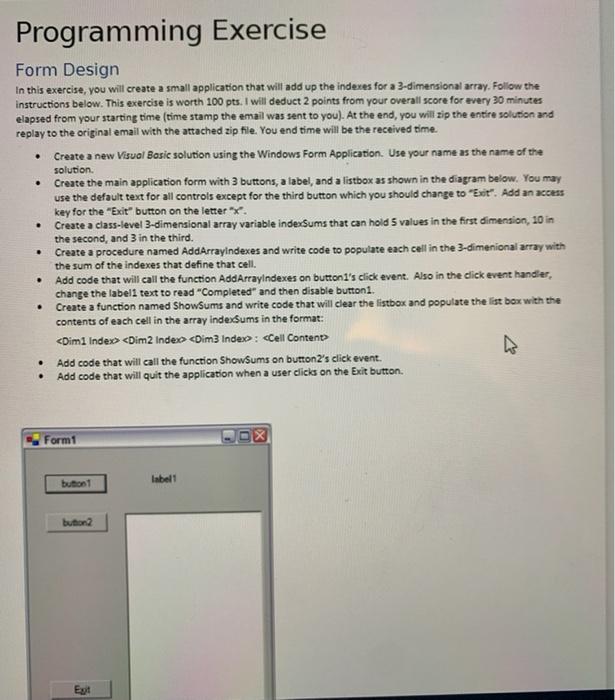
Programming Exercise . Form Design In this exercise, you will create a small application that will add up the indexes for a 3-dimensional array. Follow the instructions below. This exercise is worth 100 pts. I will deduct 2 points from your overall score for avery 30 minutes elapsed from your starting time (time stamp the email was sent to you). At the end, you will zip the entire solution and replay to the original email with the attached zip file. You end time will be the received time Create a new Visual Basie solution using the Windows Form Application. Use your name as the name of the solution Create the main application form with 3 buttons, a label, and a listbox as shown in the diagram below. You may use the default text for all controls except for the third button which you should change to "Exit". Add an access key for the "Exit" button on the lettere Create a class-level 3-dimensional array variable indexSums that can hold 5 values in the first dimension, 10 in the second, and 3 in the third. Create a procedure named AddArrayIndexes and write code to populate each cell in the 3-dimenional array with the sum of the indexes that define that cell. Add code that will call the function AddArrayIndexes on buttoni's click event. Also in the click event handler, change the labell text to read "Completed" and then disable button. Create a function named ShowSums and write code that will clear the listbox and populate the list box with the contents of each cell in the array indesums in the format:
Step by Step Solution
There are 3 Steps involved in it

Get step-by-step solutions from verified subject matter experts
 Study Help