



Question: C++ language in 2019 Visual Studio EE 285 Pelton Water Wheel with functions due 2/18 Design a program for the problem on the back of
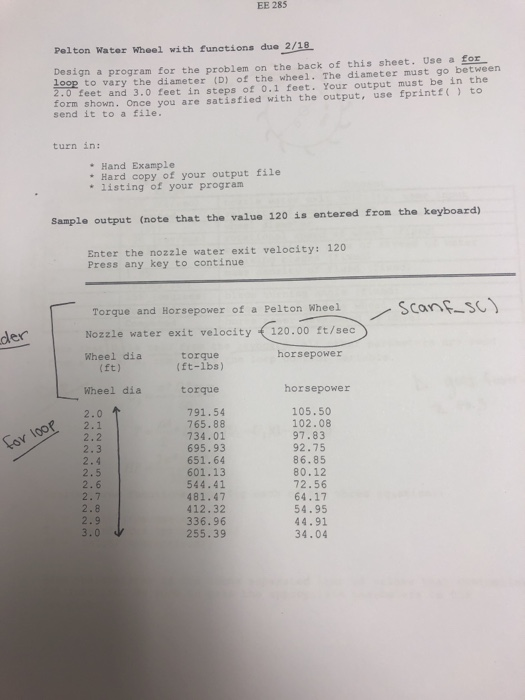
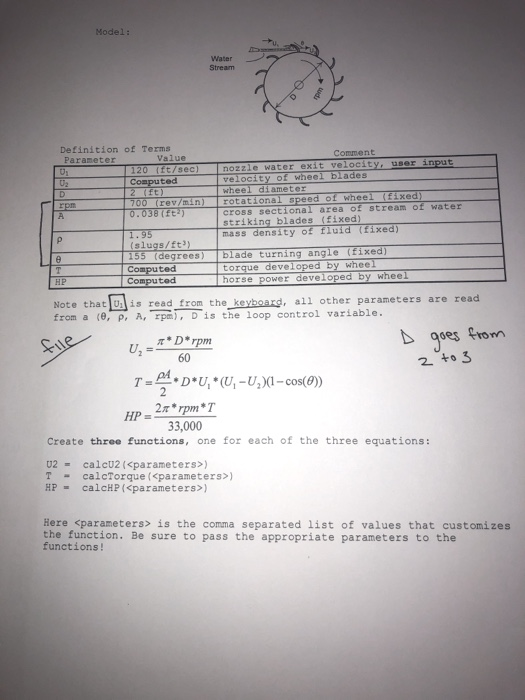
EE 285 Pelton Water Wheel with functions due 2/18 Design a program for the problem on the back of this sheet. Use a for loop to vary the diameter (D) of the wheel. The diameter must go between 2.0 feet and 3.0 feet in steps of 0.1 feet. Your output must be in the form shown. Once you are satisfied with the output, use fprintf() to send it to a file. turn in: Hand Example Hard copy of your output file * listing of your program Sample output (note that the value 120 is entered from the keyboard) Enter the nozzle water exit velocity: 120 Press any key to continue Scanf_SC) der Torque and Horsepower of a Pelton Wheel Nozzle water exit velocity 120.00 ft/sec Wheel dia torque horsepower (ft) (ft-lbs) Wheel dia torque horsepower 2.0 791.54 105.50 765.88 102.08 734.01 97.83 695.93 92.75 86.85 80.12 72.56 64.17 54.95 44.91 34.04 for loop ) oocoon in win on No wiowa moro - uno in N Model: Water Stream Definition of Terms Parameter Value Comment 120 [it/sec) nozzle water exit velocity, usor input Computed velocity of wheel blades 2 ft) wheel diameter 700 (rev/min rotational speed of wheel (fixed) 0.038 (ft) cross sectional area of stream of water striking blades (fixed) 1.95 mass density of fluid fixed) (slugs/ft?) 155 (degrees) blade turning angle (fixed) Computed torque developed by wheel _Computed h orse power developed by wheel Note that is read from the keyboard, all other parameters are read from a (0, P, A, rpm), D is the loop control variable. D goes from 2 to 3 **D*U* U-UXI-cos(()) HP-2* rpm *T 33,000 Create three functions, one for each of the three equations: U2 - calcu2
Step by Step Solution
There are 3 Steps involved in it

Get step-by-step solutions from verified subject matter experts