







Question: C language #include #include #include #include student.h typedef enum { ADD_STUDENT, ADD_GRADE, COUNT, PRINT_STUDENT, PRINT, ADD_STUDENT_ORDERED, ADD_GRADE_ORDERED, REMOVE_GRADE, REMOVE_STUDENT, HELP, QUIT, INVALID } Option ;
C language
#include
#include "student.h"
typedef enum { ADD_STUDENT, ADD_GRADE, COUNT, PRINT_STUDENT, PRINT, ADD_STUDENT_ORDERED, ADD_GRADE_ORDERED, REMOVE_GRADE, REMOVE_STUDENT, HELP, QUIT, INVALID } Option ;
char *actions[11] = { "addStudent", "addGrade", "count", "printStudent", "print", "addStudentOrdered", "addGradeOrdered", "removeGrade", "removeStudent", "help", "quit" };
int getActionID(char action[]) { int i; for (i=0; i
int isValidGradeName(char gradeName[]) { char type; int num; sscanf(gradeName, "%c%d", &type, &num); switch (type) { case 'L': case 'B': if (num10) return 0; break; case 'E': if (num8) return 0; break; case 'Q': if (num11) return 0; break; case 'P': if (num6) return 0; break; default: return 0; }
char gradeName2[strlen(gradeName)+1]; sprintf(gradeName2, "%c%d", type, num); if (strcmp(gradeName, gradeName2)!=0) return 0;
return 1; }
void printHelp(void) { printf(" The valid commands: "); printf(" addStudent lastname firstname "); printf(" *** Add a student (add-at-front) "); printf(" addGrade lastname firstname gradename value "); printf(" *** Add a grade to an existing student (add-at-end) "); printf(" count "); printf(" *** Print the number of students "); printf(" printStudent lastname firstname "); printf(" *** Print a student "); printf(" print "); printf(" *** Print all students "); printf(" addStudentOrdered lastname firstname "); printf(" *** Add a student (in alphabetical order) "); printf(" addGradeOrdered lastname firstname gradename value "); printf(" *** Add a grade in order to an existing student "); printf(" removeGrade lastname firstname gradename "); printf(" *** Remove a grade from a student "); printf(" removeStudent lastname firstname "); printf(" *** Remove a student "); printf(" help "); printf(" *** Display this list "); printf(" quit "); printf(" *** Exit the program ");
printf(" The valid grade names: "); printf(" B1, B2, B3, B4, B5, B6, B7, B8, B9, B10 "); printf(" E1, E2, E3, E4, E5, E6, E7, E8 "); printf(" L1, L2, L3, L4, L5, L6, L7, L8, L9, L10 "); printf(" P1, P2, P3, P4, P5, P6 "); printf(" Q1, Q2, Q3, Q4, Q5, Q6, Q7, Q8, Q9, Q10, Q11 "); }
int main(int argc, char* argv[]) { char action[100]; char last[100], first[100]; char gradeName[100]; double value; char rest[300];
Student *headStudentList=NULL;
while (1) { printf(" Enter a command: "); scanf("%s", action); int action_id=getActionID(action); if (action_id==QUIT) break; switch (action_id) { case ADD_STUDENT: scanf("%s%s", last, first); headStudentList = addStudent(headStudentList, last, first); break; case ADD_GRADE: scanf("%s%s", last, first); scanf("%s", gradeName); if (isValidGradeName(gradeName)) { scanf("%lf", &value); addGrade(headStudentList, last, first, gradeName, value); } else { printf(" %s: invalid grade name. Type help for help. ", gradeName); fgets(rest, 300, stdin); // skip the rest of line } break; case COUNT: printf(" There are %d students ", count(headStudentList)); break; case PRINT_STUDENT: scanf("%s%s", last, first); printStudent(headStudentList, last, first); break; case PRINT: print(headStudentList); break; case ADD_STUDENT_ORDERED: scanf("%s%s", last, first); headStudentList = addStudentOrdered(headStudentList, last, first); break; case ADD_GRADE_ORDERED: scanf("%s%s", last, first); scanf("%s", gradeName); if (isValidGradeName(gradeName)) { scanf("%lf", &value); addGradeOrdered(headStudentList, last, first, gradeName, value); } else { printf(" %s: invalid grade name. Type help for help. ", gradeName); fgets(rest, 300, stdin); // skip the rest of line } break; case REMOVE_GRADE: scanf("%s%s", last, first); scanf("%s", gradeName); if (isValidGradeName(gradeName)) { removeGrade(headStudentList, last, first, gradeName); } else { printf(" %s: invalid grade name. Type help for help. ", gradeName); fgets(rest, 300, stdin); // skip the rest of line } break; case REMOVE_STUDENT: scanf("%s%s", last, first); headStudentList = removeStudent(headStudentList, last, first); break; case HELP: printHelp(); break; case INVALID: printf(" %s: invalid action. Type help for help. ", action); fgets(rest, 300, stdin); // skip the rest of line break; }
} return 0; }
![; char *actions[11] = { "addStudent", "addGrade", "count", "printStudent", "print", "addStudentOrdered", "addGradeOrdered",](https://dsd5zvtm8ll6.cloudfront.net/si.experts.images/questions/2024/09/66f966acdb402_78066f966ac7cd2d.jpg)
!["removeGrade", "removeStudent", "help", "quit" }; int getActionID(char action[]) { int i; for](https://dsd5zvtm8ll6.cloudfront.net/si.experts.images/questions/2024/09/66f966ad7c2ad_78166f966ad1e402.jpg)
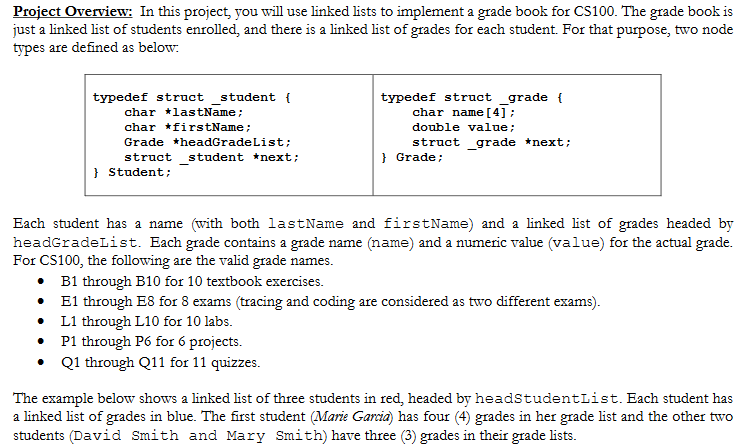
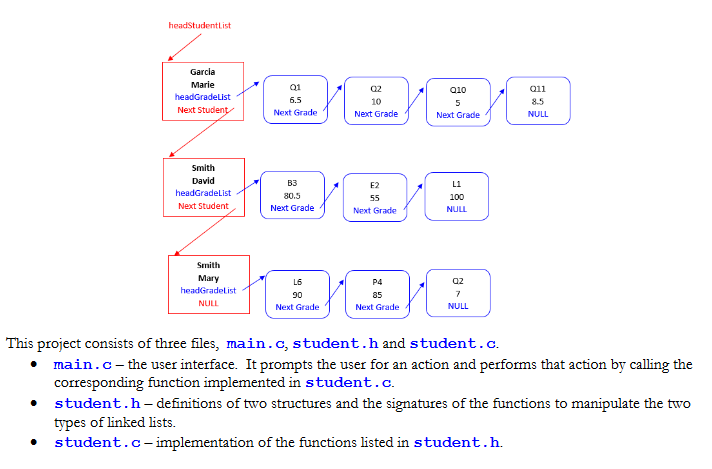
Project Overview: In this project, you will use linked lists to implement a grade book for CS100. The grade book is just a linked list of students enrolled, and there is a linked list of grades for each student. For that purpose, two node types are defined as below typedef struct student f typedef struct grade ( char lastName char firstName; Grade *headGrade List; struct student *next char name [4] double value struct grade next ; Grade t Student: Each student has a name (with both lastName and firstName) and a linked list of grades headed by headGradeList. Each grade contains a grade name (name) and a numeric value (value) for the actual grade. For CS100, the following are the valid grade names. B1 through B10 for 10 textbook exercises. E1 through E8 for 8 exams (tracing and coding are considered as two different exams) L1 through L10 for 10 labs. P1 through P6 for 6 projects. Q1 through Q11 for 11 quizzes. * The example below shows a linked list of three students in red, headed by headstudentList. Each student has a linked list of grades in blue. The first student (Marie Garcia) has four (4) grades in her grade list and the other two students (David Smith and Mary Smith) have three (3) grades in their grade lists. 01 011 headGradeList 10 Next Grade Next Grade Next Grade headGradeList Next Student Next Grade Next Grade 02 L6 90 Next Grade 85 Next Grade NULL NULL This project consists of three files, main.c, student.h and student.c. * main.c- the user interface. It prompts the user for an action and performs that action by calling the corresponding function implemented in student.c * student.h - definitions of two structures and the signatures of the functions to manipulate the two types of linked lists. student.c- implementation of the functions listed in student.h. . Create a directory project6 on your machine. Download main.c, student.h and student.c to that directory To compile this program, use gcc-Wall-std-c99 main.c student.c You can compile and run this program without doing any coding- It does nothing, but you can see how it works. You are not allowed to change main.c and student.h. You just need to complete student.c In student.c, add a header block of comments that includes your name and a brief overview of your task. * * * The file student.c should contain the actual code for the nine functions that are used by the main function. There is no implementation just comments) in each function when downloaded. Your job is to implement these nine functions. o addStudent add a student, using the "add-at-front" method. o addGrade - add a grade to a student, using the "add-at-end method. o count -eturn the number of students in the linked list. o printStudent - print the information of a student (the student name and all the grades for that student o print -prints all students. For each student, print the name and all the grades for that student. o addStudentOrdered - add a student in alphabetical order (ordered add of a student). To order two students, you irst need to compare their last names. If they have the same last name, you then need to compare their first names. We recommend you write a helper function to compare two student nodes (a new student and an existing student) to detemine the order of these two students, similar to strcmp addGradeOrdered - add a grade to a student in the specified order (ordered add of a grade). The o specified order is B1 through B10, then E1 through E8, then L1 through L10, then P1 through Pd and finally Q1 through Q11. Please note that using strcmp alone to compare two grade names will result in an incorrect order. For example, strcmp will place Q10 and Q11 before Q2. Again, we recommend vou write a helper function to compare two grade nodes (a new grade and an existing grade) to demine the order of these two grade nodes in the grade list. o removeGrade remove the specified grade from a student and free the related node. o removeStudent remove the specified student and all the grades of that student. You shall also free all the related space. Things you must remember when implementing these functions Please also see the comments of each function in student.c for details.) o When you try to add a student, if a student with that name exists, generate an error message. o When you try to add a grade to a student that does not exist, generate an error message o When you try to add a grade to a student, if the student already has such a grade, update the grade o When you try to remove a student that does not exist, generate an error message. o When you try to remove a grade from a student, if the student or the grade does not exist, generate an error message. * We recommend you complete the functions from the easiest. We will grade each of them individually, so you can get partial credit even if you do not complete them all. We recommend the following order whein completing the functions. However, you can complete them in any order that you want. o addStudent and addGrade and printStudent o count and print o addStudentOrdered and addGradeOrdered o removeGrade and removeStudent When testing the program, we will never combine addStudent with addStudentOrdered (or addGrade with addGradeOrdered) in the same test case. We will test both ordered lists and unordered lists, but never together. Input for this program is entered from standard input The user types in commands that call the various functions mentioned above. For example, to add a student, the user types addStudent, followed by last name and first name * You can put all the commands in a fle, say testData. (Do not forget to put quit as the last command.) Project Overview: In this project, you will use linked lists to implement a grade book for CS100. The grade book is just a linked list of students enrolled, and there is a linked list of grades for each student. For that purpose, two node types are defined as below typedef struct student f typedef struct grade ( char lastName char firstName; Grade *headGrade List; struct student *next char name [4] double value struct grade next ; Grade t Student: Each student has a name (with both lastName and firstName) and a linked list of grades headed by headGradeList. Each grade contains a grade name (name) and a numeric value (value) for the actual grade. For CS100, the following are the valid grade names. B1 through B10 for 10 textbook exercises. E1 through E8 for 8 exams (tracing and coding are considered as two different exams) L1 through L10 for 10 labs. P1 through P6 for 6 projects. Q1 through Q11 for 11 quizzes. * The example below shows a linked list of three students in red, headed by headstudentList. Each student has a linked list of grades in blue. The first student (Marie Garcia) has four (4) grades in her grade list and the other two students (David Smith and Mary Smith) have three (3) grades in their grade lists. 01 011 headGradeList 10 Next Grade Next Grade Next Grade headGradeList Next Student Next Grade Next Grade 02 L6 90 Next Grade 85 Next Grade NULL NULL This project consists of three files, main.c, student.h and student.c. * main.c- the user interface. It prompts the user for an action and performs that action by calling the corresponding function implemented in student.c * student.h - definitions of two structures and the signatures of the functions to manipulate the two types of linked lists. student.c- implementation of the functions listed in student.h. . Create a directory project6 on your machine. Download main.c, student.h and student.c to that directory To compile this program, use gcc-Wall-std-c99 main.c student.c You can compile and run this program without doing any coding- It does nothing, but you can see how it works. You are not allowed to change main.c and student.h. You just need to complete student.c In student.c, add a header block of comments that includes your name and a brief overview of your task. * * * The file student.c should contain the actual code for the nine functions that are used by the main function. There is no implementation just comments) in each function when downloaded. Your job is to implement these nine functions. o addStudent add a student, using the "add-at-front" method. o addGrade - add a grade to a student, using the "add-at-end method. o count -eturn the number of students in the linked list. o printStudent - print the information of a student (the student name and all the grades for that student o print -prints all students. For each student, print the name and all the grades for that student. o addStudentOrdered - add a student in alphabetical order (ordered add of a student). To order two students, you irst need to compare their last names. If they have the same last name, you then need to compare their first names. We recommend you write a helper function to compare two student nodes (a new student and an existing student) to detemine the order of these two students, similar to strcmp addGradeOrdered - add a grade to a student in the specified order (ordered add of a grade). The o specified order is B1 through B10, then E1 through E8, then L1 through L10, then P1 through Pd and finally Q1 through Q11. Please note that using strcmp alone to compare two grade names will result in an incorrect order. For example, strcmp will place Q10 and Q11 before Q2. Again, we recommend vou write a helper function to compare two grade nodes (a new grade and an existing grade) to demine the order of these two grade nodes in the grade list. o removeGrade remove the specified grade from a student and free the related node. o removeStudent remove the specified student and all the grades of that student. You shall also free all the related space. Things you must remember when implementing these functions Please also see the comments of each function in student.c for details.) o When you try to add a student, if a student with that name exists, generate an error message. o When you try to add a grade to a student that does not exist, generate an error message o When you try to add a grade to a student, if the student already has such a grade, update the grade o When you try to remove a student that does not exist, generate an error message. o When you try to remove a grade from a student, if the student or the grade does not exist, generate an error message. * We recommend you complete the functions from the easiest. We will grade each of them individually, so you can get partial credit even if you do not complete them all. We recommend the following order whein completing the functions. However, you can complete them in any order that you want. o addStudent and addGrade and printStudent o count and print o addStudentOrdered and addGradeOrdered o removeGrade and removeStudent When testing the program, we will never combine addStudent with addStudentOrdered (or addGrade with addGradeOrdered) in the same test case. We will test both ordered lists and unordered lists, but never together. Input for this program is entered from standard input The user types in commands that call the various functions mentioned above. For example, to add a student, the user types addStudent, followed by last name and first name * You can put all the commands in a fle, say testData. (Do not forget to put quit as the last command.)
Step by Step Solution
There are 3 Steps involved in it

Get step-by-step solutions from verified subject matter experts
 Study Help