







Question: c++ library system using vectors CSC 2110 Computer Science I Pregramming Project Due: 04/17/2018 11:00 PM 70 points+10 points extra credit-80 points Submission Format .
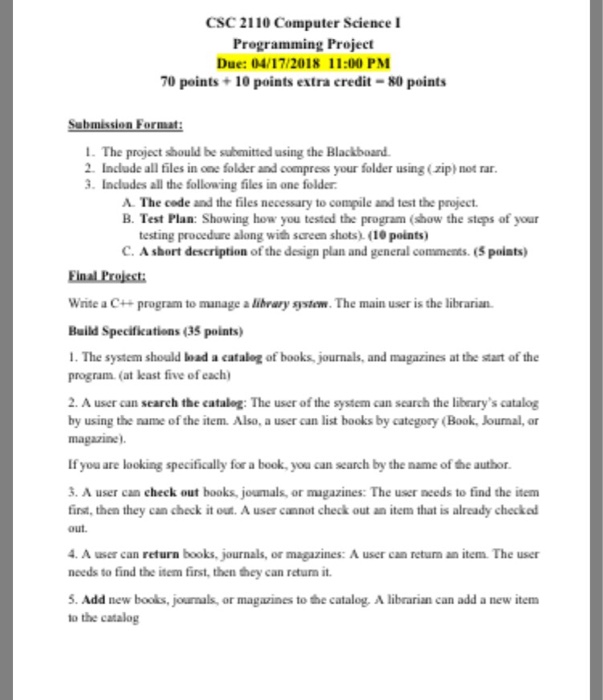
CSC 2110 Computer Science I Pregramming Project Due: 04/17/2018 11:00 PM 70 points+10 points extra credit-80 points Submission Format . The project should be subenitted using the Blackboard 2 Include all files in one folder and compress your folder using (zip) not rar 3. Includes all the following files in one folder A. The code and the files necessary to compile and test the project. B. Test Plan: Showing how you tested the program (show the steps of your testing procedure along with screen shots) (10 points) C. A short description of the design plan and general comments(S poiats) Final Project: Write a C+program to manage a library system. The main user is the librarian Build Specifikations (35 points) . The system should load a catalog of books, journals, and magazines at the start of the program (at lkast five of each) 2. A user can search the catalog: The user of the system can search the libeary's catalog by using the name of the item. Also, a user can list books by category (Book, Jourmal, or magazine If you are looking specifically for a book, you can search by the name of the author. 3. A user can check out books, joumals, or magazines: The user needs to find the item first, then they can check it out. A user cannot check out an item that is already checked out. 4 A user can return books, journals, or magazines: A user can return an item The user noeds to find the item first, then they can returm it 5. Add new boolks, journals, or magazines to the catalog.A librarian can add a new item to the catalog
Step by Step Solution
There are 3 Steps involved in it

Get step-by-step solutions from verified subject matter experts
 Study Help