







Question: C# need help with it before the night is over please! Please download the following files to use in Microsoft Visual Studio 2017. https://drive.google.com/open?id=1WrXPIdEZ5jJgRwBtS17QuRotFWqAYz61 Look
C# need help with it before the night is over please! Please download the following files to use in Microsoft Visual Studio 2017. https://drive.google.com/open?id=1WrXPIdEZ5jJgRwBtS17QuRotFWqAYz61
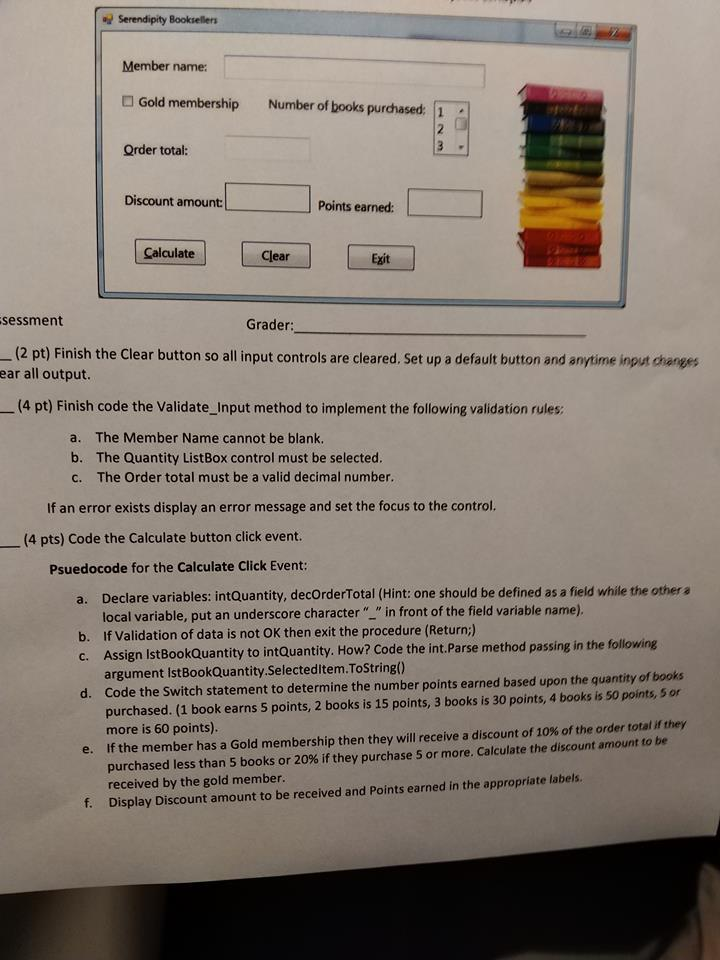
Look at the picture for what needs to be done to the following code
using System; using System.Collections.Generic; using System.ComponentModel; using System.Data; using System.Drawing; using System.Linq; using System.Text; using System.Threading.Tasks; using System.Windows.Forms;
namespace Book_Club { public partial class frmBookClub : Form { public frmBookClub() { InitializeComponent(); }
private void frmBookClub_Load(object sender, EventArgs e) { int iQuantity; //load the quantity of textbooks ordered list box control for (iQuantity= 1; iQuantity
} }
private void btnClear_Click(object sender, EventArgs e) { //clear all input controls txtMemberName.Text = "";
//clear all output controls lblDiscountAmount.Text = ""; lblPointsEarned.Text = "";
}
private void btnExit_Click(object sender, EventArgs e) { this.Close();
} private bool Validate_Input() { bool blnValidDecimal;
//validate the member name
//validate the quantity list box control
//validate the total book sales
return true;
} } }
d Serendipity Booksellen Member name: Gold membership Number of books purdhased: 1 Order total: Discount amount Points earned: Calculate Clear Exit sessment Grader: (2 pt) Finish the Clear button so all input controls are cleared. Set up a default button and anytime input changes ear all output. (4 pt) Finish code the Validate_Input method to implement the following validation rules a. The Member Name cannot be blank b. The Quantity ListBox control must be selected. c. The Order total must be a valid decimal number. If an error exists display an error message and set the focus to the control. (4 pts) Code the Calculate button click event. Psuedocode for the Calculate Click Event: a. Declare variables: intQuantity, decOrderTotal (Hint: one should be defined as a field while the other a b. If Validation of data is not OK then exit the procedure (Return) c. Assign IstBookQuantity to intQuantity. How? Code the int.Parse method passing in the following d. Code the Switch statement to determine the number points earned based upon the quantity of books local variable, put an underscore character" "in front of the field variable name). argument IstBookQuantity.Selecteditem.ToString) purchased. (1 book earns 5 points, 2 books is 15 points, 3 books is 30 points, 4 books is s0 points, 5 or more is 60 points). If the member has a Gold membership then they will receive a discount of 10% of the order total if they purchased less than 5 books or 20% if they purchase 5 or more. Calculate the discount amount to be received by the gold member Display Discount amount to be received and Points earned in the appropriate labels. e. f
Step by Step Solution
There are 3 Steps involved in it

Get step-by-step solutions from verified subject matter experts
 Study Help