







Question: C# PLEASE I need any help to add 2 methods into my original code. Specification: To this CODE needs to be added 2 methods on
C# PLEASE I need any help to add 2 methods into my original code.
Specification: To this "CODE" needs to be added 2 methods on the pictures I uploaded.(in short, code should be converted into 2 methods)
1)CODE:
const decimal CostPerAnvilTier1 = 80M;
const double SalesTax = 0.0995;
const decimal CostPerAnvilTier2 = 72.35M; const decimal CostPerAnvilTier3 = 67.99M; const decimal ShippingCostPerAnvil = 99M; const double LoyaltyDiscountFactor = 0.15; //15% discount
.................................
int numberOfAnvils;
decimal loyaltyDiscountAmt;
//Calculate subtotal: price * qty using volume discount if (numberOfAnvils
subTotal = numberOfAnvils * (decimal)quantityBasedCostPerAnvil;
//Subtract loyalty discount if applicable loyaltyDiscountAmt = loyaltyDiscount ? loyaltyDiscountAmt = Decimal.Round(subTotal * -(decimal)LoyaltyDiscountFactor, 2) : 0; //loyaltyDiscountAmt = loyaltyDiscount ? loyaltyDiscountAmt = subTotal * (decimal)-LoyaltyDiscountFactor : 0;
taxableAmount = subTotal + loyaltyDiscountAmt;
//Add tax and calculate final total tax = Decimal.Round((subTotal + loyaltyDiscountAmt) * (decimal)SalesTax, 2); //tax = (subTotal + loyaltyDiscountAmt) * (decimal)SalesTax;
shipping = ShippingCostPerAnvil * numberOfAnvils; total = taxableAmount + tax + shipping;
//Display invoice Write(" Press any key to display invoice. . ."); ReadKey(); Write(" ");
WriteLine(ACMEBanner1); WriteLine(ACMEBanner2); WriteLine("CUSTOMER INVOICE"); WriteLine(" SHIP TO:"); WriteLine($"\t\t{fullName}"); WriteLine("\t\t" + streetAddress); WriteLine("\t\t{0}", city); WriteLine("\t\t{0}", stateAbbreviation); WriteLine("\t\t{0}", zipCode);
WriteLine($" Quantity:\t\t\t{numberOfAnvils,10}"); WriteLine($"Cost per anvil:\t\t\t{quantityBasedCostPerAnvil,10:C}"); WriteLine($"Subtotal: \t\t\t{subTotal,10:C}");
if (loyaltyDiscount) { WriteLine($"Less {LoyaltyDiscountFactor:P0} Futility Club: \t{loyaltyDiscountAmt,11:C}"); WriteLine($"Taxable amount: \t\t{taxableAmount,10:C}"); }
WriteLine($"Sales Tax: \t\t\t{tax,10:C}"); WriteLine($"Shipping: \t\t\t{shipping,10:C}");
WriteLine("\t\t\t\t__________"); WriteLine($"TOTAL: \t\t\t\t{total,10:C}");
//Promotional gift? if (sendGift) { WriteLine(" And congratulations on winning FREE Invisible Paint!!!"); }
WriteLine(ACMEBanner1);
//Goodbye!
WriteLine(" Your total today is {0:C}. Thanks for shopping with Acme!", total); WriteLine(" And don\'t forget: Acme anvils fly farther, drop faster, and land harder than " + "any other anvil on the market!");
Write(" Ready to take another order? "); } while (ReadLine().ToUpper() == "Y");
WriteLine(" Okay, then. Buh-bye!");
}
2 METHODS:
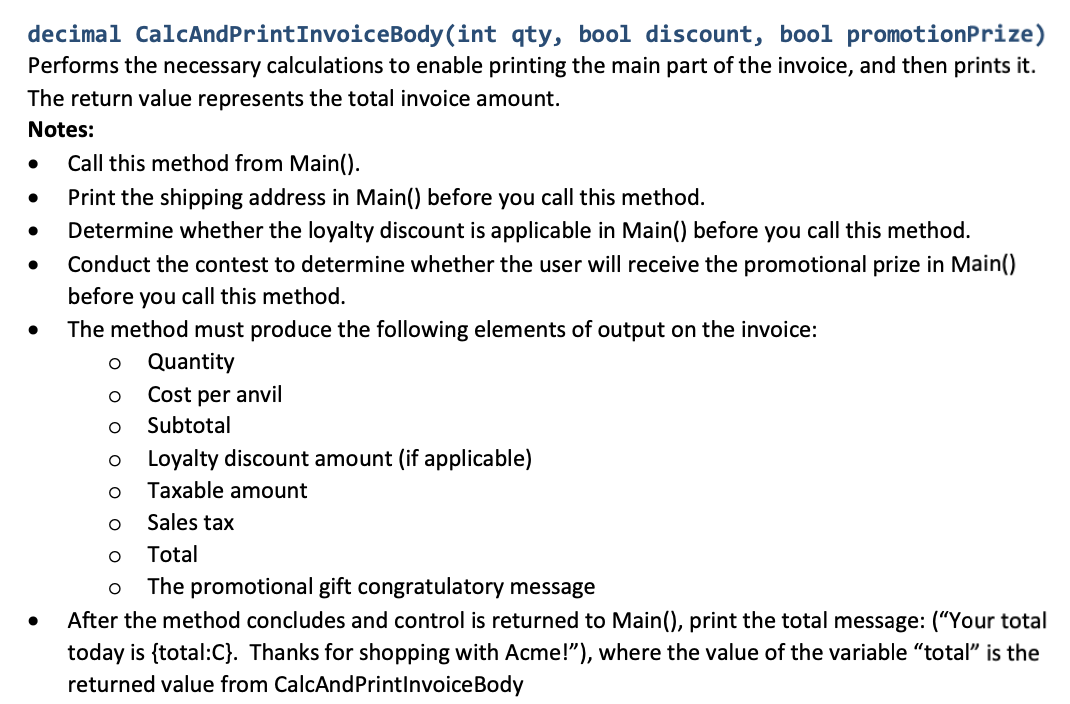
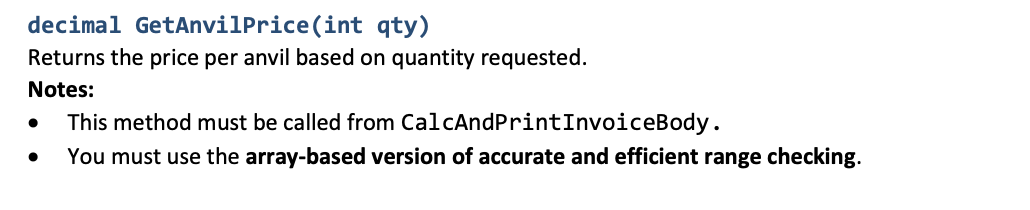
decimal CalcAndPrintInvoiceBody(int qty, bool discount, bool promotionPrize) Performs the necessary calculations to enable printing the main part of the invoice, and then prints it. The return value represents the total invoice amount. Notes: Call this method from Main(). Print the shipping address in Main() before you call this method. Determine whether the loyalty discount is applicable in Main() before you call this method. Conduct the contest to determine whether the user will receive the promotional prize in Main() before you call this method. The method must produce the following elements of output on the invoice: Quantity Cost per anvil Subtotal Loyalty discount amount (if applicable) Taxable amount Sales tax Total The promotional gift congratulatory message After the method concludes and control is returned to Main(), print the total message: (Your total today is {total:C}. Thanks for shopping with Acme!"), where the value of the variable total is the returned value from CalcAndPrintInvoiceBody O O O O O O O O decimal GetAnvilPrice(int qty) Returns the price per anvil based on quantity requested. Notes: This method must be called from CalcAndPrintInvoiceBody. You must use the array-based version of accurate and efficient range checking. decimal CalcAndPrintInvoiceBody(int qty, bool discount, bool promotionPrize) Performs the necessary calculations to enable printing the main part of the invoice, and then prints it. The return value represents the total invoice amount. Notes: Call this method from Main(). Print the shipping address in Main() before you call this method. Determine whether the loyalty discount is applicable in Main() before you call this method. Conduct the contest to determine whether the user will receive the promotional prize in Main() before you call this method. The method must produce the following elements of output on the invoice: Quantity Cost per anvil Subtotal Loyalty discount amount (if applicable) Taxable amount Sales tax Total The promotional gift congratulatory message After the method concludes and control is returned to Main(), print the total message: (Your total today is {total:C}. Thanks for shopping with Acme!"), where the value of the variable total is the returned value from CalcAndPrintInvoiceBody O O O O O O O O decimal GetAnvilPrice(int qty) Returns the price per anvil based on quantity requested. Notes: This method must be called from CalcAndPrintInvoiceBody. You must use the array-based version of accurate and efficient range checking
Step by Step Solution
There are 3 Steps involved in it

Get step-by-step solutions from verified subject matter experts
 Study Help