







Question: C++ program on visual studio. the program: /* file: binary_timing.cpp lab 10 exercise program to demonstrate to the student how much faster it is to
C++ program on visual studio.
the program:
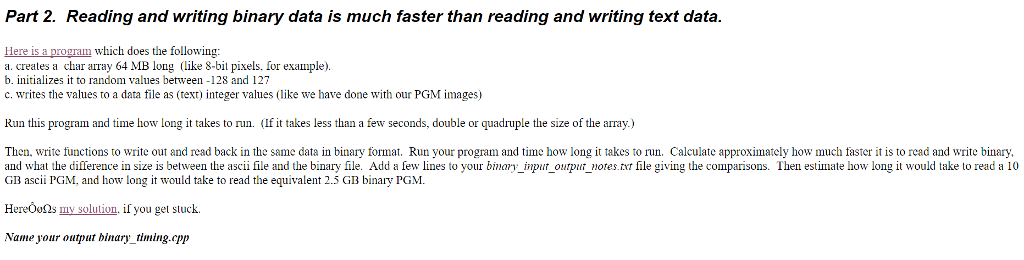
/* file: binary_timing.cpp lab 10 exercise program to demonstrate to the student how much faster it is to write (and read) a data file in binary than in ascii. */ #include#include #include #include using namespace std; const int SIZE=64*1048576; // 64 * 1024*1024, 64 MegBytes void initialize_dat(char dat[], int size); void write_ascii_data(const char dat[], int size); void read_ascii_data(char dat[], int size); /* void write_binary_data(const char dat[], int size); void read_binary_data(char dat[], int size); */ int main( ) { char *dat = new char[SIZE]; if (! dat) {cerr (dat[i]); if (i%16==15) ofs > val; // read number into an integer dat[i] = static_cast (val); // convert it to a char. if(i%(1024*1024)==0) {cout Part 2. Reading and writing binary data is much faster than reading and writing text data. Here is a program which does the following a. creates a char array 64 MB long (like 8-bit pixels. for example b. initializes it to random values between 28 and 127 c. writes the values to a data file as (text eger values (like we have done with our PGM images) Run this program and time how long it takes to nun. (lfit takes less than a few seconds, double or quadruple the size of the array Then, write functions to write out and read back in the same data in binary format. Run your program and time how long it takes to run. Calculate approximately how much faster it is to read and write binary, and what the difference in size is between the ascii file and the binary file. Add a few lines to your binary input outpur otes file giving the comparisons. Then estimate how long it would take to read a 10 GB ascii PGM, and how long it would take to read the equivalent 2.5 GB binary PGM Here soluuion. f you gel stuck Name your output binary timing.cpp
Step by Step Solution
There are 3 Steps involved in it
1 Expert Approved Answer
Step: 1 Unlock

Question Has Been Solved by an Expert!
Get step-by-step solutions from verified subject matter experts
Step: 2 Unlock
Step: 3 Unlock
 Study Help