







Question: C++ Program using Functions for a guessing game. Attached in the photo is the instructions for what is needed. Thank you Here is the starting
C++ Program using Functions for a guessing game. Attached in the photo is the instructions for what is needed. Thank you
Here is the starting program:
using namespace std;
void introduction(int high, int low); int getGuess(); bool testGuess(int guess, int numberToGuess);
int main(int argc, char *argv[]) { int high = 0; int low = 0;
int numberToGuess; bool stillPlaying = true; bool winner = false;
int guess;
while (stillPlaying) { // generate a random number between low and high value numberToGuess = rand() % (high - low + 1) + low;
//tell the user about the game introduction(high, low);
while (!winner) { guess = getGuess();
winner = testGuess(guess, numberToGuess); if (winner) { //output a congratulatory message } else ; //output the number of guesses they've made so far }
//ask the user if they want to play again, and if not, change the loop control condition
}
cout
cin.ignore(); cin.get();
}
//Tells the user the ruules of the game void introduction(int high, int low) { //I'm thinking of a number between high and low..... }
//Prompts for, inputs, and returns the next guess int getGuess() { return 0; }
// returns true if guess is correct //if guess is not correct, outputs a high or low message and returns false bool testGuess(int guess, int numberToGuess) { return false; }
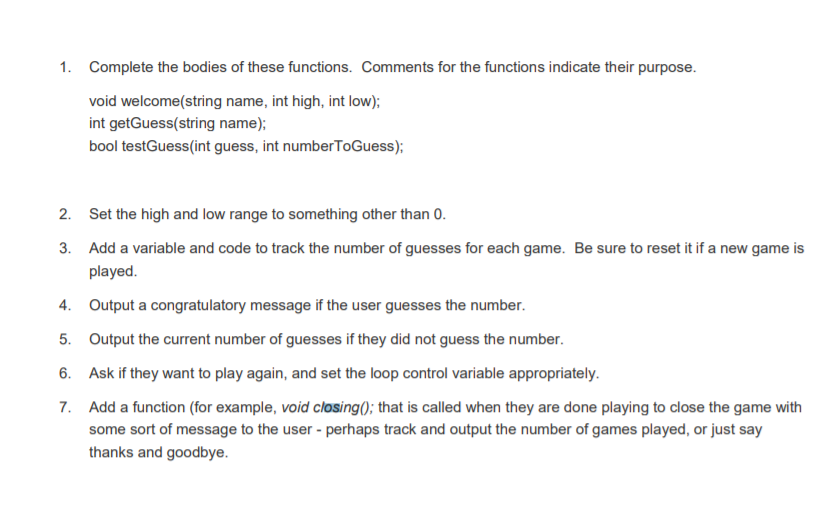
1 Complete the bodies of these functions. Comments for the functions indicate their purpose. int getGuess(string name): bool testGuess(int guess, int numberToGuess) 2. Set the high and low range to something other than 0. Add a variable and code to track the number of guesses for each game. Be sure to reset it if a new game is played. 3. 4 Output a congratulatory message if the user guesses the number. 5. Output the current number of guesses if they did not guess the number. 6. Ask if they want to play again, and set the loop control variable appropriately. 7. Add a function (for example, void closing); that is called when they are done playing to close the game with some sort of message to the user perhaps track and output the number of games played, or just say thanks and goodbye
Step by Step Solution
There are 3 Steps involved in it

Get step-by-step solutions from verified subject matter experts
 Study Help