Question: C programing: In this lab, you will write a program that will simulate the random rolling of two dice. The goals of the lab are
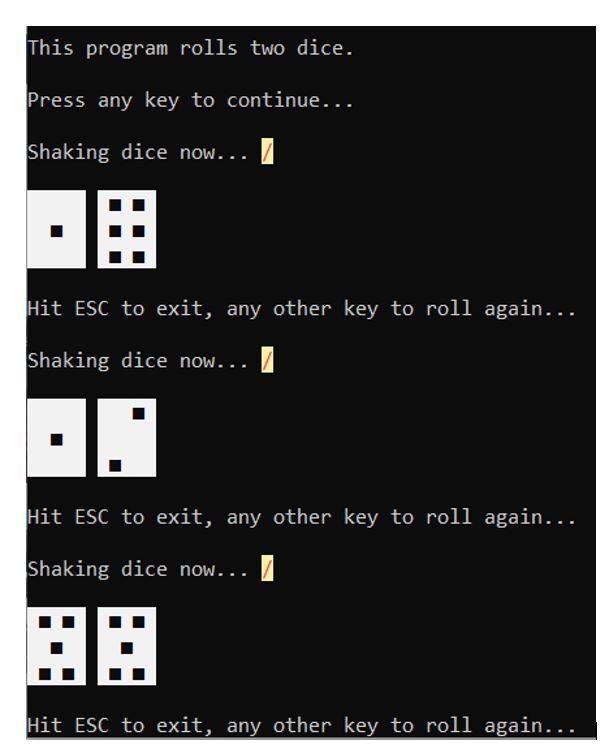
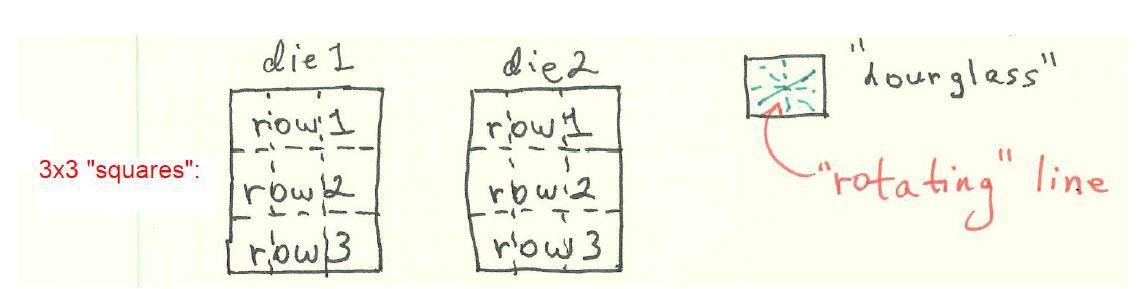
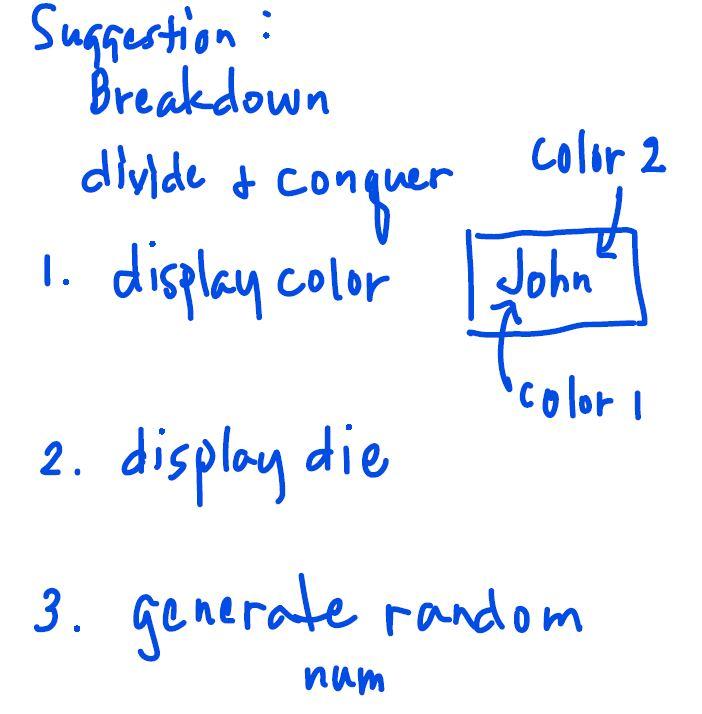
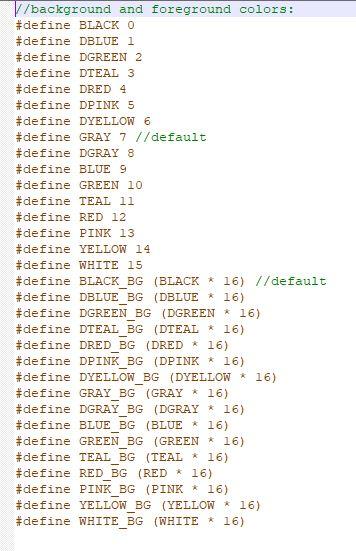
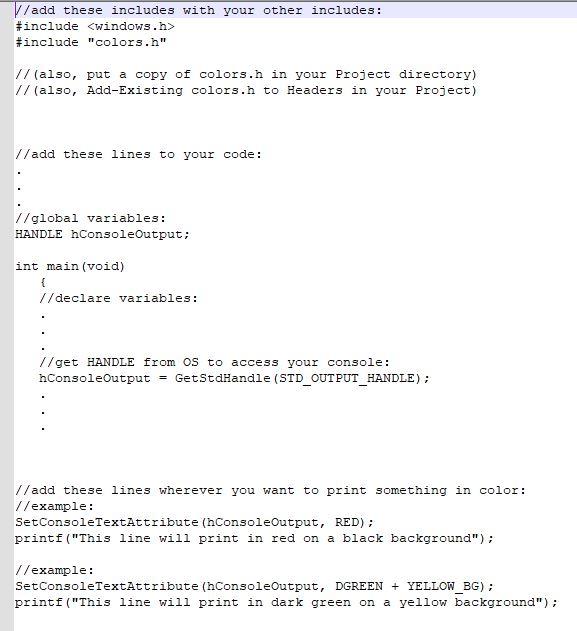
C programing: In this lab, you will write a program that will simulate the random rolling of two dice. The goals of the lab are for you to gain experience with: 1. The switch control structure. 2. Color printing in the console output window. 3. Writing your own functions. 4. Using the Sleep() function from windows.h to slow your program down. 5. Using rand() and srand() functions from stdlib.h. 6. Using time() function from time.h to seed the random number generator. See the sample Roll Two Dice.exe. Your program is to perform similarly. See the file: Using Colors in Windows.h.txt You will need to: 1. Learn how to print in color by creating a "HANDLE with windows.h. 2. Figure out how to use the windows.h color codes to create the desired color. Your program will need to: 1. Print an intro (with your name, student number and set). 2. Print a rotating "hourglass figurine. 3. Obtain random values for each die. 4. Display the two dice side-by-side horizontally. 5. Print "Hit ESC to exit, any other key to roll again..." 6. Repeat steps 2 to 5 in a loop. 7. Exit the loop and the program when the ESC key is hit. . Notes: Make three functions and three functions only) to print, respectively, the first row, second row, and the third row of a die. Use a switch in each function. Use symbolic constants such as: #define ESC 27 //Escape key #define SQUARE 254 // small black square on a die #define BS 8 //backspace for the "hourglass" #define WAIT 50 // wait time for the sleep function Generate random seed based on current time: #include //time) srand((int)time(NULL)); This program rolls two dice. Press any key to continue... Shaking dice now... I Hit ESC to exit, any other key to roll again... Shaking dice now... I O Hit ESC to exit, any other key to roll again... shaking dice now... / . Hit ESC to exit, any other key to roll again... diel die2 row, 1 dourglass" nowl 3x3 "squares": rowia rowia "rotating" line rowl3 row 3 3 Suggestion : Breakdown color 2 diuide & conquer conquer 1. display color John color i 2. display die 3. generate random num \/background and foreground colors: #define BLACK O #define DBLUE 1 #define DGREEN 2 #define DTEAL 3 #define DRED 4 #define DPINK 5 #define DYELLOW 6 #define GRAY 7 //default #define DGRAY 8 #define BLUE 9 #define GREEN 10 #define TEAL 11 #define RED 12 #define PINK 13 #define YELLOW 14 #define WHITE 15 #define BLACK_BG (BLACK * 16) 7/default #define DBLUE_BG (DBLUE * 16) #define DGREEN_BG (DGREEN * 16) #define DTEAL_BG (DTEAL * 16) #define DRED_BG (DRED * 16) #define DPINK_BG (DPINK * 16) #define DYELLOW_BG (DYELLOW * 16) #define GRAY_BG (GRAY * 16) #define DGRAY_BG (DGRAY * 16) #define BLUE BG (BLUE * 16) #define GREEN_BG (GREEN * 16) #define TEAL_BG (TEAL * 16) #define RED_BG (RED * 16) #define PINK_BG (PINK * 16) #define YELLOW_BG (YELLOW * 16) #define WHITE_BG (WHITE * 16) \/add these includes with your other includes: #include #include "colors.h" // (also, put a copy of colors.h in your project directory) // (also, Add-Existing colors.h to Headers in your Project) //add these lines to your code: //global variables: HANDLE hConsoleOutput; int main(void) { 1/declare variables: //get HANDLE from os to access your console: nConsoleOutput = GetStdHandle (STD_OUTPUT_HANDLE); //add these lines wherever you want to print something in color: //example: SetConsoleTextAttribute (hConsoleOutput, RED); printf("This line will print in red on a black background"); //example: SetConsoleTextAttribute (hConsoleOutput, DGREEN + YELLOW_BG); printf("This line will print in dark green on a yellow background"); C programing: In this lab, you will write a program that will simulate the random rolling of two dice. The goals of the lab are for you to gain experience with: 1. The switch control structure. 2. Color printing in the console output window. 3. Writing your own functions. 4. Using the Sleep() function from windows.h to slow your program down. 5. Using rand() and srand() functions from stdlib.h. 6. Using time() function from time.h to seed the random number generator. See the sample Roll Two Dice.exe. Your program is to perform similarly. See the file: Using Colors in Windows.h.txt You will need to: 1. Learn how to print in color by creating a "HANDLE with windows.h. 2. Figure out how to use the windows.h color codes to create the desired color. Your program will need to: 1. Print an intro (with your name, student number and set). 2. Print a rotating "hourglass figurine. 3. Obtain random values for each die. 4. Display the two dice side-by-side horizontally. 5. Print "Hit ESC to exit, any other key to roll again..." 6. Repeat steps 2 to 5 in a loop. 7. Exit the loop and the program when the ESC key is hit. . Notes: Make three functions and three functions only) to print, respectively, the first row, second row, and the third row of a die. Use a switch in each function. Use symbolic constants such as: #define ESC 27 //Escape key #define SQUARE 254 // small black square on a die #define BS 8 //backspace for the "hourglass" #define WAIT 50 // wait time for the sleep function Generate random seed based on current time: #include //time) srand((int)time(NULL)); This program rolls two dice. Press any key to continue... Shaking dice now... I Hit ESC to exit, any other key to roll again... Shaking dice now... I O Hit ESC to exit, any other key to roll again... shaking dice now... / . Hit ESC to exit, any other key to roll again... diel die2 row, 1 dourglass" nowl 3x3 "squares": rowia rowia "rotating" line rowl3 row 3 3 Suggestion : Breakdown color 2 diuide & conquer conquer 1. display color John color i 2. display die 3. generate random num \/background and foreground colors: #define BLACK O #define DBLUE 1 #define DGREEN 2 #define DTEAL 3 #define DRED 4 #define DPINK 5 #define DYELLOW 6 #define GRAY 7 //default #define DGRAY 8 #define BLUE 9 #define GREEN 10 #define TEAL 11 #define RED 12 #define PINK 13 #define YELLOW 14 #define WHITE 15 #define BLACK_BG (BLACK * 16) 7/default #define DBLUE_BG (DBLUE * 16) #define DGREEN_BG (DGREEN * 16) #define DTEAL_BG (DTEAL * 16) #define DRED_BG (DRED * 16) #define DPINK_BG (DPINK * 16) #define DYELLOW_BG (DYELLOW * 16) #define GRAY_BG (GRAY * 16) #define DGRAY_BG (DGRAY * 16) #define BLUE BG (BLUE * 16) #define GREEN_BG (GREEN * 16) #define TEAL_BG (TEAL * 16) #define RED_BG (RED * 16) #define PINK_BG (PINK * 16) #define YELLOW_BG (YELLOW * 16) #define WHITE_BG (WHITE * 16) \/add these includes with your other includes: #include #include "colors.h" // (also, put a copy of colors.h in your project directory) // (also, Add-Existing colors.h to Headers in your Project) //add these lines to your code: //global variables: HANDLE hConsoleOutput; int main(void) { 1/declare variables: //get HANDLE from os to access your console: nConsoleOutput = GetStdHandle (STD_OUTPUT_HANDLE); //add these lines wherever you want to print something in color: //example: SetConsoleTextAttribute (hConsoleOutput, RED); printf("This line will print in red on a black background"); //example: SetConsoleTextAttribute (hConsoleOutput, DGREEN + YELLOW_BG); printf("This line will print in dark green on a yellow background")









 Study Help