







Question: C Programming 1. 2. 3. 4. 5. Have the user enter their beginning principal balance (must be a double greater than zero) If not a
C Programming
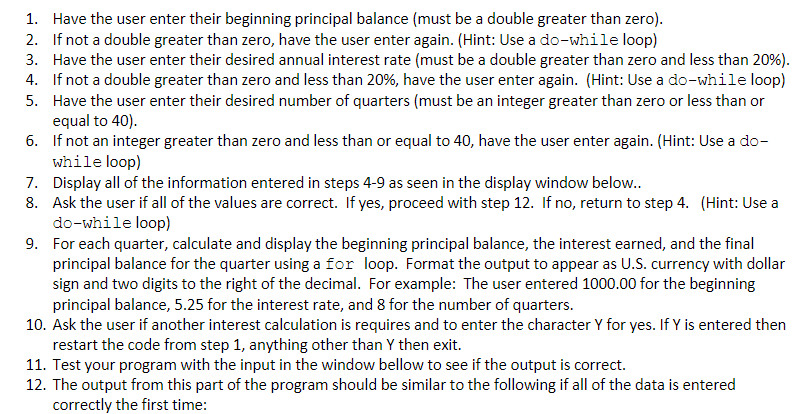
1. 2. 3. 4. 5. Have the user enter their beginning principal balance (must be a double greater than zero) If not a double greater than zero, have the user enter again. (Hint: Use a do-while loop) Have the user enter their desired annual interest rate (must be a double greater than zero and less than 20%) If not a double greater than zero and less than 20%, have the user enter again. (Hint: Use a do-while loop) Have the user enter their desired number of quarters (must be an integer greater than zero or less than or equal to 40). If not an integer greater than zero and less than or equal to 40, have the user enter again. (Hint: Use a do- while loop) 6. 7. Display all of the information entered in steps 4-9 as seen in the display window belovw. 8. Ask the user if all of the values are correct. If yes, proceed with step 12. If no, return to step 4. (Hint: Use a do-while loop) For each quarter, calculate and display the beginning principal balance, the interest earned, and the final principal balance for the quarter using a for loop. Format the output to appear as U.S. currency with dollar sign and two digits to the right of the decimal. For example: The user entered 1000.00 for the beginning principal balance, 5.25 for the interest rate, and 8 for the number of quarters. 9. 10. Ask the user if another interest calculation is requires and to enter the character Y for yes. If Y is entered then restart the code from step 1, anything other than Y then exit. 11. Test your program with the input in the window bellow to see if the output is correct. 12. The output from this part of the program should be similar to the following if all of the data is entered correctly the first time
Step by Step Solution
There are 3 Steps involved in it

Get step-by-step solutions from verified subject matter experts
 Study Help