







Question: the code shown is lab_inhertiance.py undefined Microsoft Word - Lab 5 - Exceptions 1 / 4 Exercise 1: Inheritance is a fundamental concept in object-oriented
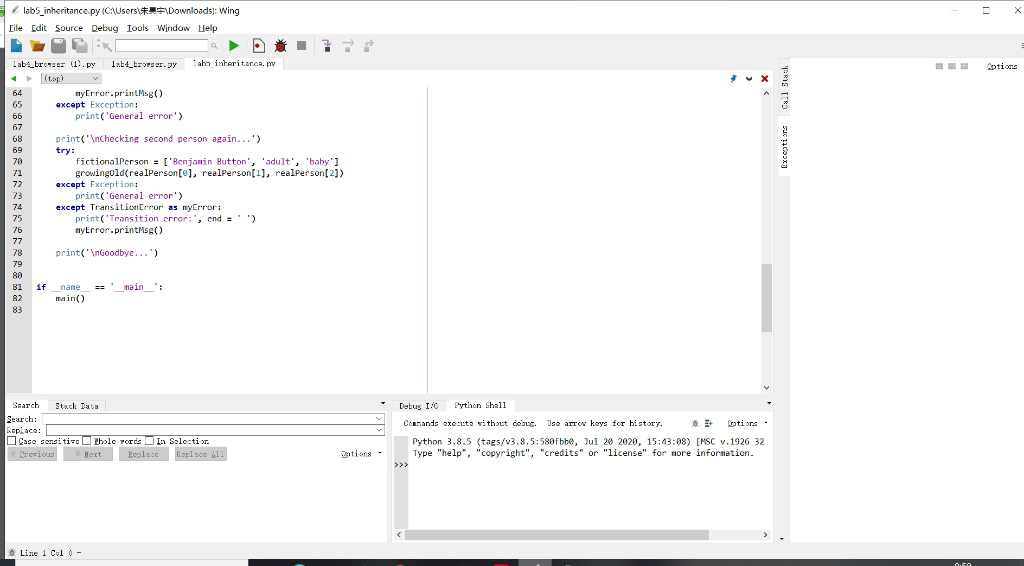
the code shown is lab_inhertiance.py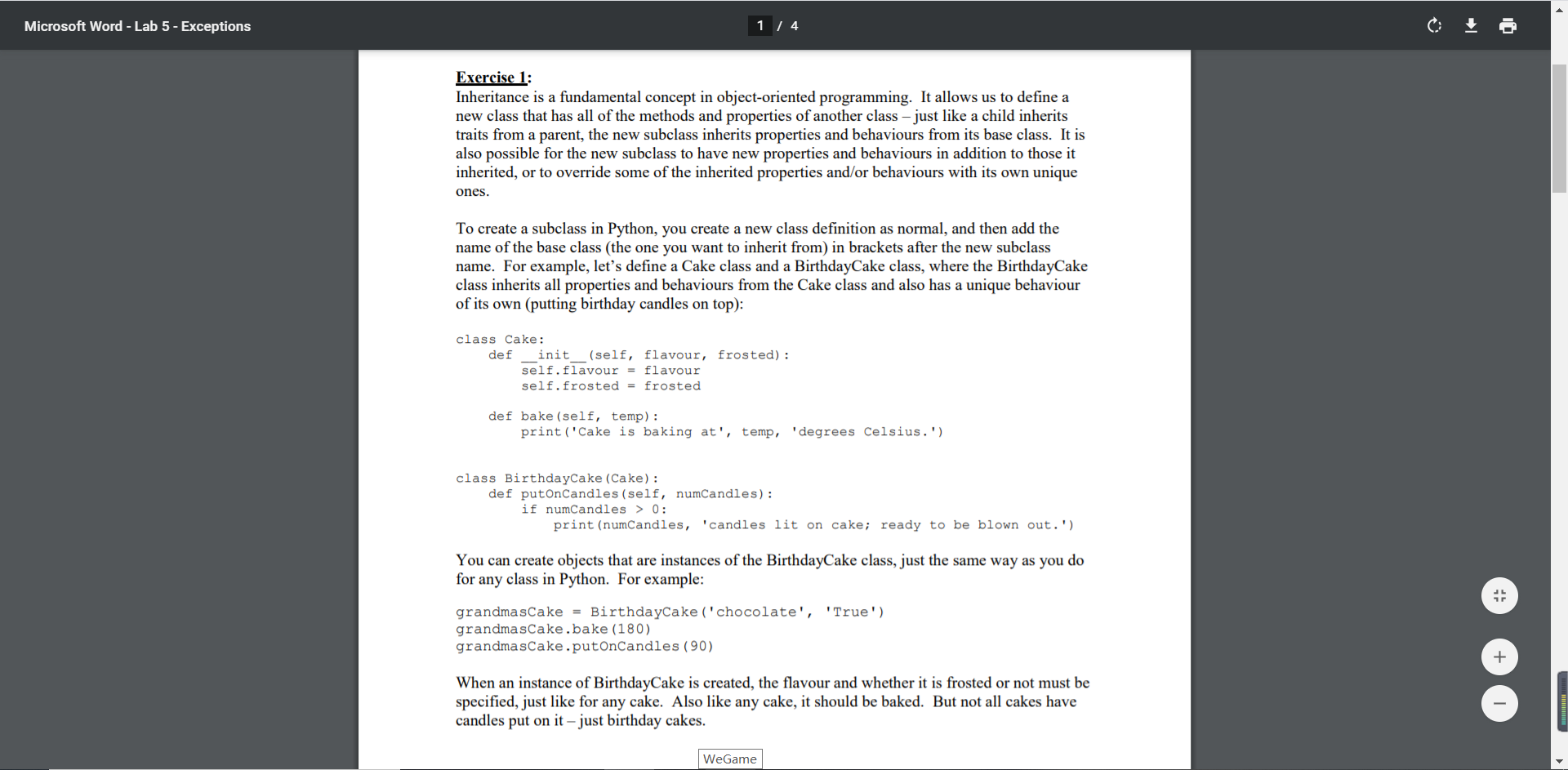
 undefined
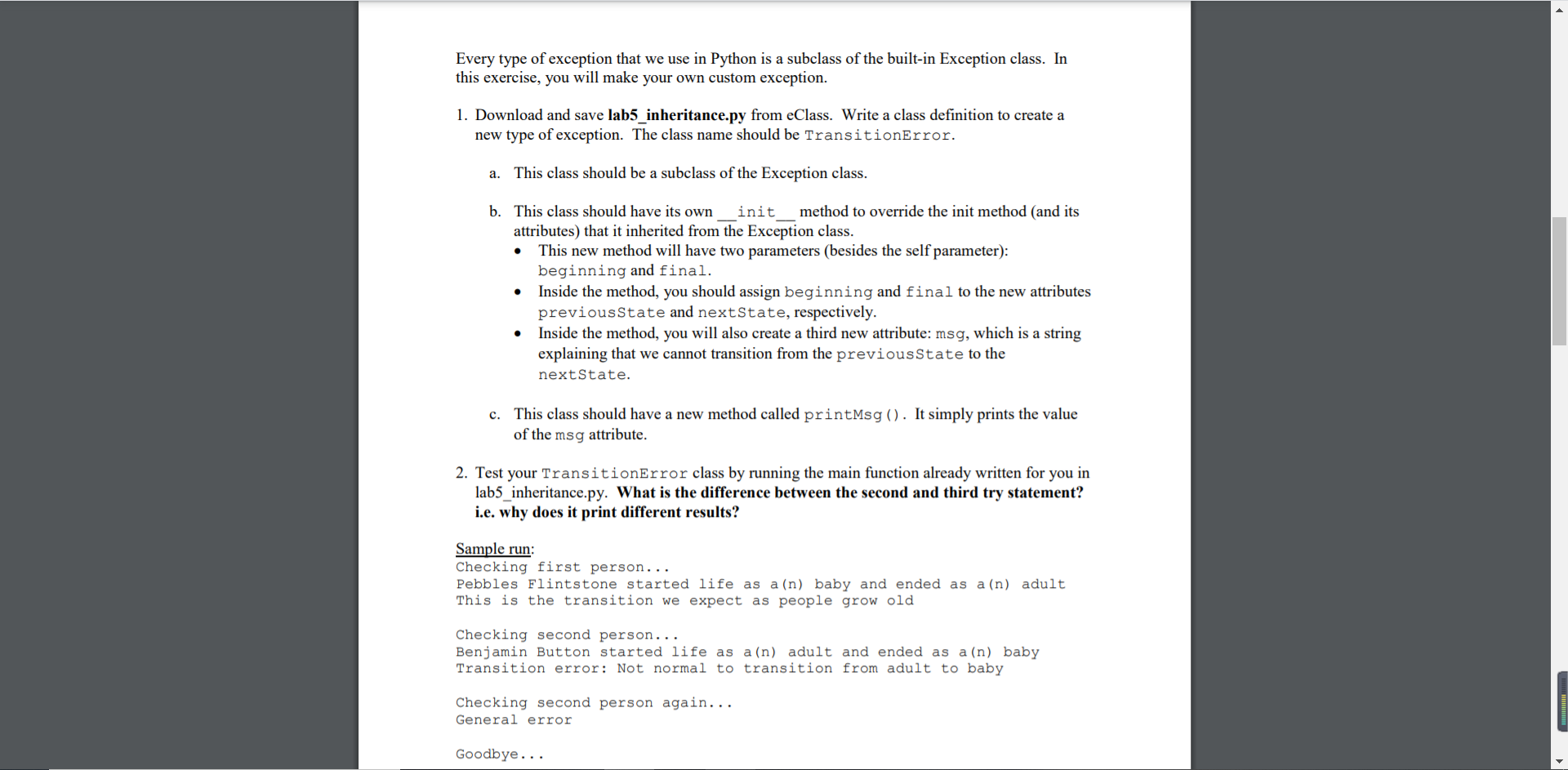
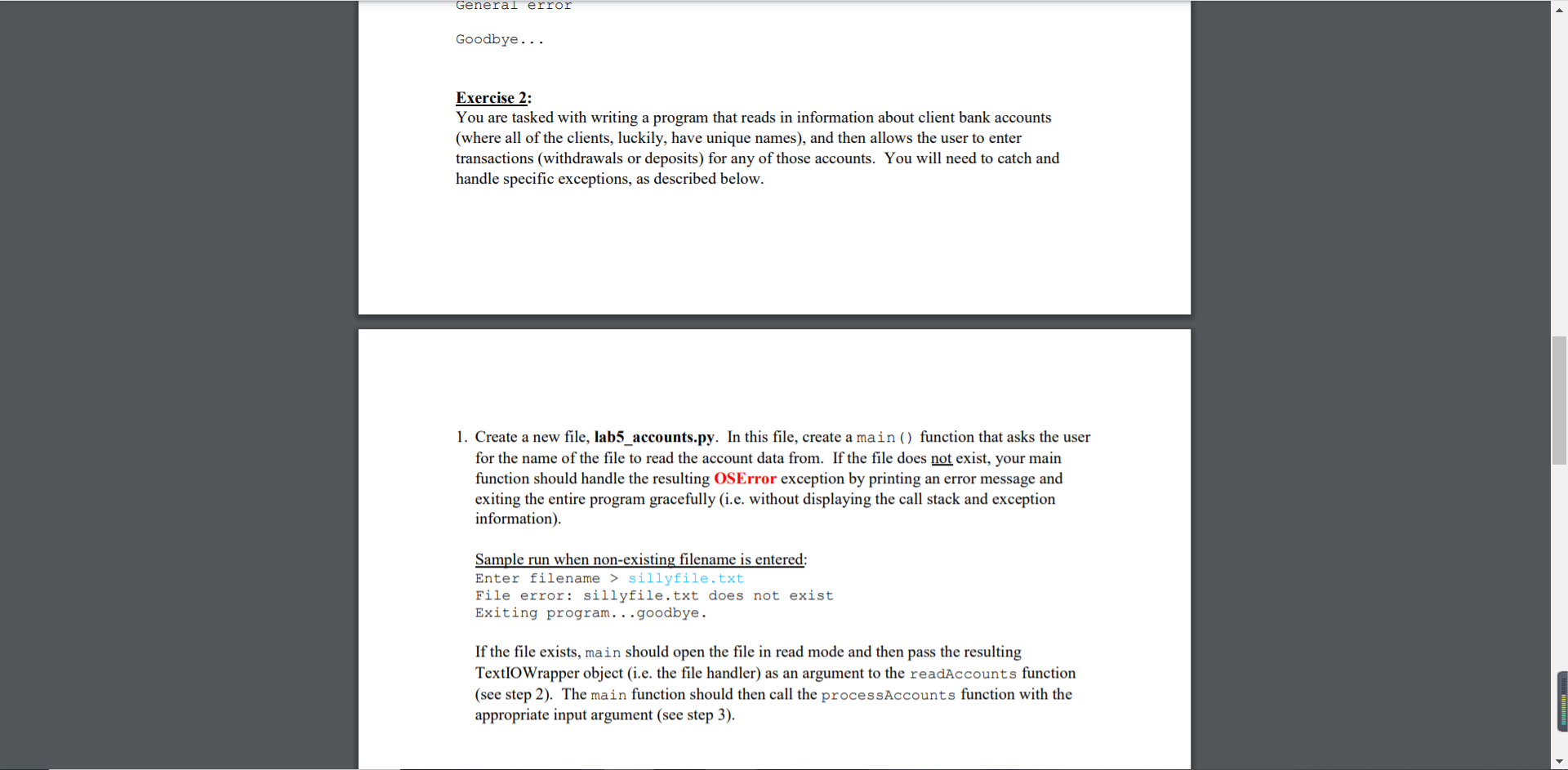
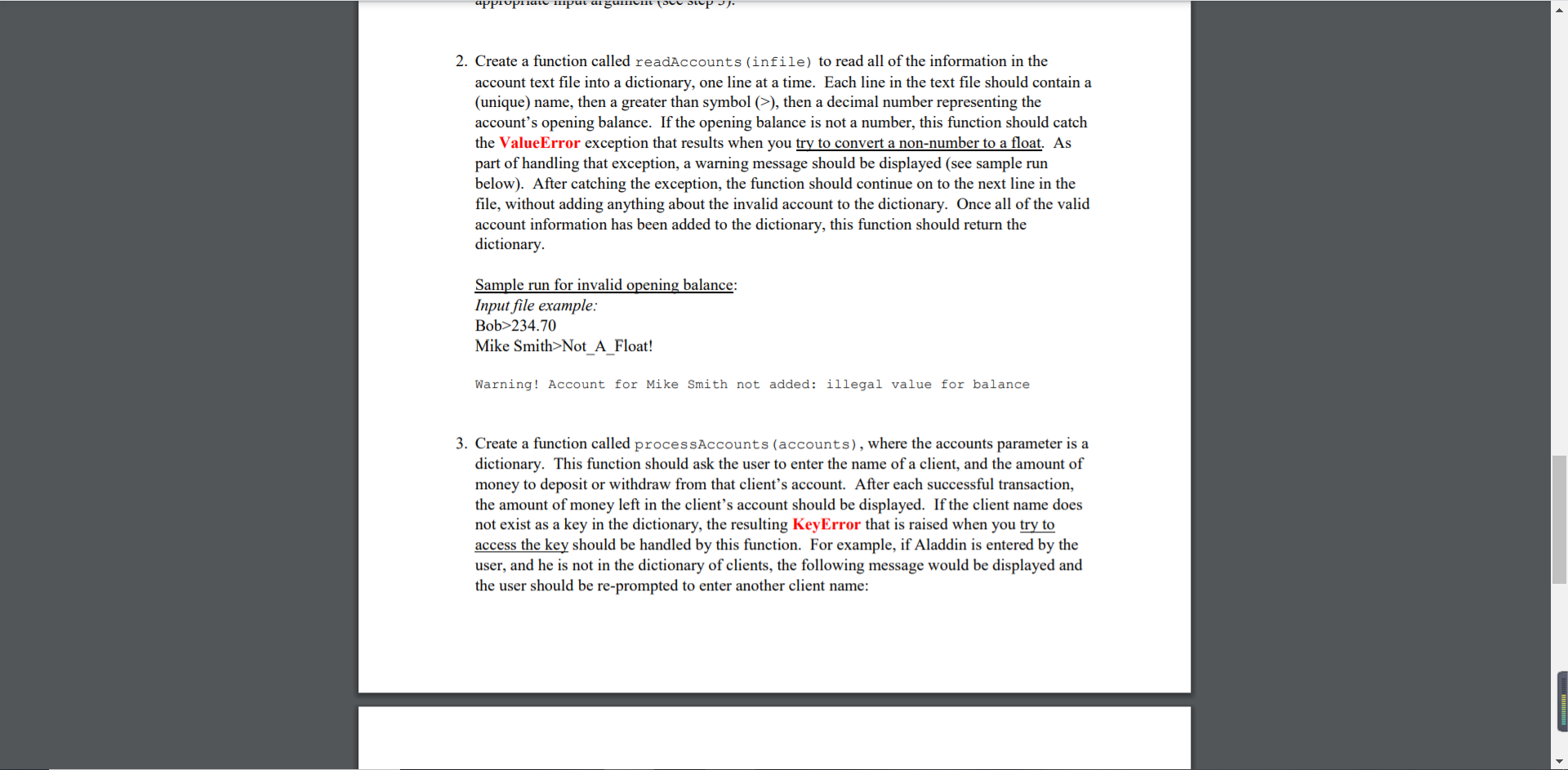
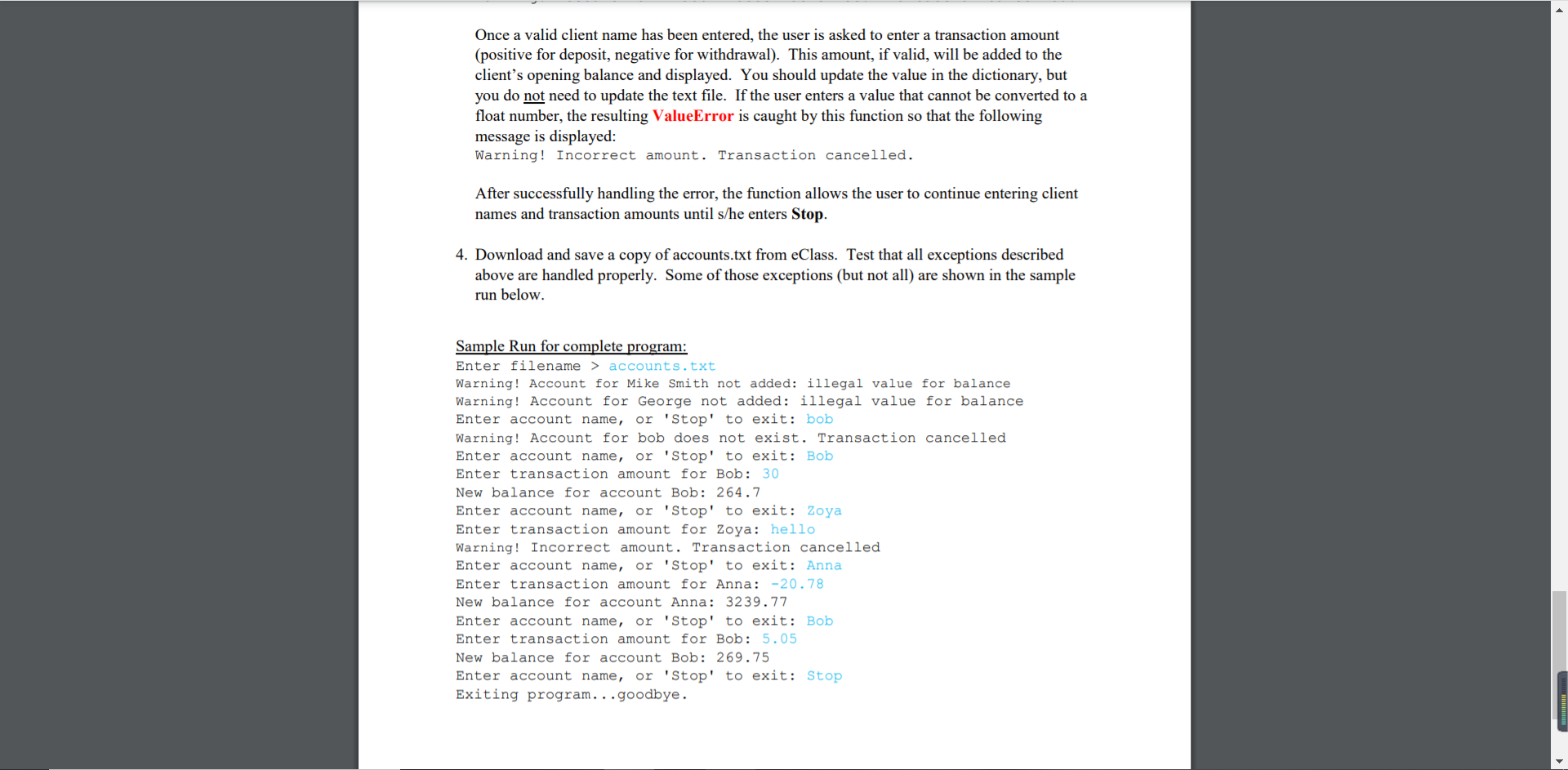
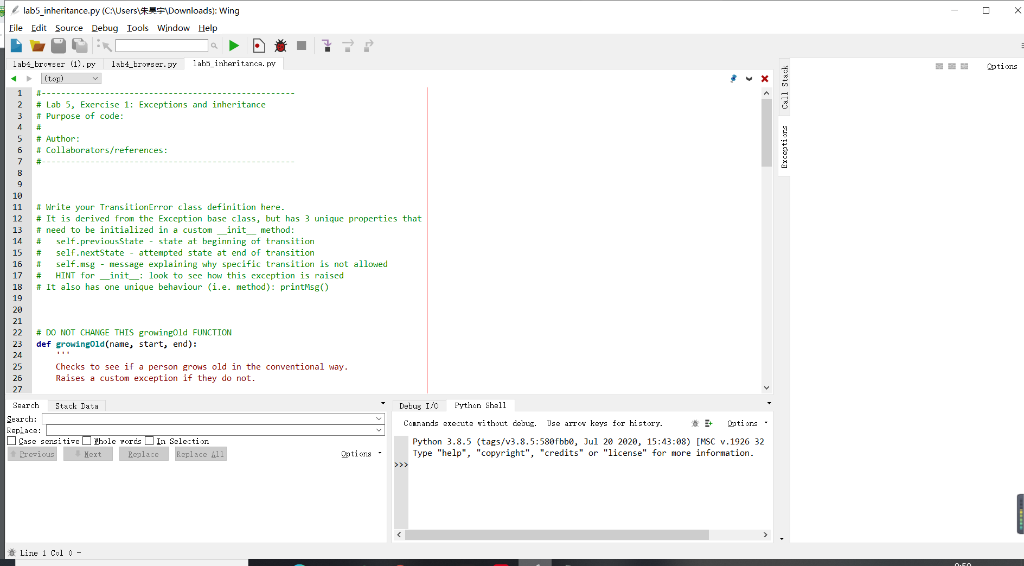
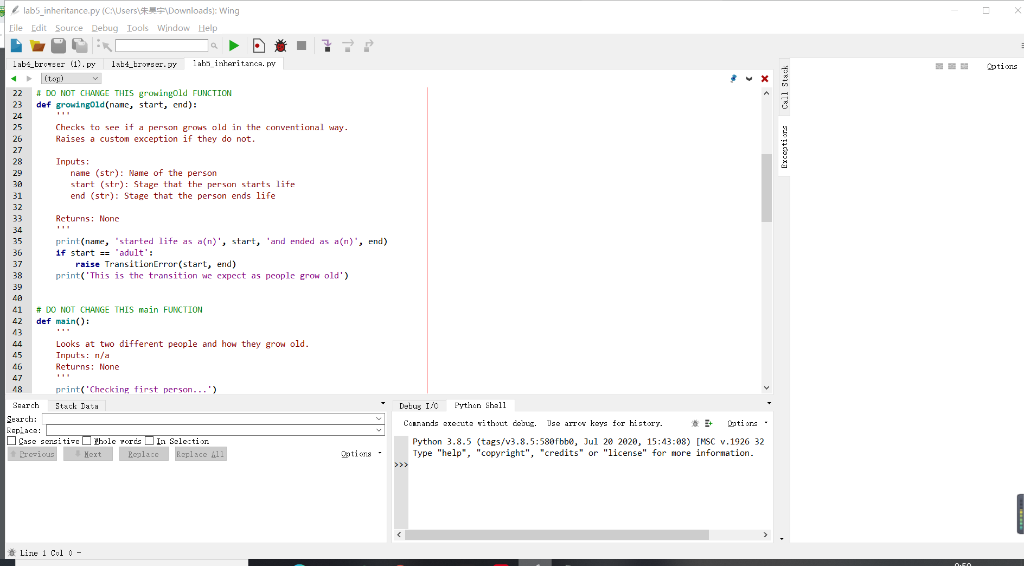
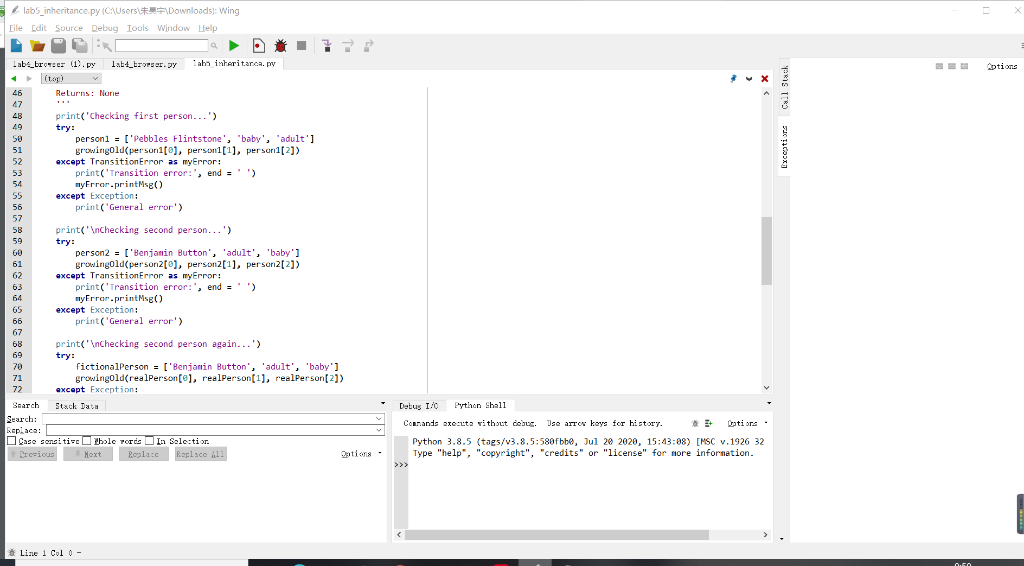
Microsoft Word - Lab 5 - Exceptions 1 / 4 Exercise 1: Inheritance is a fundamental concept in object-oriented programming. It allows us to define a new class that has all of the methods and properties of another class - just like a child inherits traits from a parent, the new subclass inherits properties and behaviours from its base class. It is also possible for the new subclass to have new properties and behaviours in addition to those it inherited, or to override some of the inherited properties and/or behaviours with its own unique ones. To create a subclass in Python, you create a new class definition as normal, and then add the name of the base class (the one you want to inherit from) in brackets after the new subclass name. For example, let's define a Cake class and a Birthday Cake class, where the BirthdayCake class inherits all properties and behaviours from the Cake class and also has a unique behaviour of its own (putting birthday candles on top): class Cake: def init (self, flavour, frosted) : self. flavour = flavour self.frosted = frosted def bake (self, temp) : print ('Cake is baking at', temp, 'degrees Celsius.') class Birthday Cake (Cake): def putonCandles (self, numCandles): if numCandles > 0: print (numCandles, 'candles lit on cake; ready to be blown out.') - You can create objects that are instances of the BirthdayCake class, just the same way as you do for any class in Python. For example: grandmasCake = Birthdaycake ('chocolate', 'True') grandmascake.bake (180) grandmascake.putonCandles (90) When an instance of BirthdayCake is created, the flavour and whether it is frosted or not must be specified, just like for any cake. Also like any cake, it should be baked. But not all cakes have candles put on it - just birthday cakes. WeGame Every type of exception that we use in Python is a subclass of the built-in Exception class. In this exercise, you will make your own custom exception. 1. Download and save lab5_inheritance.py from eClass. Write a class definition to create a new type of exception. The class name should be TransitionError. a. This class should be a subclass of the Exception class. b. This class should have its own init method to override the init method (and its attributes) that it inherited from the Exception class. This new method will have two parameters (besides the self parameter): beginning and final. Inside the method, you should assign beginning and final to the new attributes previous State and nextState, respectively. Inside the method, you will also create a third new attribute: msg, which is a string explaining that we cannot transition from the previous State to the nextState. c. This class should have a new method called printMsg(). It simply prints the value of the msg attribute. 2. Test your TransitionError class by running the main function already written for you in lab5_inheritance.py. What is the difference between the second and third try statement? i.e. why does it print different results? Sample run: Checking first person... Pebbles Flintstone started life as a (n) baby and ended as a (n) adult This is the transition we expect as people grow old Checking second person... Benjamin Button started life as a (n) adult and ended as a (n) baby Transition error: Not normal to transition from adult to baby Checking second person again... General error Goodbye... General error Goodbye... Exercise 2: You are tasked with writing a program that reads in information about client bank accounts (where all of the clients, luckily, have unique names), and then allows the user to enter transactions (withdrawals or deposits) for any of those accounts. You will need to catch and handle specific exceptions, as described below. 1. Create a new file, lab5_accounts.py. In this file, create a main() function that asks the user for the name of the file to read the account data from. If the file does not exist, your main function should handle the resulting OSError exception by printing an error message and exiting the entire program gracefully (i.e. without displaying the call stack and exception information). Sample run when non-existing filename is entered: Enter filename > sillyfile.txt File error: sillyfile.txt does not exist Exiting program...goodbye. If the file exists, main should open the file in read mode and then pass the resulting TextIO Wrapper object (i.e. the file handler) as an argument to the readAccounts function (see step 2). The main function should then call the processAccounts function with the appropriate input argument (see step 3). appropriate "pur aigun e ( 2. Create a function called readAccounts (infile) to read all of the information in the account text file into a dictionary, one line at a time. Each line in the text file should contain a (unique) name, then a greater than symbol (), then a decimal number representing the account's opening balance. If the opening balance is not a number, this function should catch the ValueError exception that results when you try to convert a non-number to a float. As part of handling that exception, a warning message should be displayed (see sample run below). After catching the exception, the function should continue on to the next line in the file, without adding anything about the invalid account to the dictionary. Once all of the valid account information has been added to the dictionary, this function should return the dictionary Sample run for invalid opening balance: Input file example: Bob>234.70 Mike Smith>Not_A_Float! Warning! Account for Mike Smith not added: illegal value for balance 3. Create a function called processAccounts (accounts), where the accounts parameter is a dictionary. This function should ask the user to enter the name of a client, and the amount of money to deposit or withdraw from that client's account. After each successful transaction, the amount of money left in the client's account should be displayed. If the client name does not exist as a key in the dictionary, the resulting KeyError that is raised when you try to access the key should be handled by this function. For example, if Aladdin is entered by the user, and he is not in the dictionary of clients, the following message would be displayed and the user should be re-prompted to enter another client name: Once a valid client name has been entered, the user is asked to enter a transaction amount (positive for deposit, negative for withdrawal). This amount, if valid, will be added to the client's opening balance and displayed. You should update the value in the dictionary, but you do not need to update the text file. If the user enters a value that cannot be converted to a float number, the resulting ValueError is caught by this function so that the following message is displayed: Warning! Incorrect amount. Transaction cancelled. After successfully handling the error, the function allows the user to continue entering client names and transaction amounts until s/he enters Stop. 4. Download and save a copy of accounts.txt from eClass. Test that all exceptions described above are handled properly. Some those exceptions (but not all) are shown in the sample run below. Sample Run for complete program: Enter filename > accounts.txt Warning! Account for Mike Smith not added: illegal value for balance Warning! Account for George not added: illegal value for balance Enter account name, or 'Stop' to exit: bob Warning! Account for bob does not exist. Transaction cancelled Enter account name, or 'Stop' to exit: Bob Enter transaction amount for Bob: 30 New balance for account Bob: 264.7 Enter account name, or 'Stop' to exit: Zoya Enter transaction amount for Zoya: hello Warning! Incorrect amount. Transaction cancelled Enter account name, or 'Stop' to exit: Anna Enter transaction amount for Anna: -20.78 New balance for account Anna: 3239.77 Enter account name, or 'Stop' to exit: Bob Enter transaction amount for Bob: 5.05 New balance for account Bob: 269.75 Enter account name, or 'Stop' to exit: Stop Exiting program...goodbye. labs_inheritance.py (CAUsers Downloads): Wing Eile Edit Source Debug Tools Window Help Lab: brosser (1.py 1ab4_tropser.gy Laba interitaren. ptions # Lab 5, Exercise 1: Exceptions and inheritance i Purpose of code Exceptior Call Stack # Author: 4 Collaborators/references: 1 2 3 4 5 6 7 7 8 9 10 11 12 13 14 15 16 17 18 19 20 21 22 23 24 25 26 27 # Write your TransitionError class definition here. # It is derived from the Exception base class, but has 3 unique properties that if need to be initialized in a custom init method: # self previous State - state at beginning of transition # self.nextState - attempted state at end of transition self.msg - Nessage explaining why specific transition is not allowed # HINT for _init_: look to see how this exception is raised # It also has one unique behaviour (i.e. method): printMsg() # DO NOT CHANGE THIS growingold FUNCTION def growingold(nane, start, end): Checks to see if a person grows old in the conventional way. Raises a custom exception if they do not. . Debug I/O Python shall Search Stack Data Search: Leplace: Case sensiti- cable cords In Selection Precious Next Replace Raplace 411 Conrands execute without debug. Ise arrow keys for history. Latire Python 3.8.5 (tags/v3.8.5:588fbbe, Jul 20 2020, 15:43:08) [MSC v.1926 32 Type "help", "copyright", "credits" or "license" for more information. >>> Qation - Line 1 Col 0 - labs_inheritance.py (C\Users Downloads: Wing Eile Edit Source Debug Tools Window Help Lab4_browser (1).py 1ab4_tropser.gy Taba interitare, py ptions A DO NOT CHANGE THIS growingold FUNCTION def growingold(none, start, end): Checks to see it a person grow old in the conventional way. Raises a custon exception if they do not. Exceptior Call Stack 22 23 24 25 26 27 28 29 38 31 32 33 34 35 36 37 38 39 Inputs: nane (str): Name of the person start (str): Stage that the person starts lite end (str): Stage that the person ends life Returns: None print(name, 'started lite as an)', start, and ended as a(n)', end) 1f start m'adult': raise TransitionError(start, end) print('This is the transition we expect as people grow old') 41 # DO NOT CHANGE THIS main FUNCTION 42 def main(): 43 44 Looks at two different people and how they grow old. 45 Inputs: n/a 46 Returns: None 47 48 print('Checking first person...) Search Stack Data Search: Leplace: Case sensitiscle Tords In Selectir. Previous Next Replace Raplace 411 Datus I0 Python shall Conrands execute without debug. Ise arrow keys for history. Latire Python 3.8.5 (tags/v3.8.5:588fbbe, Jul 20 2020, 15:43:08) [MSC v.1926 32 Type "help", "copyright", "credits" or "license" for more information. >>> Qation - Line 1 Col 0 - labs_inheritance.py (C\Users Downloads: Wing Eile Edit Source Debug Tools Window Help . Lab4_brer (1).py lab4_broser. By Laba interitaren. ptions Exceptisrs Call Stack 46 Returns: None 47 48 print('Checking first person...') 49 try: 50 person1 = ['Pebbles Flintstone', 'baby', 'adult'] 51 growingold(person1[0], personl[1], person 1[2]) 52 except TransitionError as myError: 53 print('Transition error:', end = 54 myFrror.printMe() 55 except Exception: 56 print("General error'> 57 58 print('Inchecking second person...) 59 try: person2 = ['Benjamin Button', 'adult', 'baby'] 61 growingold(person2[], person 2[1], person 2[2]) 62 except TransitionError as myError: 63 print('Transition error:', end = ") 64 myError.printMe() 65 except Exception: 66 print('General error) 67 68 print(" Checking second person again...') 69 try: 70 fictionalPerson = ['Benjanin Button', 'adult', 'baby'] 71 growingold(realPerson[e], realPerson(1), realperson(21) 72 except Exception: Search Stack Data Search: Leplace: Case sensitisble Tords In Selectir. Precious Next Replace Raplace 411 Qation - Debug I/O Python shall Conrands execute without debug. Ise arrow keys for history. Latire Python 3.8.5 (tags/v3.8.5:588fbbe, Jul 20 2020, 15:43:08) [MSC v.1926 32 Type "help", "copyright", "credits" or "license" for more information. >>> Line 1 Col 0 - Microsoft Word - Lab 5 - Exceptions 1 / 4 Exercise 1: Inheritance is a fundamental concept in object-oriented programming. It allows us to define a new class that has all of the methods and properties of another class - just like a child inherits traits from a parent, the new subclass inherits properties and behaviours from its base class. It is also possible for the new subclass to have new properties and behaviours in addition to those it inherited, or to override some of the inherited properties and/or behaviours with its own unique ones. To create a subclass in Python, you create a new class definition as normal, and then add the name of the base class (the one you want to inherit from) in brackets after the new subclass name. For example, let's define a Cake class and a Birthday Cake class, where the BirthdayCake class inherits all properties and behaviours from the Cake class and also has a unique behaviour of its own (putting birthday candles on top): class Cake: def init (self, flavour, frosted) : self. flavour = flavour self.frosted = frosted def bake (self, temp) : print ('Cake is baking at', temp, 'degrees Celsius.') class Birthday Cake (Cake): def putonCandles (self, numCandles): if numCandles > 0: print (numCandles, 'candles lit on cake; ready to be blown out.') - You can create objects that are instances of the BirthdayCake class, just the same way as you do for any class in Python. For example: grandmasCake = Birthdaycake ('chocolate', 'True') grandmascake.bake (180) grandmascake.putonCandles (90) When an instance of BirthdayCake is created, the flavour and whether it is frosted or not must be specified, just like for any cake. Also like any cake, it should be baked. But not all cakes have candles put on it - just birthday cakes. WeGame Every type of exception that we use in Python is a subclass of the built-in Exception class. In this exercise, you will make your own custom exception. 1. Download and save lab5_inheritance.py from eClass. Write a class definition to create a new type of exception. The class name should be TransitionError. a. This class should be a subclass of the Exception class. b. This class should have its own init method to override the init method (and its attributes) that it inherited from the Exception class. This new method will have two parameters (besides the self parameter): beginning and final. Inside the method, you should assign beginning and final to the new attributes previous State and nextState, respectively. Inside the method, you will also create a third new attribute: msg, which is a string explaining that we cannot transition from the previous State to the nextState. c. This class should have a new method called printMsg(). It simply prints the value of the msg attribute. 2. Test your TransitionError class by running the main function already written for you in lab5_inheritance.py. What is the difference between the second and third try statement? i.e. why does it print different results? Sample run: Checking first person... Pebbles Flintstone started life as a (n) baby and ended as a (n) adult This is the transition we expect as people grow old Checking second person... Benjamin Button started life as a (n) adult and ended as a (n) baby Transition error: Not normal to transition from adult to baby Checking second person again... General error Goodbye... General error Goodbye... Exercise 2: You are tasked with writing a program that reads in information about client bank accounts (where all of the clients, luckily, have unique names), and then allows the user to enter transactions (withdrawals or deposits) for any of those accounts. You will need to catch and handle specific exceptions, as described below. 1. Create a new file, lab5_accounts.py. In this file, create a main() function that asks the user for the name of the file to read the account data from. If the file does not exist, your main function should handle the resulting OSError exception by printing an error message and exiting the entire program gracefully (i.e. without displaying the call stack and exception information). Sample run when non-existing filename is entered: Enter filename > sillyfile.txt File error: sillyfile.txt does not exist Exiting program...goodbye. If the file exists, main should open the file in read mode and then pass the resulting TextIO Wrapper object (i.e. the file handler) as an argument to the readAccounts function (see step 2). The main function should then call the processAccounts function with the appropriate input argument (see step 3). appropriate "pur aigun e ( 2. Create a function called readAccounts (infile) to read all of the information in the account text file into a dictionary, one line at a time. Each line in the text file should contain a (unique) name, then a greater than symbol (), then a decimal number representing the account's opening balance. If the opening balance is not a number, this function should catch the ValueError exception that results when you try to convert a non-number to a float. As part of handling that exception, a warning message should be displayed (see sample run below). After catching the exception, the function should continue on to the next line in the file, without adding anything about the invalid account to the dictionary. Once all of the valid account information has been added to the dictionary, this function should return the dictionary Sample run for invalid opening balance: Input file example: Bob>234.70 Mike Smith>Not_A_Float! Warning! Account for Mike Smith not added: illegal value for balance 3. Create a function called processAccounts (accounts), where the accounts parameter is a dictionary. This function should ask the user to enter the name of a client, and the amount of money to deposit or withdraw from that client's account. After each successful transaction, the amount of money left in the client's account should be displayed. If the client name does not exist as a key in the dictionary, the resulting KeyError that is raised when you try to access the key should be handled by this function. For example, if Aladdin is entered by the user, and he is not in the dictionary of clients, the following message would be displayed and the user should be re-prompted to enter another client name: Once a valid client name has been entered, the user is asked to enter a transaction amount (positive for deposit, negative for withdrawal). This amount, if valid, will be added to the client's opening balance and displayed. You should update the value in the dictionary, but you do not need to update the text file. If the user enters a value that cannot be converted to a float number, the resulting ValueError is caught by this function so that the following message is displayed: Warning! Incorrect amount. Transaction cancelled. After successfully handling the error, the function allows the user to continue entering client names and transaction amounts until s/he enters Stop. 4. Download and save a copy of accounts.txt from eClass. Test that all exceptions described above are handled properly. Some those exceptions (but not all) are shown in the sample run below. Sample Run for complete program: Enter filename > accounts.txt Warning! Account for Mike Smith not added: illegal value for balance Warning! Account for George not added: illegal value for balance Enter account name, or 'Stop' to exit: bob Warning! Account for bob does not exist. Transaction cancelled Enter account name, or 'Stop' to exit: Bob Enter transaction amount for Bob: 30 New balance for account Bob: 264.7 Enter account name, or 'Stop' to exit: Zoya Enter transaction amount for Zoya: hello Warning! Incorrect amount. Transaction cancelled Enter account name, or 'Stop' to exit: Anna Enter transaction amount for Anna: -20.78 New balance for account Anna: 3239.77 Enter account name, or 'Stop' to exit: Bob Enter transaction amount for Bob: 5.05 New balance for account Bob: 269.75 Enter account name, or 'Stop' to exit: Stop Exiting program...goodbye. labs_inheritance.py (CAUsers Downloads): Wing Eile Edit Source Debug Tools Window Help Lab: brosser (1.py 1ab4_tropser.gy Laba interitaren. ptions # Lab 5, Exercise 1: Exceptions and inheritance i Purpose of code Exceptior Call Stack # Author: 4 Collaborators/references: 1 2 3 4 5 6 7 7 8 9 10 11 12 13 14 15 16 17 18 19 20 21 22 23 24 25 26 27 # Write your TransitionError class definition here. # It is derived from the Exception base class, but has 3 unique properties that if need to be initialized in a custom init method: # self previous State - state at beginning of transition # self.nextState - attempted state at end of transition self.msg - Nessage explaining why specific transition is not allowed # HINT for _init_: look to see how this exception is raised # It also has one unique behaviour (i.e. method): printMsg() # DO NOT CHANGE THIS growingold FUNCTION def growingold(nane, start, end): Checks to see if a person grows old in the conventional way. Raises a custom exception if they do not. . Debug I/O Python shall Search Stack Data Search: Leplace: Case sensiti- cable cords In Selection Precious Next Replace Raplace 411 Conrands execute without debug. Ise arrow keys for history. Latire Python 3.8.5 (tags/v3.8.5:588fbbe, Jul 20 2020, 15:43:08) [MSC v.1926 32 Type "help", "copyright", "credits" or "license" for more information. >>> Qation - Line 1 Col 0 - labs_inheritance.py (C\Users Downloads: Wing Eile Edit Source Debug Tools Window Help Lab4_browser (1).py 1ab4_tropser.gy Taba interitare, py ptions A DO NOT CHANGE THIS growingold FUNCTION def growingold(none, start, end): Checks to see it a person grow old in the conventional way. Raises a custon exception if they do not. Exceptior Call Stack 22 23 24 25 26 27 28 29 38 31 32 33 34 35 36 37 38 39 Inputs: nane (str): Name of the person start (str): Stage that the person starts lite end (str): Stage that the person ends life Returns: None print(name, 'started lite as an)', start, and ended as a(n)', end) 1f start m'adult': raise TransitionError(start, end) print('This is the transition we expect as people grow old') 41 # DO NOT CHANGE THIS main FUNCTION 42 def main(): 43 44 Looks at two different people and how they grow old. 45 Inputs: n/a 46 Returns: None 47 48 print('Checking first person...) Search Stack Data Search: Leplace: Case sensitiscle Tords In Selectir. Previous Next Replace Raplace 411 Datus I0 Python shall Conrands execute without debug. Ise arrow keys for history. Latire Python 3.8.5 (tags/v3.8.5:588fbbe, Jul 20 2020, 15:43:08) [MSC v.1926 32 Type "help", "copyright", "credits" or "license" for more information. >>> Qation - Line 1 Col 0 - labs_inheritance.py (C\Users Downloads: Wing Eile Edit Source Debug Tools Window Help . Lab4_brer (1).py lab4_broser. By Laba interitaren. ptions Exceptisrs Call Stack 46 Returns: None 47 48 print('Checking first person...') 49 try: 50 person1 = ['Pebbles Flintstone', 'baby', 'adult'] 51 growingold(person1[0], personl[1], person 1[2]) 52 except TransitionError as myError: 53 print('Transition error:', end = 54 myFrror.printMe() 55 except Exception: 56 print("General error'> 57 58 print('Inchecking second person...) 59 try: person2 = ['Benjamin Button', 'adult', 'baby'] 61 growingold(person2[], person 2[1], person 2[2]) 62 except TransitionError as myError: 63 print('Transition error:', end = ") 64 myError.printMe() 65 except Exception: 66 print('General error) 67 68 print(" Checking second person again...') 69 try: 70 fictionalPerson = ['Benjanin Button', 'adult', 'baby'] 71 growingold(realPerson[e], realPerson(1), realperson(21) 72 except Exception: Search Stack Data Search: Leplace: Case sensitisble Tords In Selectir. Precious Next Replace Raplace 411 Qation - Debug I/O Python shall Conrands execute without debug. Ise arrow keys for history. Latire Python 3.8.5 (tags/v3.8.5:588fbbe, Jul 20 2020, 15:43:08) [MSC v.1926 32 Type "help", "copyright", "credits" or "license" for more information. >>> Line 1 Col 0
Step by Step Solution
There are 3 Steps involved in it

Get step-by-step solutions from verified subject matter experts
 Study Help