





Question: (C programming) After completing the lab, students will be able to use the GPIO peripheral for both in- puts (switches) and outputs (LEDs). Second, the
(C programming) After completing the lab, students will be able to use the GPIO peripheral for both in-
puts (switches) and outputs (LEDs). Second, the lab
explicitly requires the students to find some additional
software needed and incorporate that into the project. Third, this lab will expose students to the SysTick pe- ripheral and how to use polling to create time delays.
 (C programming) After completing the lab, students will be able to

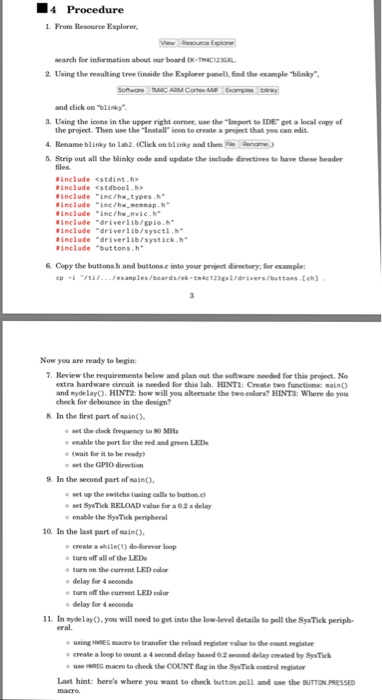
L From Resource Explorer, search for insormation about our board EX-THAC12K 2 Using the resulting tree (inside the Exploner anel), find the example "blinky and click on Dlinky 3. Using the icons in the upper right corner, use the "Import to IDE" get a local copy of the project. Then use the "Install" ioon to create a preject that yeu can edit 4. Rename blinky to lab2. Click on blinky and the 5. Strip out all the blinky code and update the include directives to have these header einclude #include include #include #include #inelude #include include "inc/h..types.h" ine/hw.neenap.h "inc/hw_avie.h" "driverlib/gpio.h" -driver lib/sysetl.h" "driver lib/systick.h. "buttons h 6 Copy the buttonsh and buttons.c into your project directory for esample Now you are ready to begin: 7. Review the requirements below and plan out the sotware meeded for this project. No extra hardware circuit is needed for this lab HINT: Create two functions main() and nydelayO. HINT2: how will you alternate the twe eelers? HINT3: Where do you check for debounce in the design? 8 In the irst part of saino, set the dock Erequency to 80 MH - enable the port for the red and green LED (wait for it to be ready, o set the GPlO direction o set up the switchs (using ealls to butson.c set SyTick RELOAD value for a 0.2 8 delay o enable the SysTick perigheral 10. In the last part of saino, o create a whilet) de-Sorever loop o turn off all of the LED o turn on the current LED color o delay for 4 seconds o turn off the current LED colo o delay for 4 seconds 11 In sydelayO. you will need to get into the low-level details to poll the Sys Tick periph using HREG macro to transfer the reload repater valoe te the eeant register o create a loop to count a 4 second delay hased 0 2 scnd delay created by SysTick use "MEG macro to deck theCOUNT flag in the SyTick coetampater Last hint: here's where you want to check button poll and use the BUTTON PRESSED L From Resource Explorer, search for insormation about our board EX-THAC12K 2 Using the resulting tree (inside the Exploner anel), find the example "blinky and click on Dlinky 3. Using the icons in the upper right corner, use the "Import to IDE" get a local copy of the project. Then use the "Install" ioon to create a preject that yeu can edit 4. Rename blinky to lab2. Click on blinky and the 5. Strip out all the blinky code and update the include directives to have these header einclude #include include #include #include #inelude #include include "inc/h..types.h" ine/hw.neenap.h "inc/hw_avie.h" "driverlib/gpio.h" -driver lib/sysetl.h" "driver lib/systick.h. "buttons h 6 Copy the buttonsh and buttons.c into your project directory for esample Now you are ready to begin: 7. Review the requirements below and plan out the sotware meeded for this project. No extra hardware circuit is needed for this lab HINT: Create two functions main() and nydelayO. HINT2: how will you alternate the twe eelers? HINT3: Where do you check for debounce in the design? 8 In the irst part of saino, set the dock Erequency to 80 MH - enable the port for the red and green LED (wait for it to be ready, o set the GPlO direction o set up the switchs (using ealls to butson.c set SyTick RELOAD value for a 0.2 8 delay o enable the SysTick perigheral 10. In the last part of saino, o create a whilet) de-Sorever loop o turn off all of the LED o turn on the current LED color o delay for 4 seconds o turn off the current LED colo o delay for 4 seconds 11 In sydelayO. you will need to get into the low-level details to poll the Sys Tick periph using HREG macro to transfer the reload repater valoe te the eeant register o create a loop to count a 4 second delay hased 0 2 scnd delay created by SysTick use "MEG macro to deck theCOUNT flag in the SyTick coetampater Last hint: here's where you want to check button poll and use the BUTTON PRESSED

Step by Step Solution

There are 3 Steps involved in it

1 Expert Approved Answer
Step: 1 Unlock blur-text-image
Question Has Been Solved by an Expert!

Get step-by-step solutions from verified subject matter experts

Step: 2 Unlock
Step: 3 Unlock

Students Have Also Explored These Related Databases Questions!