







Question: C PROGRAMMING in Eclipse please Design a program that prints a dot matrix image on the console using the asterisk * and space characters in
C PROGRAMMING in Eclipse please
Design a program that prints a dot matrix image on the console using the asterisk * and space characters in an 8x8 matrix.
Create a program that prints one character, similar to the above example. Your program must
- Use loops to generate the 8x8 pattern
- At least one loop for the rows
- At least one loop for the columns
- Create the 8x8 pattern from an encoded number image (e.g. 64-bit unsigned integer)
- Use an unsigned long int datatype for your 64-bit encoded number.
- Alternately use the uint64_t datatype. Be sure to add the line: #include
- The encoded number can be hard-coded (i.e. a constant integer). It does not have to come from user input.
- Use 0x in front of the number in your code to tell the compiler its hexadecimal.
- If the input is not valid, your program should ask the user to try again using a loop to get back to the user input code.
- MUST BE ABLE TO PRINT ANY LETTER (UPPER OR LOWERCASE) THAT THE USER ENTERS. YOUR CODE WILL PRINT THE LETTER AS A STAR PATTERN ON THE CONSOLE.
HINT 1: In your row loop, you will need to extract 8 bits from the 64-bit number each time it loops. Use math operators or use bitwise operators to isolate the proper 8 bits out of the 64 for that row.
HINT 2: In your column loop, you will need to focus on just one bit of the 8-bit row number each time it loops. Use math or bitwise operators to mask or isolate the bit that corresponds to the column the loop is currently printing.
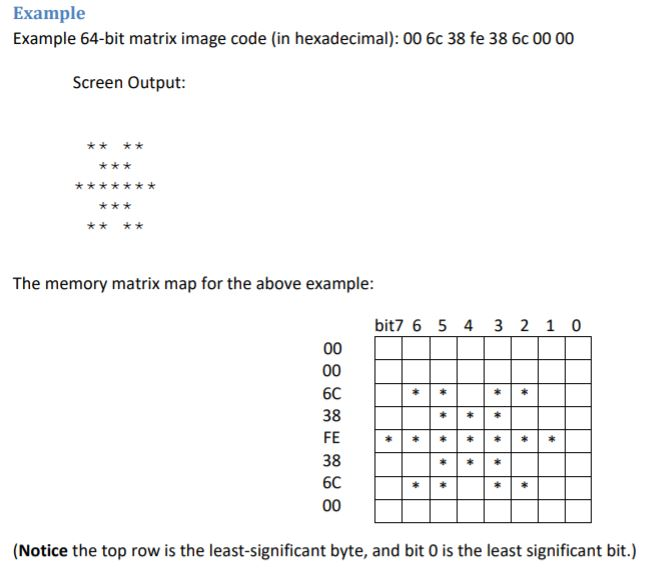
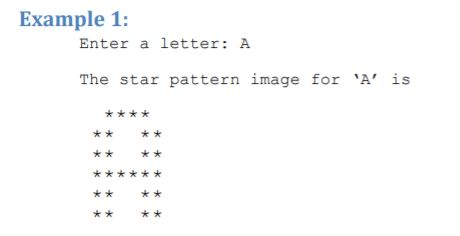
Example Example 64-bit matrix image code (in hexadecimal): 00 6c 38 fe 38 6c 00 00 Screen Output: k* The memory matrix map for the above example: bit7 6 5 4 3 2 1 0 6C 38 FE 38 (Notice the top row is the least-significant byte, and bit 0 is the least significant bit.) xample 1: Enter a letter: A The star pattern image for A' is
Step by Step Solution
There are 3 Steps involved in it

Get step-by-step solutions from verified subject matter experts
 Study Help