





Question: c++ programming Read the instructions carefully And write a program in c++ Financial Account Transactions Loop Create a new Windows console program in project folder
c++ programming
Read the instructions carefully
And write a program in c++
 c++ programming Read the instructions carefully And write a program in
c++ Financial Account Transactions Loop Create a new Windows console program in

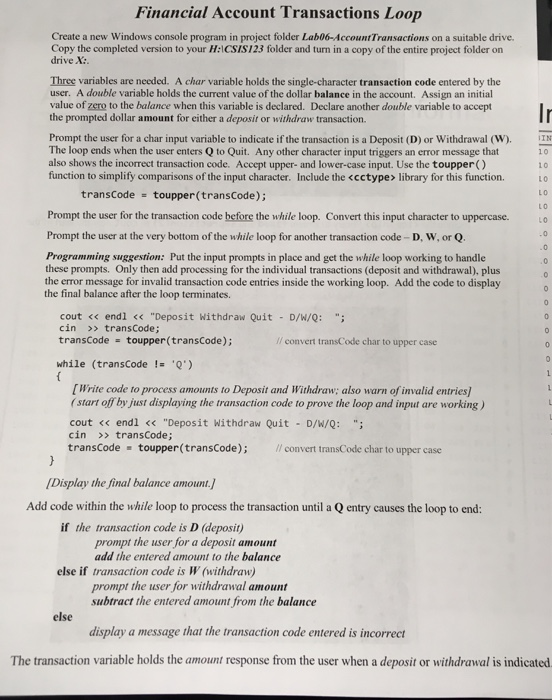
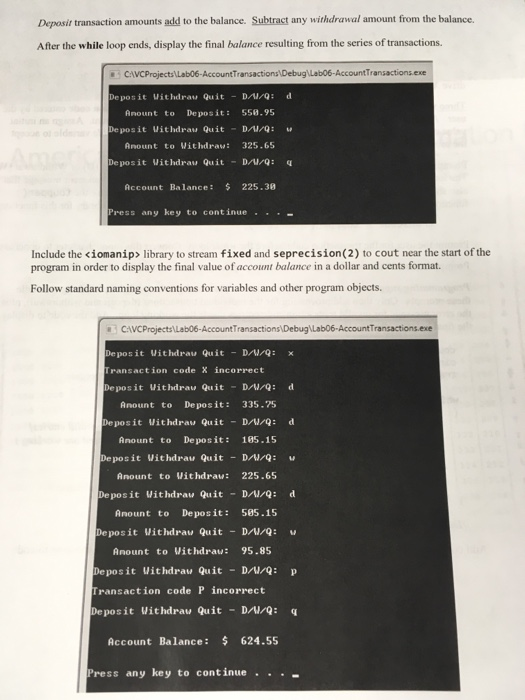
Financial Account Transactions Loop Create a new Windows console program in project folder Lab06-Account Transactions on a suitable drive. Copy the completed version to your H:ICSIS123 folder and turn in a copy of the entire project folder on drive X: Three variables are needed. A char variable holds the single-character transaction code entered by the user. A double variable holds the current value of the dollar balance in the account. Assign an initial value of zero to the balance when this variable is declared. Declare another double variable to accept the prompted dollar amount for either a deposit or withdraw transaction. Prompt the user for a char input variable to indicate if the transaction is a Deposit (D) or Withdrawal (W) The loop ends when the user enters Q to Quit. Any other character input triggers an error message that also shows the incorrect transaction code. Accept upper- and lower-case input. Use the toupper() function to simplify comparisons of the input character. Include the library for this function I 10 10 L0 L O LO transCode toupper (transCode); Prompt the user for the transaction code before the while loop. Convert this input character to uppercase. Prompt the user at the very bottom of the while loop for another transaction code-D, W, or Q Programming suggestion: Put the input prompts in place and get the while loop working to handle these prompts. Only then add processing for the individual transactions (deposit and withdrawal), plus the error message for invalid transaction code entries inside the working loop. Add the code to display the final balance after the loop terminates. cout > transCode; transCode toupper(transCode); convert transCode char to upper case while (transCode Q) [Write code to process amounts to Deposit and Withdraw; also warn of invalid entries) start off by just displaying the transaction code to prove the loop and input are working) cout transCode; transCode toupper(transCode); convert transCode char to upper case Display the final balance amount Add code within the while loop to process the transaction until a Q entry causes the loop to end: if the transaction code is D (deposit) prompt the user for a deposit amount add the entered amount to the balance else if transaction code is W (withdraw) prompt the user for withdrawal amount subtract the entered amount from the balance else display a message that the transaction code entered is incorrect The transaction variable holds the amount response from the user when a deposit or withdrawal is indicated

Step by Step Solution

There are 3 Steps involved in it

1 Expert Approved Answer
Step: 1 Unlock blur-text-image
Question Has Been Solved by an Expert!

Get step-by-step solutions from verified subject matter experts

Step: 2 Unlock
Step: 3 Unlock

Students Have Also Explored These Related Databases Questions!