







Question: C + + PROGRAMMING: VECTORS AND SORTING ASSIGNMENT INSTRUCTIONS REMINDER - Do not put code into a single file use Main.cpp , BooksReceived.cpp , and
C PROGRAMMING: VECTORS AND SORTING ASSIGNMENT INSTRUCTIONS
REMINDER Do not put code into a single file use Main.cpp BooksReceived.cpp and BooksReceived.h
INSTRUCTIONS
Create an application that will load a list of books received in a shipment and produce a report about the shipment.
Use the class by creating a BooksReceived object and prompting the user for a file name. The file is of the type txt the name of the file may contain a space; therefore, be sure to use getline instead of cin
Class:
Name: BooksReceived
Constructor:
Zeroargument constructor that initializes the data members to or as appropriate.
Fourargument constructor that receives the name of the book store, the date shipped, the number of hardbound books, and the number of paperback books.
Functions: Setters and Getters are required even if they are not used.
addBookstring void Accepts a book value as a string and adds it to the vector.
sortBookList void Sorts the vector
countBooksReceived int number of books in the vector. Do not use a counter of books added.
calcHardboundPercentage void calculates pertentage of Hardbound books
calcPaperbackPercentage void calculates pertentage of Paperback books
displayBooksReceivedInfo void Prints the shipment information
setNameBookstore void Accepts a string containing the book store name value and updates the nameBookstore data member.
getNameBookstore string Returns the value stored in the nameBookstore data member.
setDateShipped void Accepts a string containing the date shipped value and updates the dateShipped dat member.
getDateShipped string Returns the value stored in the dateShipped data member.
setNumberHardbound void Accepts an int value containing the number of hardboard books in the shipment and updates the numberHardbound data member.
getNumberHardbound int Returns the value stored in the numberHardbound data member.
setNumberPaperback void Accepts an int value containing the number of paperback books in the shipment and updates the numberPaperback data member.
getNumberPaperback int Returns the value stored in the numberPaperback data member
displayBooksReceivedInfo void Creates and displays the formatted output of the book shipment information.
Formulas:
Need: Calculate the percentage of hardbound and paperback books against the total number of books in the shipment.
o For the percentage, always display only digit after the decimal point.
o The formula for calculating the percentage is:
Number of Hardbound books Total Number of Books
Business Rules:
No blank lines are allowed in the text file.
The value for hardbound and paperback must be numeric.
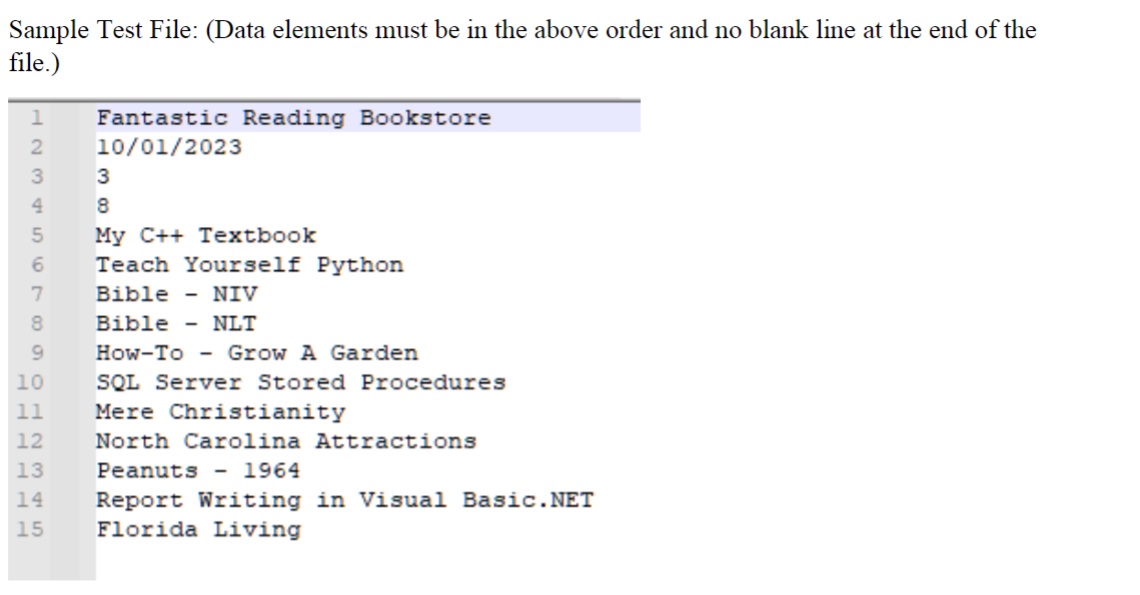
The data in the text file must be in the exact order given below.
o Bookstore name
o Date of shipment
o Number of hardbound books
o Number of paperback books
o A list of book titles
Must be at least three titles in the list.
Book titles must not exceed characters in length.
The example below shows an if statement that would work.
If bookTitle
do nothing
Else
add vector code hereAdd book to vector
The class should use appropriate protection levels for the member data and functions. Data members must be in the private: section. It must also follow principles of minimalization: that is no data member should be part of a class unless most functions of the object need it A general rule of thumb is that if you can easily calculate it dont store it
Program Flow:
Request the file name from the user.
Open the file. If fails to open, notify the user and exit the program.
Read the first four values in the text file and use error checking for each line. If there is any error, inform the user of the error with a meaningful message and exit the program with no further processing, including any display of information.
o Remember the data can contain spaces.
Create the BooksReceived object and pass in the four values loaded from the text file using the argument constructor.
While the text file is not EOF Google C file eof for how to handle this.
o Load the next book from the text file.
Remember the data can contain spaces.
o If the book value is blank, discard the input.
o If the book title size is greater than characters in length, display a meaningful error message and exit the program with no further processing, including any display of information.
o Otherwise, call the addBook function in BooksReceived and pass in the book name.
Once the list is loaded, call the displayBooksReceivedInfo function to display the information about the shipment.
Note: Do not create a vector in main and pass the entire vector into the addBook function in the BooksReceived class. Pass in only one book at a time and allow the addBook function to add it to the vector of books in the class.
Step by Step Solution
There are 3 Steps involved in it
1 Expert Approved Answer
Step: 1 Unlock

Question Has Been Solved by an Expert!
Get step-by-step solutions from verified subject matter experts
Step: 2 Unlock
Step: 3 Unlock
 Study Help