







Question: c# Question Completion Status: Change the following checkboard generation code to produce squares where the red square would show the letter i. An example output
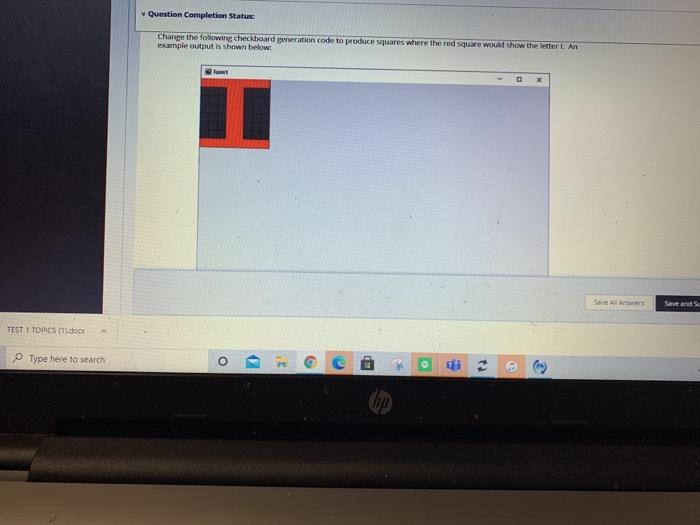
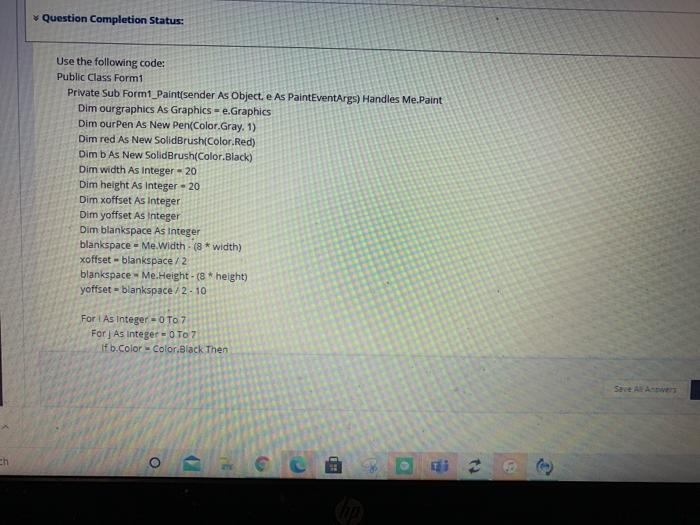
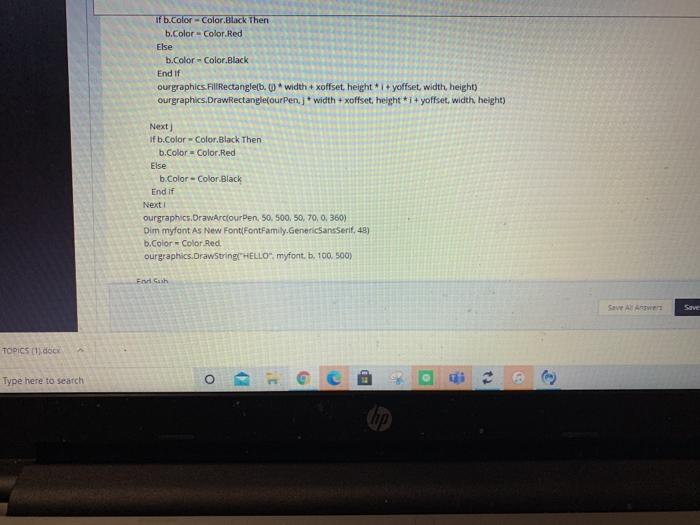
Question Completion Status: Change the following checkboard generation code to produce squares where the red square would show the letter i. An example output is shown below: fot Save All Save and TEST 1 TOPICS (I.docx A Type here to search G ED O Question Completion Status: Use the following code: Public Class Form1 Private Sub Formt_Paint(sender As Object. e As PaintEventArgs) Handles Me.Paint Dim ourgraphics As Graphics - e.Graphics Dim our Pen As New Pen(Color Gray. 1) Dim red As New SolidBrush(Color Red) Dim b As New SolidBrush(Color.Black) Dim width As Integer - 20 Dim height As Integer - 20 Dim xoffset As Integer Dim yoffset As Integer Dim blankspace As Integer blankspace = Me Width - (8 *width) xoffset-blankspace/2 blankspace - Me.Height - (8 * height) yoffset-blankspace/2-10 For i As Integer = 0 To 7 For] As Integer - 0 To 7 If b.Color = Color.Black Then Sant ALAV ch O ) mo G if b.Color - Color Black Then b.Color = Color.Red Else b.Color - Color.Black End If ourgraphics.Fill Rectangleb. O *width + xoffset height 1+yoffset width, height) ourgraphics.DrawRectangle(our Penj width + xoffset height *i+yoffset, width height) Next) if b.Color - Color Black Then b.Color = Color.Red Else b Color = Color Black End If Next ourgraphics.DrawArcouren 50.500.50, 70, 0.360) Dim mytont As New Font FontFamily.GenericSansSerif, 43) b.Color = Color Red ourgraphics.Drawstring"HELLO.myfont. b. 100.500) Flash Save TOPICS (1).docx . Type here to search o Question Completion Status: Change the following checkboard generation code to produce squares where the red square would show the letter i. An example output is shown below: fot Save All Save and TEST 1 TOPICS (I.docx A Type here to search G ED O Question Completion Status: Use the following code: Public Class Form1 Private Sub Formt_Paint(sender As Object. e As PaintEventArgs) Handles Me.Paint Dim ourgraphics As Graphics - e.Graphics Dim our Pen As New Pen(Color Gray. 1) Dim red As New SolidBrush(Color Red) Dim b As New SolidBrush(Color.Black) Dim width As Integer - 20 Dim height As Integer - 20 Dim xoffset As Integer Dim yoffset As Integer Dim blankspace As Integer blankspace = Me Width - (8 *width) xoffset-blankspace/2 blankspace - Me.Height - (8 * height) yoffset-blankspace/2-10 For i As Integer = 0 To 7 For] As Integer - 0 To 7 If b.Color = Color.Black Then Sant ALAV ch O ) mo G if b.Color - Color Black Then b.Color = Color.Red Else b.Color - Color.Black End If ourgraphics.Fill Rectangleb. O *width + xoffset height 1+yoffset width, height) ourgraphics.DrawRectangle(our Penj width + xoffset height *i+yoffset, width height) Next) if b.Color - Color Black Then b.Color = Color.Red Else b Color = Color Black End If Next ourgraphics.DrawArcouren 50.500.50, 70, 0.360) Dim mytont As New Font FontFamily.GenericSansSerif, 43) b.Color = Color Red ourgraphics.Drawstring"HELLO.myfont. b. 100.500) Flash Save TOPICS (1).docx . Type here to search o
Step by Step Solution
There are 3 Steps involved in it

Get step-by-step solutions from verified subject matter experts
 Study Help