







Question: C++ THANKS Sales Tax Calculator Create a program that uses a separate module to calculate sales tax and total after tax. Console Sales Tax Calculator
C++ THANKS 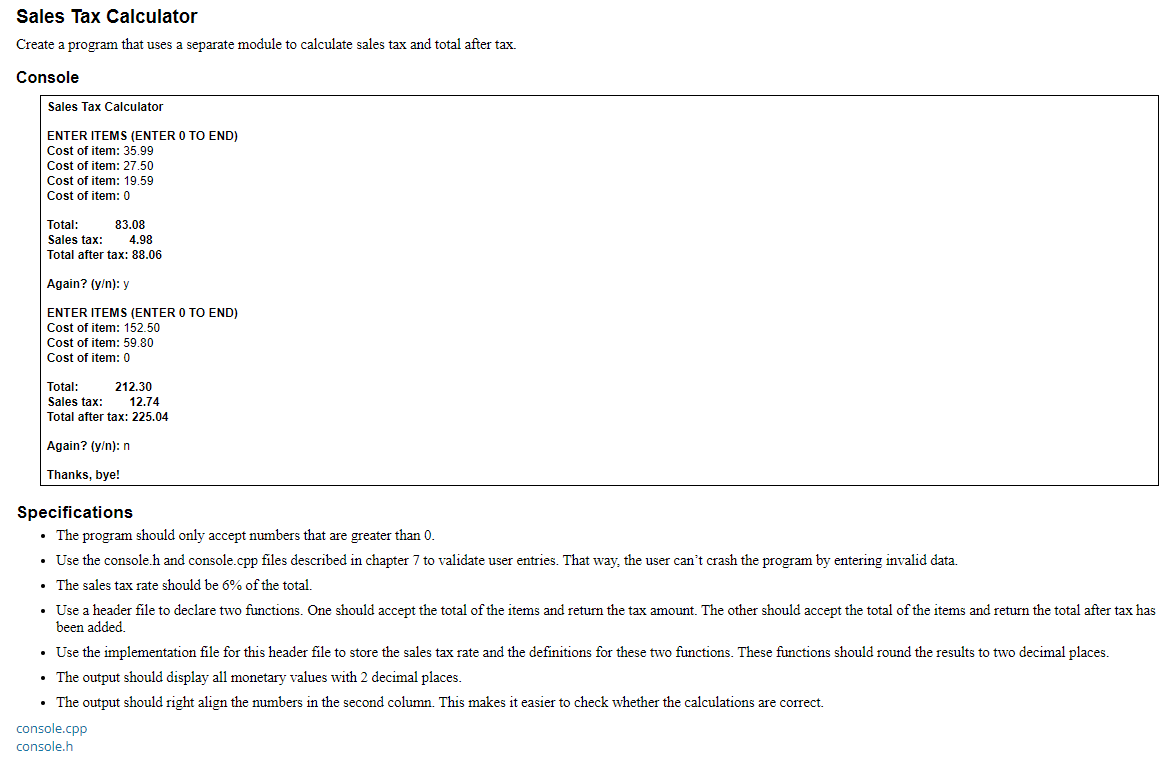
Sales Tax Calculator Create a program that uses a separate module to calculate sales tax and total after tax. Console Sales Tax Calculator ENTER ITEMS (ENTER O TO END) Cost of item: 35.99 Cost of item: 27.50 Cost of item: 19.59 Cost of item: 0 Total: 83.08 Sales tax: 4.98 Total after tax: 88.06 Again? (y): y ENTER ITEMS (ENTER O TO END) Cost of item: 152.50 Cost of item: 59.80 Cost of item: 0 Total: 212.30 Sales tax: 12.74 Total after tax: 225.04 Again? [y): n Thanks, bye! Specifications The program should only accept numbers that are greater than 0. Use the console.h and console.cpp files described in chapter 7 to validate user entries. That way, the user can't crash the program by entering invalid data. The sales tax rate should be 6% of the total. Use a header file to declare two functions. One should accept the total of the items and return the tax amount. The other should accept the total of the items and return the total after tax has been added. Use the implementation file for this header file to store the sales tax rate and the definitions for these two functions. These functions should round the results to two decimal places. The output should display all monetary values with 2 decimal places. The output should right align the numbers in the second column. This makes it easier to check whether the calculations are correct. console.cpp console.h
Step by Step Solution
There are 3 Steps involved in it

Get step-by-step solutions from verified subject matter experts
 Study Help