







Question: C# using System; using System.Collections.Generic; using System.ComponentModel; using System.Data; using System.Drawing; using System.Linq; using System.Text; using System.Threading.Tasks; using System.Windows.Forms; namespace InvoiceTotal { public partial class
C#
using System; using System.Collections.Generic; using System.ComponentModel; using System.Data; using System.Drawing; using System.Linq; using System.Text; using System.Threading.Tasks; using System.Windows.Forms; namespace InvoiceTotal { public partial class Form1 : Form { public Form1() { InitializeComponent(); } const decimal SalesTaxPct = 7.75m; private void btnCalculate_Click(object sender, EventArgs e) { if (IsValidData()) { decimal productTotal = Convert.ToDecimal(txtProductTotal.Text); decimal discountPercent = .0m; if (productTotal = 100 && productTotal = 250) discountPercent = .25m; decimal discountAmount = productTotal * discountPercent; decimal subtotal = productTotal - discountAmount; decimal tax = subtotal * SalesTaxPct / 100; decimal total = subtotal + tax; txtDiscountAmount.Text = discountAmount.ToString("c"); txtSubtotal.Text = subtotal.ToString("c"); txtTax.Text = tax.ToString("c"); txtTotal.Text = total.ToString("c"); txtProductTotal.Focus(); } } public bool IsValidData() { return IsPresent(txtProductTotal, "Subtotal") && IsDecimal(txtProductTotal, "Subtotal") && IsWithinRange(txtProductTotal, "Subtotal", 0, 1000000); } public bool IsPresent(TextBox textBox, string name) { if (textBox.Text == "") { MessageBox.Show(name + " is a required field.", "Entry Error"); textBox.Focus(); return false; } return true; } public bool IsDecimal(TextBox textBox, string name) { decimal number = 0m; if (Decimal.TryParse(textBox.Text, out number)) { return true; } else { MessageBox.Show(name + " must be a decimal number.", "Entry Error"); textBox.Focus(); return false; } } public bool IsWithinRange(TextBox textBox, string name, decimal min, decimal max) { decimal number = Convert.ToDecimal(textBox.Text); if (number = max) { MessageBox.Show(name + " must be between " + min + " and " + max + ".", "Entry Error"); textBox.Focus(); return false; } return true; } private void btnExit_Click(object sender, EventArgs e) { this.Close(); } } }
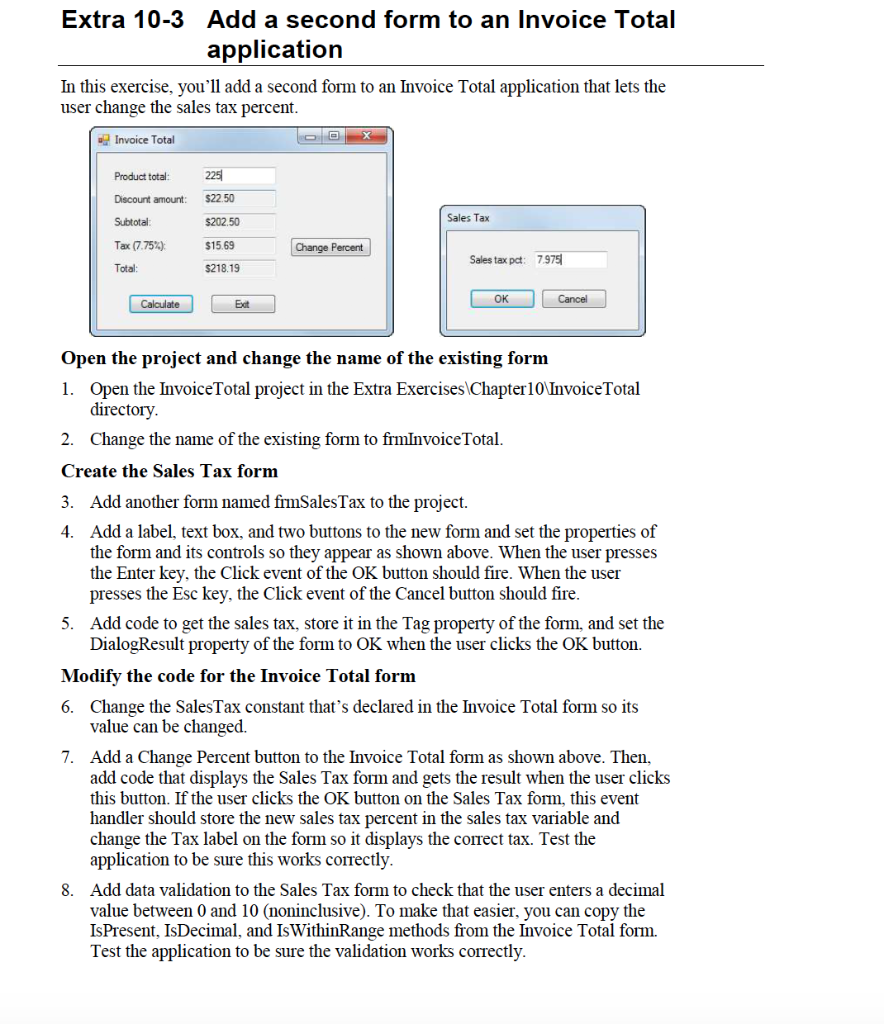
Extra 10-3 Add a second form to an Invoice Total application In this exercise, you'll add a second form to an Invoice Total application that lets the user change the sales tax percent. Invoice Total 225 Product total Discount amount: $22.50 Subtotal $202.50 Sales Tax Tax 7.75%) $15.69 Change Percent Sales tax pet: 7979 Total: $218.19 Calculate Ext Cancel OK Open the project and change the name of the existing form 1. Open the Invoice Total project in the Extra Exercises Chapter 10 Invoice Total directory 2. Change the name of the existing form to frmInvoice Total. Create the Sales Tax form 3. Add another form named fimSales Tax to the project. 4. Add a label, text box, and two buttons to the new form and set the properties of the form and its controls so they appear as shown above. When the user presses the Enter key, the Click event of the OK button should fire. When the user presses the Esc key, the Click event of the Cancel button should fire. 5. Add code to get the sales tax, store it in the Tag property of the form, and set the DialogResult property of the form to OK when the user clicks the OK button. Modify the code for the Invoice Total form 6. Change the Sales Tax constant that's declared in the Invoice Total form so its value can be changed. 7. Add a Change Percent button to the Invoice Total form as shown above. Then, add code that displays the Sales Tax form and gets the result when the user clicks this button. If the user clicks the OK button on the Sales Tax form, this event handler should store the new sales tax percent in the sales tax variable and change the Tax label on the form so it displays the correct tax. Test the application to be sure this works correctly. 8. Add data validation to the Sales Tax form to check that the user enters a decimal value between 0 and 10 (noninclusive). To make that easier, you can copy the IsPresent, IsDecimal, and IsWithinRange methods from the Invoice Total form. Test the application to be sure the validation works correctly
Step by Step Solution
There are 3 Steps involved in it

Get step-by-step solutions from verified subject matter experts
 Study Help