







Question: C# using Visual Studio IDE 2017. Create a Windows Forms Application that mimics a calculator. Thank you. Create a Windows Forms Application that mimics a
C# using Visual Studio IDE 2017.
Create a Windows Forms Application that mimics a calculator. 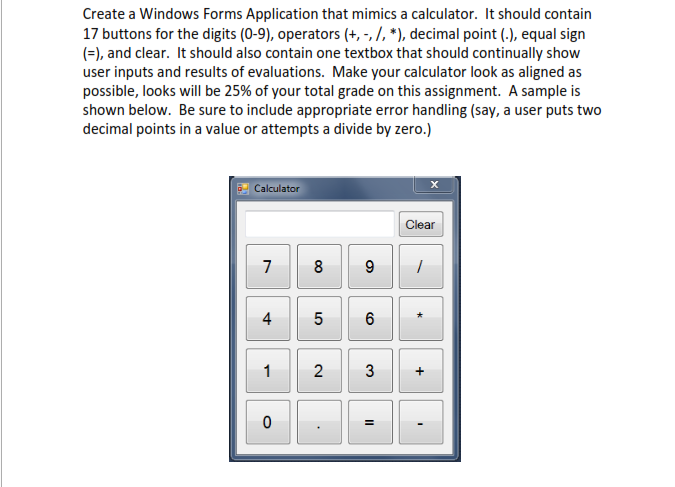
Thank you.
Create a Windows Forms Application that mimics a calculator. It should contain 17 buttons for the digits (0-9), operators (+,-,/, *), decimal point (), equal sign (), and clear. It should also contain one textbox that should continually show user inputs and results of evaluations. Make your calculator look as aligned as possible, looks will be 25% of your total grade on this assignment. A sample is shown below. Be sure to include appropriate error handling (say, a user puts two decimal points in a value or attempts a divide by zero.) Calculator Clear 4 1 2
Step by Step Solution
There are 3 Steps involved in it

Get step-by-step solutions from verified subject matter experts
 Study Help