







Question: C# Visual Studiio CarWashInvoice Class This class contains functionality that supports the business process of creating an invoice for the car wash department. The CarWashInvoice
C# Visual Studiio
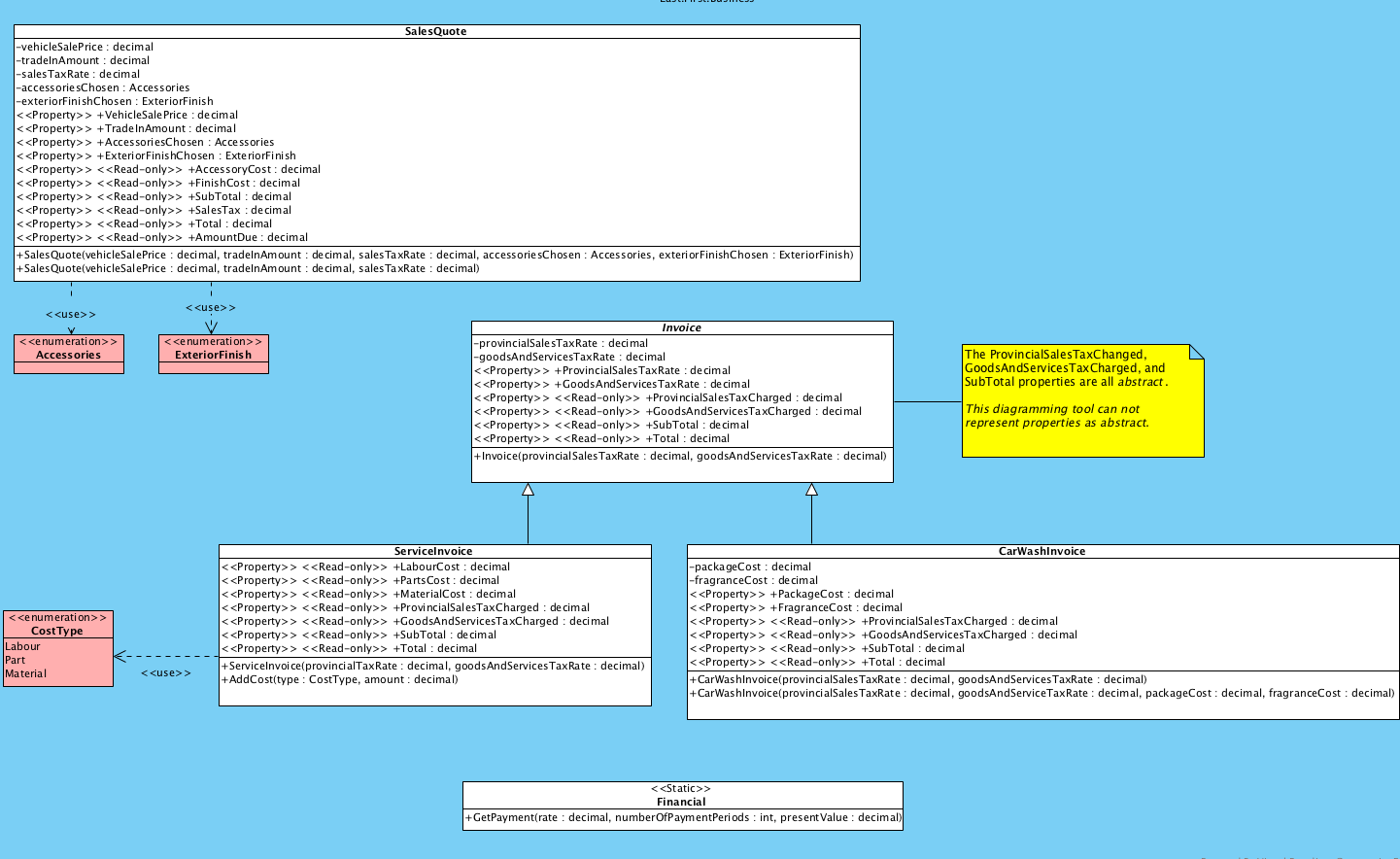
CarWashInvoice Class
This class contains functionality that supports the business process of creating an invoice for the car wash department. The CarWashInvoice class derives from the Invoice class.
Create the CarWashInvoice class in the Library project. This class must be defined under the My.Business namespace.
Fields
packageCost : decimal - The amount charged for the chosen package.
fragranceCost : decimal - The amount charged for the chosen fragrance.
Properties
PackageCost : decimal
Gets and sets the amount charged for the chosen package.
Exception:
- ArgumentOutOfRangeException - When the property is set to less than 0. Message: The value cannot be less than 0. Parameter name: "value".
FragranceCost : decimal
Gets and sets the amount charged for the chosen fragrance.
Exception:
- ArgumentOutOfRangeException - When the property is set to less than 0. Message: The value cannot be less than 0. Parameter name: "value".
ProvincialSalesTaxCharged : decimal
Gets the amount of provincial sales tax charged to the customer. No provincial sales tax is charged for a car wash.
GoodsAndServicesTaxCharged : decimal
Gets the amount of goods and services tax charged to the customer.
SubTotal : decimal
Gets the subtotal of the Invoice.
Total : decimal
Gets the total of the Invoice.
Methods
CarWashInvoice(decimal, decimal)
Initializes an instance of CarWashInvoice with a provincial and goods and services tax rates. The package cost and fragrance cost are zero.
Parameters:
- provincialSalesTaxRate - The rate of provincial tax charged to a customer.
- goodsAndServicesTaxRate - The rate of goods and services tax charged to a customer.
Exceptions:
- ArgumentOutOfRangeException - When the provincial sales tax rate is less than 0. Message: The argument cannot be less than 0. Parameter name: "provincialSalesTaxRate".
- ArgumentOutOfRangeException - When the provincial sales tax rate is greater than 1. Message: The argument cannot be greater than 1. Parameter name: "provincialSalesTaxRate".
- ArgumentOutOfRangeException - When the goods and services tax rate is less than 0. Message: The argument cannot be less than 0. Parameter name: "goodsAndServicesTaxRate".
- ArgumentOutOfRangeException - When the goods and services tax rate is greater than 1. Message: The argument cannot be greater than 1. Parameter name: "goodsAndServicesTaxRate".
CarWashInvoice(decimal, decimal, decimal, decimal)
Initializes an instance of CarWashInvoice with a provincial and goods, services tax rate, package cost and fragrance cost.
Parameters:
- provincialSalesTaxRate - The rate of provincial tax charged to a customer.
- goodsAndServicesTaxRate - The rate of goods and services tax charged to a customer.
- packageCost - The cost of the chosen package.
- fragranceCost - The cost of the chosen fragrance.
Exceptions:
- ArgumentOutOfRangeException - When the provincial sales tax rate is less than 0. Message: The argument cannot be less than 0. Parameter name: "provincialSalesTaxRate".
- ArgumentOutOfRangeException - When the provincial sales tax rate is greater than 1. Message: The argument cannot be greater than 1. Parameter name: "provincialSalesTaxRate".
- ArgumentOutOfRangeException - When the goods and services tax rate is less than 0. Message: The argument cannot be less than 0. Parameter name: "goodsAndServicesTaxRate".
- ArgumentOutOfRangeException - When the goods and services tax rate is greater than 1. Message: The argument cannot be greater than 1. Parameter name: "goodsAndServicesTaxRate".
- ArgumentOutOfRangeException - When the package cost is less than 0. Message: The argument cannot be less than 0. Parameter name: "packageCost".
- ArgumentOutOfRangeException - When the fragrance cost is less than 0. Message: The argument cannot be less than 0." Parameter name: "fragranceCost".
Sales Quote -vehicle Sale Price: decimal -tradelnAmount: decimal -sales Tax Rate : decimal -accessoriesChosen : Accessories -exteriorFinishChosen : ExteriorFinish > +VehicleSale Price : decimal > +TradeInAmount: decimal > +AccessoriesChosen : Accessories > +Exterior FinishChosen : ExteriorFinish > > +Accessory Cost: decimal > > +FinishCost: decimal > > +SubTotal: decimal > > +SalesTax : decimal > > +Total : decimal > > +AmountDue : decimal +Sales Quote(vehicleSale Price : decimal, tradelnAmount : decimal, sales TaxRate : decimal, accessoriesChosen : Accessories, exterior FinishChosen : ExteriorFinish) +Sales Quote(vehicleSale Price : decimal, tradelnAmount : decimal, sales TaxRate : decimal) > > V > ExteriorFinish > Accessories Invoice -provincialSalesTax Rate : decimal -goodsAndServices Tax Rate : decimal > + ProvincialSales Tax Rate : decimal > +GoodsAndServices Tax Rate : decimal |> > +ProvincialSalesTaxCharged: decimal > > +GoodsAndServices TaxCharged: decimal > > +SubTotal : decimal > > +Total : decimal +Invoice(provincial Sales TaxRate : decimal, goodsAndServicesTax Rate : decimal) The ProvincialSalesTaxChanged, GoodsAndServices Tax Charged, and SubTotal properties are all abstract. This diagramming tool can not represent properties as abstract. > Cost Type Labour Part Material Servicelnvoice > > +LabourCost : decimal > > +Parts Cost : decimal > > +MaterialCost : decimal > > +ProvincialSalesTaxCharged: decimal > > +GoodsAndServicesTaxCharged: decimal > > +SubTotal : decimal > > +Total : decimal +Servicelnvoice(provincialTax Rate : decimal, goodsAndServices Tax Rate : decimal) +AddCost(type: Cost Type, amount : decimal) CarWashinvoice -packageCost : decimal -fragranceCost : decimal > +PackageCost : decimal > +FragranceCost : decimal > > +ProvincialSalesTaxCharged: decimal > > +GoodsAndServicesTaxCharged: decimal > > +SubTotal : decimal > > +Total : decimal +CarWashInvoice(provincialSales TaxRate : decimal, goodsAndServices TaxRate : decimal) +CarWashInvoice provincialSales TaxRate: decimal, goodsAndService TaxRate : decimal, packageCost: decimal, fragranceCost : decimal) >
Step by Step Solution
There are 3 Steps involved in it

Get step-by-step solutions from verified subject matter experts
 Study Help