







Question: c++ with copyable link!!! please!! Complete the requested changes, and then save the file as Lab6B.cpp, making sure to compile and run the program to
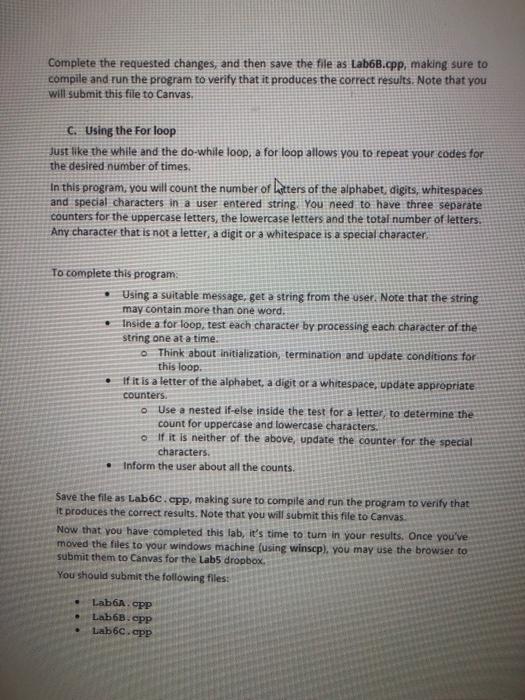
Complete the requested changes, and then save the file as Lab6B.cpp, making sure to compile and run the program to verify that it produces the correct results. Note that you will submit this file to Canvas, C. Using the For loop Just like the while and the do-white loop, a for loop allows you to repeat your codes for the desired number of times. In this program, you will count the number of Latters of the alphabet digits, whitespaces and special characters in a user entered string. You need to have three separate counters for the uppercase letters, the lowercase letters and the total number of letters. Any character that is not a letter, a digit or a whitespace is a special character. To complete this program Using a suitable message, get a string from the user. Note that the string may contain more than one word. Inside a for loop, test each character by processing each character of the string one at a time. Think about initialization, termination and update conditions for this loop. If it is a letter of the alphabet, a digit or a whitespace, update appropriate o Use a nested if-else inside the test for a letter, to determine the count for uppercase and lowercase characters. If it is neither of the above, update the counter for the special characters Inform the user about all the counts. counters. Save the file as Lab6c.cpp, making sure to compile and run the program to verify that it produces the correct results. Note that you will submit this file to Canvas Now that you have completed this lab, it's time to turn in your results. Once you've moved the files to your windows machine (using winscp), you may use the browser to submit them to Canvas for the Labs dropbox. You should submit the following files: LabA.CPP Lab6B.CPP Lab6c.cpp
Step by Step Solution
There are 3 Steps involved in it

Get step-by-step solutions from verified subject matter experts
 Study Help