







Question: c + + Write the InputTowns ( ) function in the SmallTowns class. Within InputTowns ( ) , use cin to read pairs of input,
c
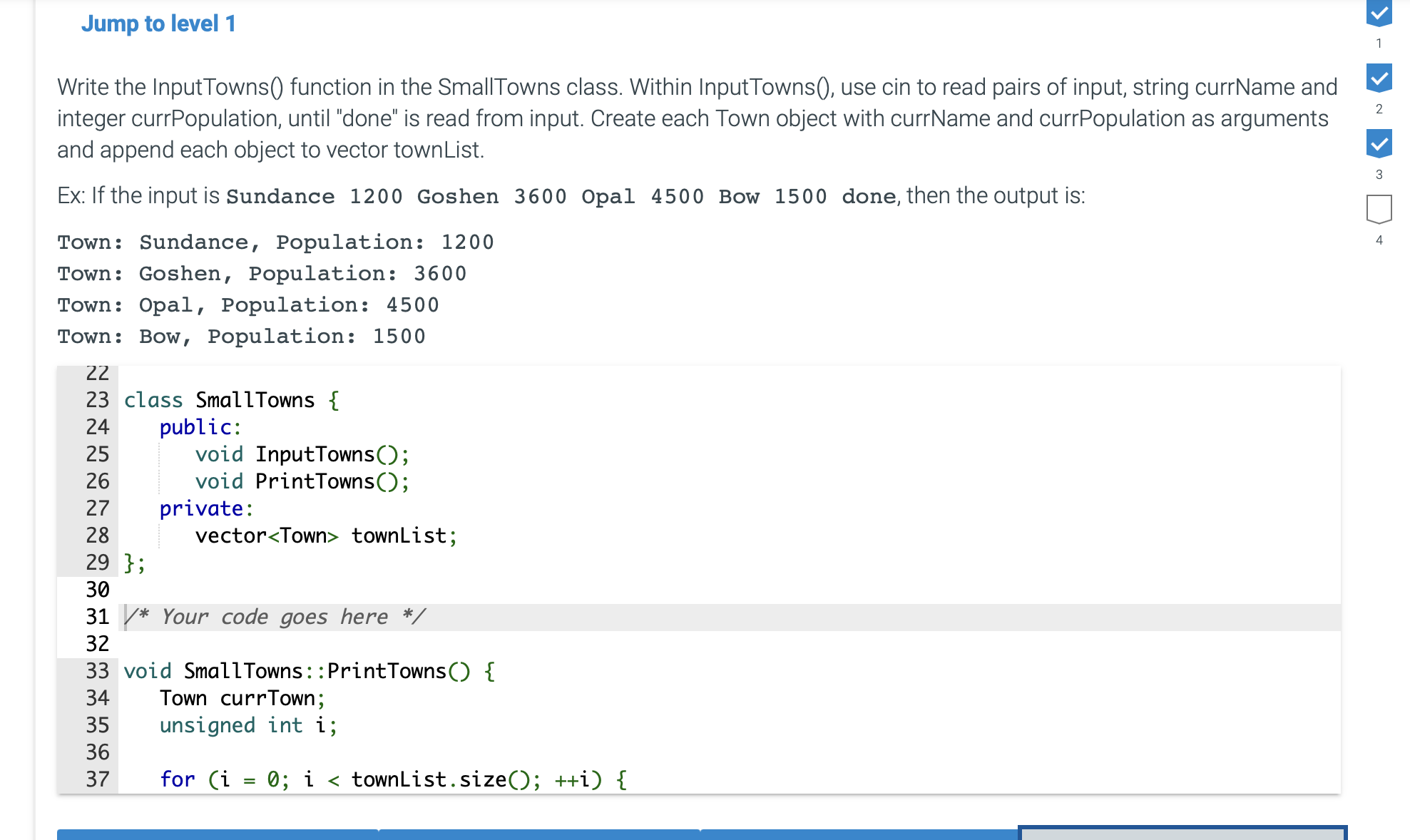
Write the InputTowns function in the SmallTowns class. Within InputTowns use cin to read pairs of input, string currName and
integer currPopulation, until "done" is read from input. Create each Town object with currName and currPopulation as arguments
and append each object to vector townList.
Ex: If the input is Sundance Goshen Opal Bow done, then the output is:
Town: Sundance, Population:
Town: Goshen, Population:
Town: Opal, Population:
Town: Bow, Population: Write the InputTowns function in the SmallTowns class. Within InputTowns use cin to read pairs of input, string currName and integer currPopulation, until "done" is read from input. Create each Town object with currName and currPopulation as arguments and append each object to vector townList.
Ex: If the input is Sundance Goshen Opal Bow done, then the output is:
Town: Sundance, Population:
Town: Goshen, Population:
Town: Opal, Population:
Town: Bow, Population: #include
#include
using namespace std;
class Town
public:
void SetNameAndPopulationstring newName, int newPopulation;
void Print const;
private:
string name;
int population;
;
void Town::SetNameAndPopulationstring newName, int newPopulation
name newName;
population newPopulation;
void Town::Print const
cout "Town: name Population: population endl;
class SmallTowns
public:
void InputTowns;
void PrintTowns;
private:
vector townList;
;
Your code goes here
void SmallTowns::PrintTowns
Town currTown;
unsigned int i;
for i ; i townList.size; i
currTown townList.ati;
currTown.Print;
int main
SmallTowns smallTowns;
smallTowns.InputTowns;
smallTowns.PrintTowns;
return ;
Step by Step Solution
There are 3 Steps involved in it
1 Expert Approved Answer
Step: 1 Unlock

Question Has Been Solved by an Expert!
Get step-by-step solutions from verified subject matter experts
Step: 2 Unlock
Step: 3 Unlock
 Study Help