



Question: Calculate Equivalent Units, Unit Costs, and Transferred CostsFIFO Method Kipling Manufacturing, Inc., operates a plant that produces its own regionally-marketed Super Salad Dressing. The dressing
Calculate Equivalent Units, Unit Costs, and Transferred CostsFIFO Method Kipling Manufacturing, Inc., operates a plant that produces its own regionally-marketed Super Salad Dressing. The dressing is produced in two processes, blending and bottling. In the Blending Department, all materials are added at the beginning of the process, and labor and overhead are incurred evenly throughout the process. Kipling uses the FIFO method. The Work in ProcessBlending Department account for January follows:
| Work in Process - Blending Department | |
|---|---|
| January 1 inventory (4,000 gallons, 75% processed) | $60,000 |
| Transferred to Bottling Department (70,000 gallons) | |
| January charges: | |
| Direct material (71,000 gallons) | 852,000 |
| Direct labor | 315,000 |
| Manufacturing overhead | 385,000 |
| January 31 inventory ( _______ gallons, 60% processed) |
Calculate the following amounts for the Blending Department: a. Number of units in the January 31 inventory. b. Equivalent units for materials and conversion costs. c. January cost per equivalent unit for materials and conversion costs. d. Cost of the units transferred to the Bottling Department. e. Cost of the incomplete units in the January 31 inventory
Round average cost per equivalent unit to two decimal places, if applicable. Round other answers to the nearest whole number, when appropriate.
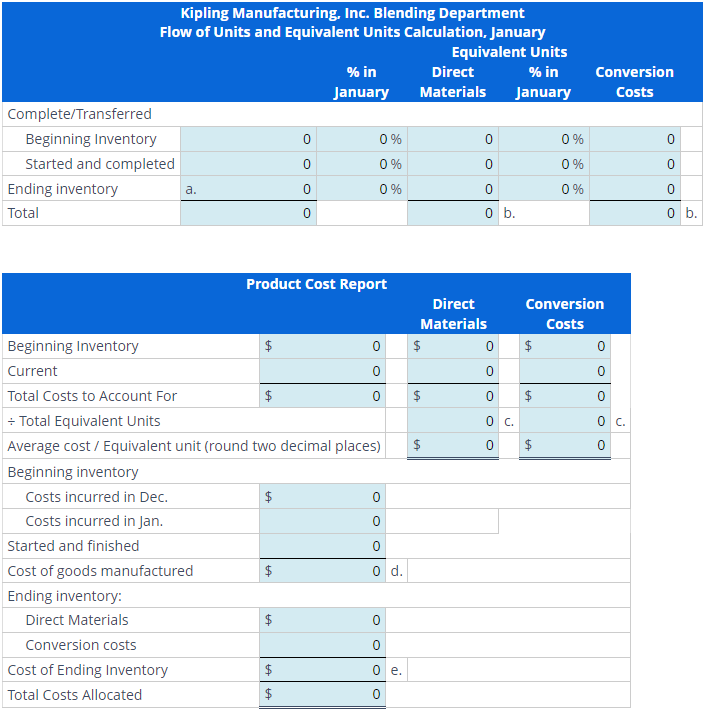
\begin{tabular}{|c|c|c|c|c|c|} \hline \multicolumn{6}{|c|}{KiplingManufacturing.Inc.BlendingDepartmentFlowofUnitsandEquivalentUnitsCalculation,JanuaryEquivalentUnits} \\ \hline & & %inJanuary & DirectMaterials & %inJanuary & ConversionCosts \\ \hline \multicolumn{6}{|l|}{ Complete/Transferred } \\ \hline Beginning Inventory & 0 & 0% & 0 & 0% & 0 \\ \hline Started and completed & 0 & 0% & 0 & 0% & 0 \\ \hline Ending inventory & 0 & 0% & 0 & 0% & 0 \\ \hline Total & 0 & & 0 & b. & 0 \\ \hline \end{tabular}
Step by Step Solution
There are 3 Steps involved in it

Get step-by-step solutions from verified subject matter experts