







Question: can anyone help in writing a assembly code for part a and part b? please and thank you! Part A: Write an Assembly program using
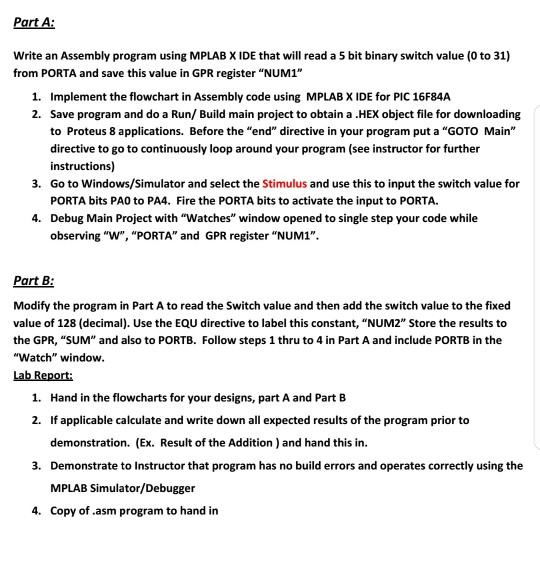
can anyone help in writing a assembly code for part a and part b? please and thank you!
Part A: Write an Assembly program using MPLAB X IDE that will read a 5 bit binary switch value (0 to 31) from PORTA and save this value in GPR register NUM!" Implement the flowchart in Assembly code using MPLAB X IDE for PIC 16F84A Save program and do a Run/ Build main project to obtain a .HEX object file for downloading to Proteus 8 applications. Before the "end" directive in your program put a "GOTO Main" directive to go to continuously loop around your program (see instructor for further instructions) Go to Windows/Simulator and select the Stimulus and use this to input the switch value for PORTA bits PAO to PA4. Fire the PORTA bits to activate the input to PORTA. Debug Main Project with "Watches" window opened to single step your code while observing "W", "PORTA" and GPR register "NUM1". 1. 2. 3. 4. Part B: Modify the program in Part A to read the Switch value and then add the switch value to the fixed value of 128 (decimal). Use the EQU directive to label this constant, NUM2" Store the results to the GPR, "SUM and also to PORTB. Follow steps 1 thru to 4 in Part A and include PORTB in the "Watch" window Lab Report: 1. Hand in the flowcharts for your designs, part A and Part B 2. If applicable calculate and write down all expected results of the program prior to (Ex. Result of the Addition) and hand this in. demonstration. Demonstrate to Instructor that program has no build errors and operates correctly using the MPLAB Simulator/Debugger Copy of.asm program to hand in 3. 4. Part A: Write an Assembly program using MPLAB X IDE that will read a 5 bit binary switch value (0 to 31) from PORTA and save this value in GPR register NUM!" Implement the flowchart in Assembly code using MPLAB X IDE for PIC 16F84A Save program and do a Run/ Build main project to obtain a .HEX object file for downloading to Proteus 8 applications. Before the "end" directive in your program put a "GOTO Main" directive to go to continuously loop around your program (see instructor for further instructions) Go to Windows/Simulator and select the Stimulus and use this to input the switch value for PORTA bits PAO to PA4. Fire the PORTA bits to activate the input to PORTA. Debug Main Project with "Watches" window opened to single step your code while observing "W", "PORTA" and GPR register "NUM1". 1. 2. 3. 4. Part B: Modify the program in Part A to read the Switch value and then add the switch value to the fixed value of 128 (decimal). Use the EQU directive to label this constant, NUM2" Store the results to the GPR, "SUM and also to PORTB. Follow steps 1 thru to 4 in Part A and include PORTB in the "Watch" window Lab Report: 1. Hand in the flowcharts for your designs, part A and Part B 2. If applicable calculate and write down all expected results of the program prior to (Ex. Result of the Addition) and hand this in. demonstration. Demonstrate to Instructor that program has no build errors and operates correctly using the MPLAB Simulator/Debugger Copy of.asm program to hand in 3. 4
Step by Step Solution
There are 3 Steps involved in it

Get step-by-step solutions from verified subject matter experts
 Study Help