







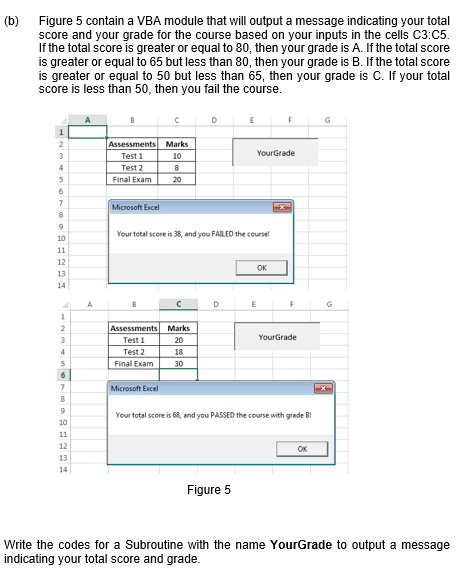
Question: CAN I have all the code for VBA using excel. (b) Figure 5 contain a VBA module that will output a message indicating your total
CAN I have all the code for VBA using excel.
(b) Figure 5 contain a VBA module that will output a message indicating your total score and your grade for the course based on your inputs in the cells C3:05. If the total score is greater or equal to 80, then your grade is A. If the total score is greater or equal to 65 but less than 80, then your grade is B. If the total score is greater or equal to 50 but less than 65, then your grade is C. If your total score is less than 50, then you fail the course. A E F 1 2 3 Your Grade Assessments Test 1 Test 2 Final Exam Marks 10 8 20 s Microsoft Excel 8 9 Your total score is 38, and you FAILED the course! 10 11 12 13 OK 14 A D E F 1 2 3 4 Your Grade Assessments Marks Test 1 20 Test 2 18 Final Exam 30 5 6 7 Microsoft Excel Your total score is 68, and you PASSED the course with grade B! 9 10 11 12 13 OK Figure 5 Write the codes for a Subroutine with the name YourGrade to output a message indicating your total score and grade
Step by Step Solution
There are 3 Steps involved in it

Get step-by-step solutions from verified subject matter experts
 Study Help