







Question: Can i have the answer in java IntelliJ. 4.1 Objective This section builds on the previous one. By now, you should have a class handling
Can i have the answer in java IntelliJ.
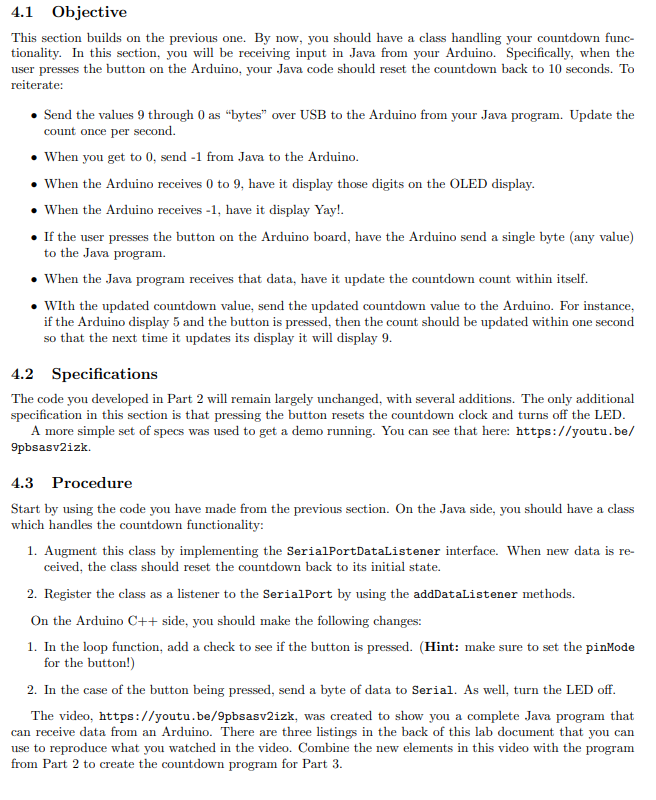
4.1 Objective This section builds on the previous one. By now, you should have a class handling your countdown func- tionality. In this section, you will be receiving input in Java from your Arduino. Specifically, when the user presses the button on the Arduino, your Java code should reset the countdown back to 10 seconds. To reiterate: Send the values 9 through 0 as bytes over USB to the Arduino from your Java program. Update the count once per second. When you get to 0, send -1 from Java to the Arduino. When the Arduino receives 0 to 9, have it display those digits on the OLED display. When the Arduino receives -1, have it display Yay! If the user presses the button on the Arduino board, have the Arduino send a single byte (any value) to the Java program. . When the Java program receives that data, have it update the countdown count within itself. . With the updated countdown value, send the updated countdown value to the Arduino. For instance, if the Arduino display 5 and the button is pressed, then the count should be updated within one second so that the next time it updates its display it will display 9. 4.2 Specifications The code you developed in Part 2 will remain largely unchanged, with several additions. The only additional specification in this section is that pressing the button resets the countdown clock and turns off the LED. A more simple set of specs was used to get a demo running. You can see that here: https://youtu.be/ 9pbsasv2izk. 4.3 Procedure Start by using the code you have made from the previous section. On the Java side, you should have a class which handles the countdown functionality: 1. Augment this class by implementing the SerialPortDataListener interface. When new data is re- ceived, the class should reset the countdown back to its initial state. 2. Register the class as a listener to the SerialPort by using the addDataListener methods. On the Arduino C++ side, you should make the following changes: 1. In the loop function, add a check to see if the button is pressed. (Hint: make sure to set the pinMode for the button!) 2. In the case of the button being pressed, send a byte of data to Serial. As well, turn the LED off. The video, https://youtu.be/9pbsasv2izk, was created to show you a complete Java program that can receive data from an Arduino. There are three listings in the back of this lab document that you can use to reproduce what you watched in the video. Combine the new elements in this video with the program from Part 2 to create the countdown program for Part 3. 4.1 Objective This section builds on the previous one. By now, you should have a class handling your countdown func- tionality. In this section, you will be receiving input in Java from your Arduino. Specifically, when the user presses the button on the Arduino, your Java code should reset the countdown back to 10 seconds. To reiterate: Send the values 9 through 0 as bytes over USB to the Arduino from your Java program. Update the count once per second. When you get to 0, send -1 from Java to the Arduino. When the Arduino receives 0 to 9, have it display those digits on the OLED display. When the Arduino receives -1, have it display Yay! If the user presses the button on the Arduino board, have the Arduino send a single byte (any value) to the Java program. . When the Java program receives that data, have it update the countdown count within itself. . With the updated countdown value, send the updated countdown value to the Arduino. For instance, if the Arduino display 5 and the button is pressed, then the count should be updated within one second so that the next time it updates its display it will display 9. 4.2 Specifications The code you developed in Part 2 will remain largely unchanged, with several additions. The only additional specification in this section is that pressing the button resets the countdown clock and turns off the LED. A more simple set of specs was used to get a demo running. You can see that here: https://youtu.be/ 9pbsasv2izk. 4.3 Procedure Start by using the code you have made from the previous section. On the Java side, you should have a class which handles the countdown functionality: 1. Augment this class by implementing the SerialPortDataListener interface. When new data is re- ceived, the class should reset the countdown back to its initial state. 2. Register the class as a listener to the SerialPort by using the addDataListener methods. On the Arduino C++ side, you should make the following changes: 1. In the loop function, add a check to see if the button is pressed. (Hint: make sure to set the pinMode for the button!) 2. In the case of the button being pressed, send a byte of data to Serial. As well, turn the LED off. The video, https://youtu.be/9pbsasv2izk, was created to show you a complete Java program that can receive data from an Arduino. There are three listings in the back of this lab document that you can use to reproduce what you watched in the video. Combine the new elements in this video with the program from Part 2 to create the countdown program for Part 3
Step by Step Solution
There are 3 Steps involved in it
To achieve this functionality youll need to modify both your Java code using IntelliJ and your Arduino sketch Heres how you can do it Java Using Intel... View full answer

Get step-by-step solutions from verified subject matter experts
 Study Help