







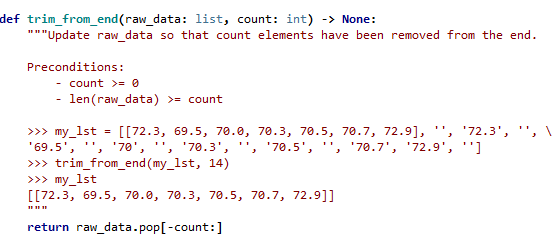
Question: Can some one please solve this question? I can upvote instantly. THX ! Just ignore my wrong 'body' def trim_from_end(raw_data: list, count: int) -> None:
 Can some one please solve this question? I can upvote instantly. THX ! Just ignore my wrong 'body'
def trim_from_end(raw_data: list, count: int) -> None: ***Update raw_data so that count elements have been removed from the end. Preconditions: - count >= 0 - len(raw_data) >= count '70.3', >>> my_1st = [[72.3, 69.5, 70.0, 70.3, 70.5, 70.7, 72.9], "', '72.3', '69.5', '', '70', '70.5', '', '70.7', '72.9', ''] >>> trim_from_end(my_1st, 14) >>> my_1st [[72.3, 69.5, 70.0, 70.3, 70.5, 70.7, 72.9]] return raw_data.pop[-count:]
Step by Step Solution
There are 3 Steps involved in it
1 Expert Approved Answer
Step: 1 Unlock

Question Has Been Solved by an Expert!
Get step-by-step solutions from verified subject matter experts
Step: 2 Unlock
Step: 3 Unlock
 Study Help