



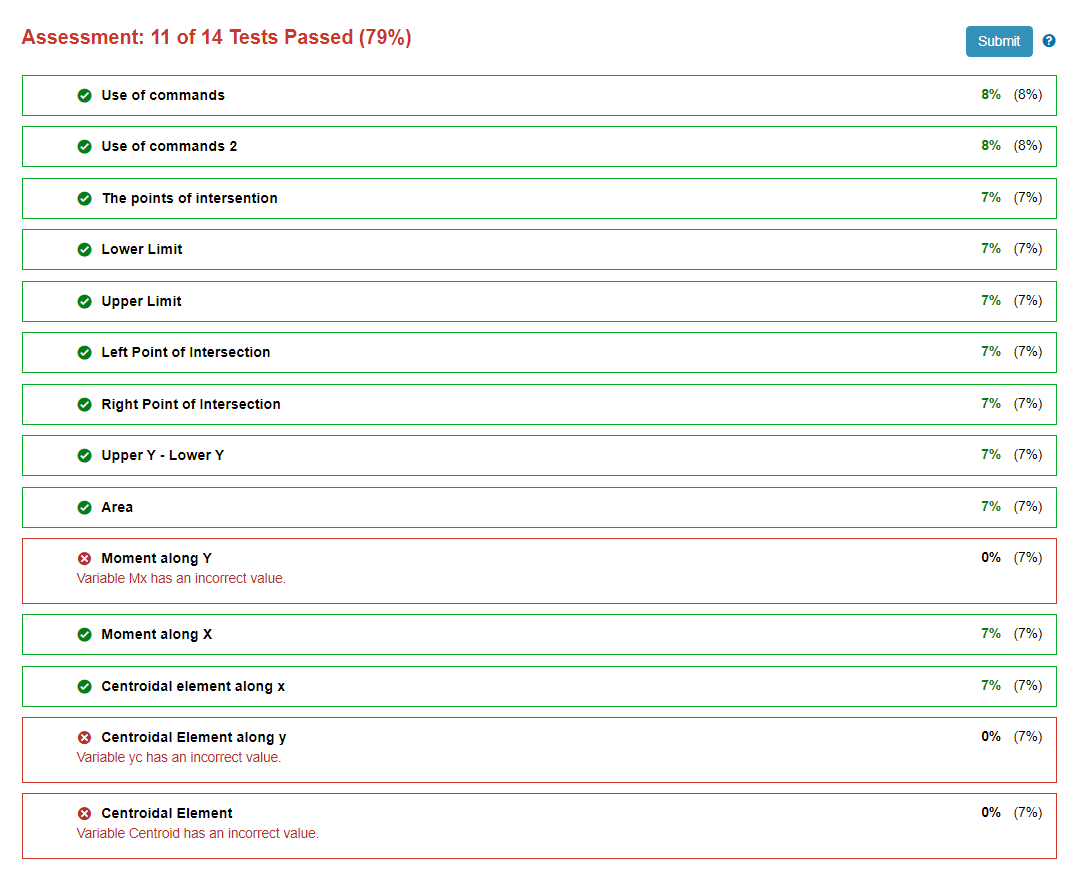
Question: Can somebody help me what is the error in this code? % Define the symbolic Variable x syms x; % Enter the upper and lower
Can somebody help me what is the error in this code?
Define the symbolic Variable x
syms x;
Enter the upper and lower functions as yx and yx respectively.
krandi;
yx kx;
yx xxk;
Solve the point of intersections. Save the array of solutions as roots.
roots solvey y x;
Save the lower value as x and the higher limit as x Use min and max to compare the roots for lower and upper limit
Convert the roots from symbolic constants to double.
x minroots;
x maxroots;
x doublex;
x doublex;
Find the points of intersection between the twop curves. Set it as an array Px y
Px yx;
Px yx;
Set the difference of the upper minus the lower function as I. Use absolute value function to ensure positive area
I absy y;
Use the integration to the find the area bounded by the two curves at the computed boundary.
Area intI x x x;
Determine the moment along y axis.
My intx I, x x x;
Determine the centroidal element ybar by finding the midoint of the lower and upper curves.
ybar doubleMy Area;
Determine the moment along y axis.
Mx intybarI x x x;
Find the centroidal elements xcyc by dividing the Moments by the Area. Convert the answer as Doubles
xc doubleMx Area;
yc doubleybar;
Combine the centroidal elements as Centroid as an array of element xc and yc
Centroid xc yc;
Set the graphing margin allowance to
margin ;
Graphing of the regions
ezplotyxmargin, xmargin;
hold on;
ezplotyxmargin,xmargin;
grid on;
k linspacexx;
kkfliplrk;
inBetween yk fliplryk;
fillk inBetween, y;
plotxyxr;
plotxyxr;
title Centroid of Plane Region"
plotxcycbo
Step by Step Solution
There are 3 Steps involved in it
1 Expert Approved Answer
Step: 1 Unlock

Question Has Been Solved by an Expert!
Get step-by-step solutions from verified subject matter experts
Step: 2 Unlock
Step: 3 Unlock