







Question: Can somebody help me write the code for this? Objectives - Array of struct - Array of struct as function parameter -Saving to the text
Can somebody help me write the code for this?
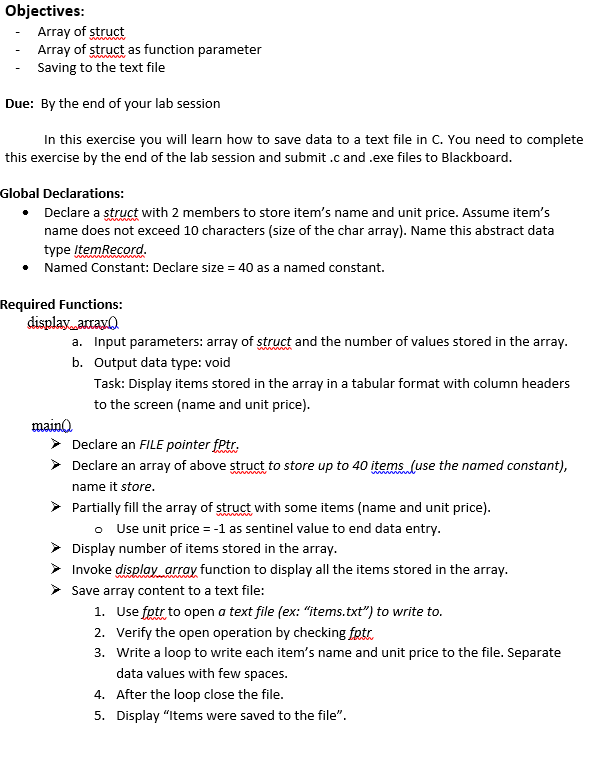
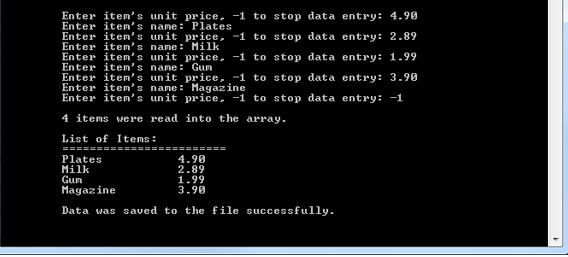
Objectives - Array of struct - Array of struct as function parameter -Saving to the text file Due: By the end of your lab session In this exercise you will learn how to save data to a text file in C. You need to complete this exercise by the end of the lab session and submit.c and .exe files to Blackboard Global Declarations Declare a struct with 2 members to store item's name and unit price. Assume item's name does not exceed 10 characters (size of the char array). Name this abstract data type ItemRecord Named Constant: Declare size = 40 as a named constant. . Required Functions: a. Input parameters: array of struct and the number of values stored in the array b. Output data type: void Task: Display items stored in the array in a tabular format with column headers to the screen (name and unit price) mainl) Declare an FILE pointer fPtr, Declare an array of above struct to store up to 40 items (use the named constant) name it store Partially fill the array of struct with some items (name and unit price) o Use unit price --1 as sentinel value to end data entry Display number of items stored in the array Invoke display array function to display all the items stored in the array. Save array content to a text file 1. Use fptr to open a text file (ex: "items.txt") to write to 2. Verify the open operation by checking fotr 3. Write a loop to write each item's name and unit price to the file. Separate data values with few spaces. After the loop close the file Display "Items were saved to the file". 4. 5
Step by Step Solution
There are 3 Steps involved in it

Get step-by-step solutions from verified subject matter experts
 Study Help