







Question: can someone guide me through exactly what needs to be done via the following: Setting Up LAMP Stack with WordPress on GCP:Explanation the appropriate web
can someone guide me through exactly what needs to be done via the following:
Setting Up LAMP Stack with WordPress on GCP:Explanation the appropriate web directory while setting proper ownership and permissions to ensure functionality.
Step
Main Body of the Report Approx words: a Key Service Offerings:
Compare and contrast the key service offerings of AWS and GCP focusing on their Virtual Machine VM instances, storage options, networking capabilities, and management tools. b Cost Model Comparison:
Analyze and compare the cost models of AWS EC and GCP VM considering factors like pricing structure, billing options, and cost optimization strategies. c Deployment Procedure:
Describe the stepbystep procedure followed from registering for an account to deploying a LAMP stack and WordPress on both AWS EC and GCP VM
Include supporting evidence such as screenshots, logs and configuration settings. d Improvement Suggestions:
Provide suggestions for improving the deployment process on both platforms, focusing on efficiency, scalability, and costeffectiveness. e Platform Comparison:
Conduct a detailed comparison of AWS EC and GCP VM highlighting strengths, weaknesses, performance metrics, and user experience. f Virtualization and Elastic Resources:
Explain the concepts of virtualization and elastic resources in AWS and GCP discussing how they contribute to scalability, flexibility, and resource optimization.
Setting Up LAMP Stack with WordPress on AWS EC:
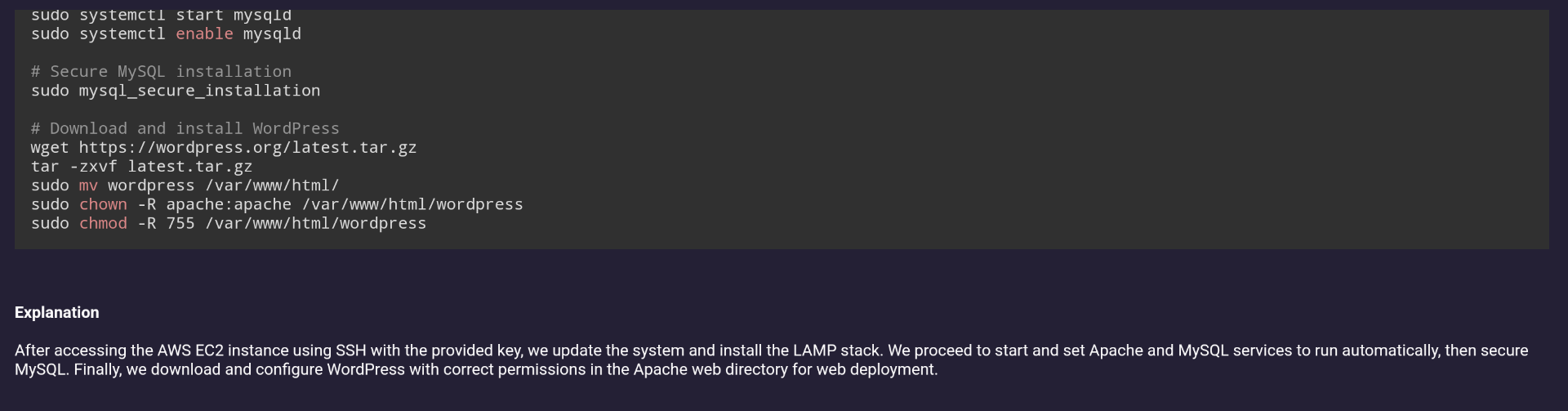
ExplanationAfter accessing the AWS EC instance using SSH with the provided key, we update the system and install the LAMP stack. We proceed to start and set Apache and MySQL services to run automatically, then secure MySQL Finally, we download and configure WordPress with correct permissions in the Apache web directory for web deployment.
Step by Step Solution
There are 3 Steps involved in it
1 Expert Approved Answer
Step: 1 Unlock

Question Has Been Solved by an Expert!
Get step-by-step solutions from verified subject matter experts
Step: 2 Unlock
Step: 3 Unlock
 Study Help