







Question: Can someone help me in this MATLAB program Program 4 (Homework) CSCI 251 Problem Statement Output the sum of the squares of all the odd
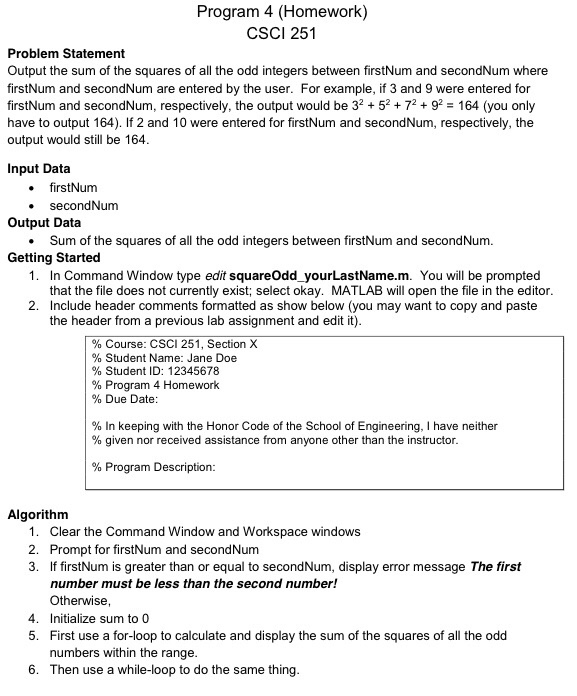
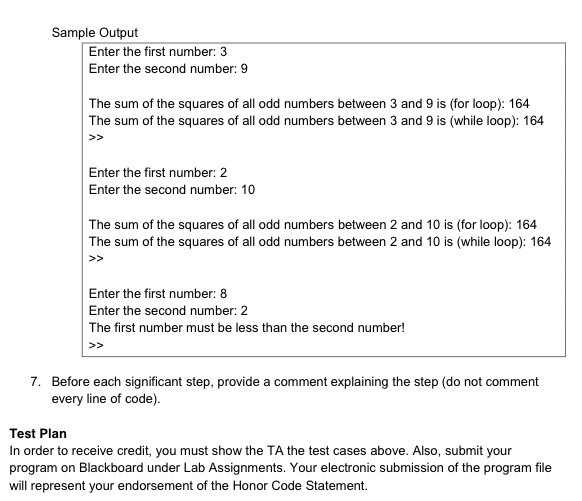
Program 4 (Homework) CSCI 251 Problem Statement Output the sum of the squares of all the odd integers between firstNum and secondNum where firstNum and secondNum are entered by the user. For example, if 3 and 9 were entered for firstNum and secondNum, respectively, the output would be 32 57292 164 (you only have to output 164). If 2 and 10 were entered for firstNum and secondNum, respectively, the output would still be 164 Input Data . firstNum Output Data Getting Started secondNum Sum of the squares of all the odd integers between firstNum and secondNum 1. In Command Window type edit squareOdd yourLastName.m. You will be prompted that the file does not currently exist; select okay. MATLAB will open the file in the editor Include header comments formatted as show below (you may want to copy and paste the header from a previous lab assignment and edit it) 2. % Course: CSCI 251, Section X % Student Name: Jane Doe % Student ID: 12345678 % Program 4 Homework % Due Date % In keeping with the Honor Code of the School of Engineering. I have neither % given nor received assistance from anyone other than the instructor % Program Description: Algorithm 1. Clear the Command Window and Workspace windows 2. Prompt for firstNum and secondNum 3. If firstNum is greater than or equal to secondNum, display error message The first number must be less than the second number! Otherwise 4. Initialize sum to 0 5. First use a for-loop to calculate and display the sum of the squares of all the odd numbers within the range 6. Then use a while-loop to do the same thing
Step by Step Solution
There are 3 Steps involved in it

Get step-by-step solutions from verified subject matter experts
 Study Help