







Question: Can someone help me make my program functional. Its a java program with 4 classes (bank, person, account and transaction), now i want to connect
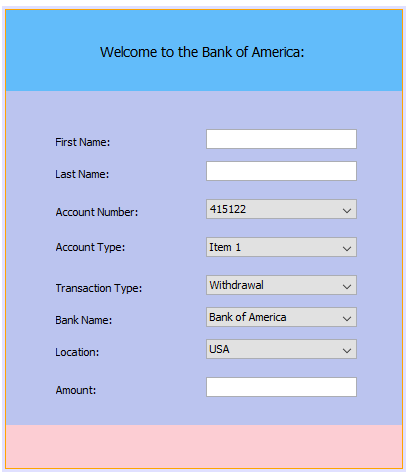
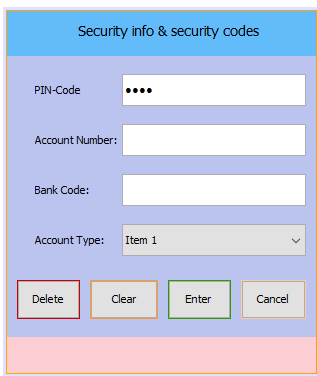
Can someone help me make my program functional. Its a java program with 4 classes (bank, person, account and transaction), now i want to connect it to my GUI with no success these are the GUI interfaces.
What i want is for my GUI to pick the information from my classes. for example, bank should pick from the backs i have provided in my class code, same for the account type and account name.
ACCOUNT>
public class Account { private String accountnumber; private String accountpin; private String accountType; private Double amount; private Bank bank; public void setBank(Bank bank){ this.bank=bank; } public String getAccountnumber() { return accountnumber; } public void setAccountnumber(String accountnumber) { this.accountnumber = accountnumber; } public String getAccountpin() { return accountpin; } public void setAccountpin(String accountpin) { this.accountpin = accountpin; } public String getAccountType() { return accountType; } public void setAccountType(String accountType) { this.accountType = accountType; } public Double getAmount() { return amount; } public void setAmount(Double amount) { this.amount = amount; } @Override public int hashCode() { final int prime = 31; int result = 1; result = prime * result + ((accountType == null) ? 0 : accountType.hashCode()); result = prime * result + ((accountnumber == null) ? 0 : accountnumber.hashCode()); result = prime * result + ((accountpin == null) ? 0 : accountpin.hashCode()); //result = prime * result + ((amount == null) ? 0 : amount.hashCode()); result = prime * result + ((bank == null) ? 0 : bank.hashCode()); return result; } @Override public boolean equals(Object obj) { if (this == obj) return true; if (obj == null) return false; if (getClass() != obj.getClass()) return false; Account other = (Account) obj; if (accountType == null) { if (other.accountType != null) return false; } else if (!accountType.equals(other.accountType)) return false; if (accountnumber == null) { if (other.accountnumber != null) return false; } else if (!accountnumber.equals(other.accountnumber)) return false; if (accountpin == null) { if (other.accountpin != null) return false; } else if (!accountpin.equals(other.accountpin)) return false; if (bank == null) { if (other.bank != null) return false; } else if (!bank.equals(other.bank)) return false; return true; } }
BANK:
public class Bank { private String bankname; private String location; private String bankcode;
public String getBankname() { return bankname; } public String getBankcode() { return bankcode; }
public void setBankcode(String bankcode) { this.bankcode = bankcode; }
public void setBankname(String bankname) { this.bankname = bankname; }
public String getLocation() { return location; }
public void setLocation(String location) { this.location = location; }
@Override public int hashCode() { final int prime = 31; int result = 1; result = prime * result + ((bankcode == null) ? 0 : bankcode.hashCode()); result = prime * result + ((bankname == null) ? 0 : bankname.hashCode()); result = prime * result + ((location == null) ? 0 : location.hashCode()); return result; }
@Override public boolean equals(Object obj) { if (this == obj) return true; if (obj == null) return false; if (getClass() != obj.getClass()) return false; Bank other = (Bank) obj; if (bankcode == null) { if (other.bankcode != null) return false; } else if (!bankcode.equals(other.bankcode)) return false; if (bankname == null) { if (other.bankname != null) return false; } else if (!bankname.equals(other.bankname)) return false; if (location == null) { if (other.location != null) return false; } else if (!location.equals(other.location)) return false; return true; }
}
PERSON~:
import java.util.ArrayList; import java.util.List;
public class Person { private String firstname; private String surname; private Account account; public String getFirstname() { return firstname; } public void setFirstname(String firstname) { this.firstname = firstname; } public String getSurname() { return surname; } public void setSurname(String surname) { this.surname = surname; } public Account getAccount() { return account; } public void setAccount(Account account) { this.account = account; } @Override public int hashCode() { final int prime = 31; int result = 1; result = prime * result + ((account == null) ? 0 : account.hashCode()); result = prime * result + ((firstname == null) ? 0 : firstname.hashCode()); result = prime * result + ((surname == null) ? 0 : surname.hashCode()); return result; } @Override public boolean equals(Object obj) { if (this == obj) return true; if (obj == null) return false; if (getClass() != obj.getClass()) return false; Person other = (Person) obj; if (account == null) { if (other.account != null) return false; } else if (!account.equals(other.account)) return false; if (firstname == null) { if (other.firstname != null) return false; } else if (!firstname.equals(other.firstname)) return false; if (surname == null) { if (other.surname != null) return false; } else if (!surname.equals(other.surname)) return false; return true; } }
TRANSACTION:
import java.util.ArrayList; import java.util.HashMap; import java.util.List; /** */ public class Transaction { private static HashMappersondetails=new HashMap(); private Person person; static String savings="SAVINGS"; static String current="CURRENT"; private static Transaction transaction=new Transaction(); static Listbanks; /* * This is where all data's are been loaded */ private Transaction(){ banks=new ArrayList(); Bank bank=new Bank(); bank.setBankname("Bank of America"); bank.setLocation("USA"); bank.setBankcode("BOA"); Bank bank1=new Bank(); bank1.setBankname("Barclays Bank"); bank1.setLocation("UK"); bank1.setBankcode("BAB"); Bank bank2=new Bank(); bank2.setBankname("BNP Paribas"); bank2.setLocation("France"); bank2.setBankcode("BNP"); banks.add(bank); banks.add(bank1); banks.add(bank2); Account account1=new Account(); account1.setAccountnumber("34567df"); account1.setAccountpin("1122"); account1.setAccountType(savings); account1.setAmount(30.50); account1.setBank(banks.get(0)); Person person1=new Person(); person1.setAccount(account1); person1.setFirstname("Sandy"); person1.setSurname("Gaar"); Account account2=new Account(); persondetails.put(account1, person1); } public static Transaction getInstance(){ return transaction; } /** * When trying to login you have to pass the account details * @param account * @return true or false */ private Boolean checkPerson(Account account){ return persondetails.containsKey(account); } /* * This us to get the Person detail when you pass the Account details * it throws an Exception if the person is not found */ public Person getPersonDetails(Account account) throws Exception{ if(checkPerson(account)){ person =persondetails.get(account); return person; }else{ throw new Exception("This is person does not exist "); } } /** * To withdrawMoney money you have to check if the money is less than what is the account * @param amount * @return */ public Boolean withdrawMoney(Double amount){ if(person==null){ return false; } Double currAmt=person.getAccount().getAmount(); if(currAmt>amount){ currAmt=currAmt-amount; Account account=person.getAccount(); account.setAmount(currAmt); return true; }else{ return false; } } }
am not able to attach the whole folder kindly assist,
Welcome to the Bank of America: First Name: Last Name 415122 Account Number: Account Type: Item 1 Withdrawal Transaction Type: Bank of America Bank Name: USA Location: Amount Welcome to the Bank of America: First Name: Last Name 415122 Account Number: Account Type: Item 1 Withdrawal Transaction Type: Bank of America Bank Name: USA Location: Amount
Step by Step Solution
There are 3 Steps involved in it

Get step-by-step solutions from verified subject matter experts
 Study Help