







Question: can someone help me with this code? using putty with C language and SSH Program Name sum Times2 Description The program will add the values
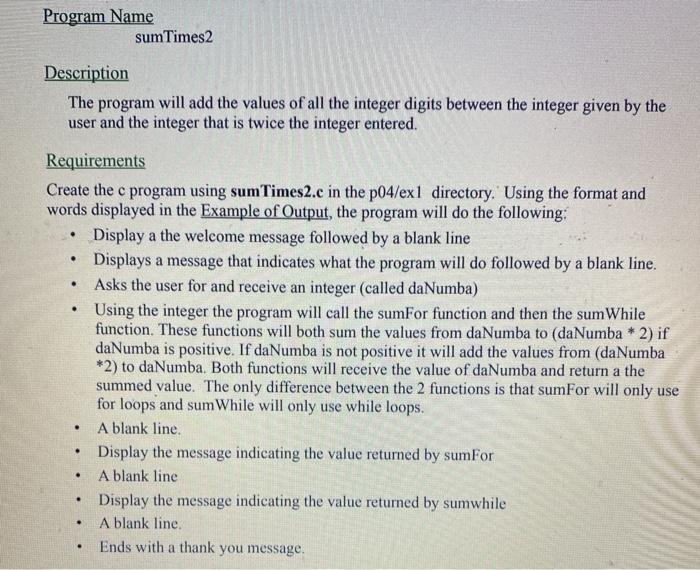
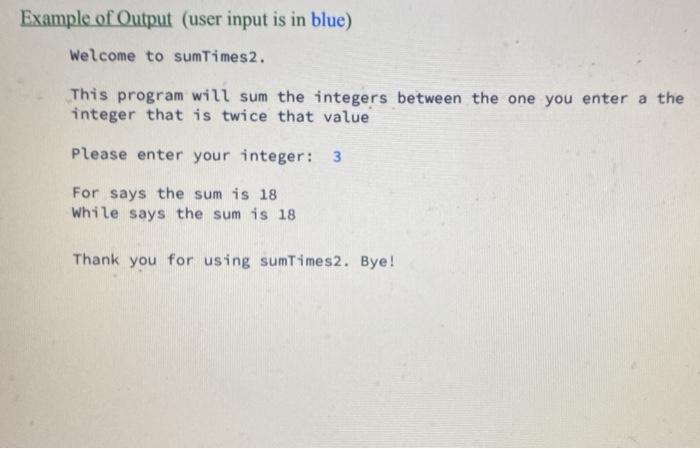
Program Name sum Times2 Description The program will add the values of all the integer digits between the integer given by the user and the integer that is twice the integer entered. . . . Requirements Create the c program using sum Times2.c in the p04/exl directory. Using the format and words displayed in the Example of Output, the program will do the following: Display a the welcome message followed by a blank line Displays a message that indicates what the program will do followed by a blank line. Asks the user for and receive an integer (called daNumba) Using the integer the program will call the sumFor function and then the sum While function. These functions will both sum the values from daNumba to (daNumba * 2) if daNumba is positive. If da Numba is not positive it will add the values from (daNumba *2) to daNumba. Both functions will receive the value of daNumba and return a the summed value. The only difference between the 2 functions is that sumFor will only use for loops and sum While will only use while loops. A blank line. Display the message indicating the value returned by sumFor A blank line Display the message indicating the value returned by sumwhile A blank line. Ends with a thank you message. . . . . . Example of Output (user input is in blue) Welcome to sumTimes2. This program will sum the integers between the one you enter a the integer that is twice that value Please enter your integer: 3 For says the sum is 18 while says the sum is 18 Thank you for using sumTimes2. Bye
Step by Step Solution
There are 3 Steps involved in it

Get step-by-step solutions from verified subject matter experts
 Study Help