







Question: Can someone help me with this GUI java program? Please?! Package name: hmwk12 File Names: CalcFrame.java and CalcGUI.java Write a GUI that allows the user
Can someone help me with this GUI java program? Please?!
Package name: hmwk12
File Names: CalcFrame.java and CalcGUI.java
Write a GUI that allows the user to:
Choose a text (foreground) color for the answer
3 radio buttons for red, green, blue
Choose the first and second number from a list (choices are 1 through 5)
Make sure only 1 list item can be selected at a time
Choose an operator (choices are +, -, *, and /) from a combo box
Click on a button to calculate the answer
Answer is shown in a label next to the = button
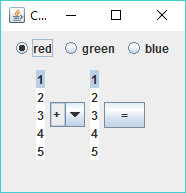
For example, if user chooses red, 2, *, 4, and clicks on =, then following will be shown:
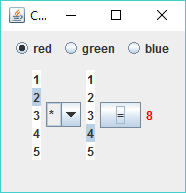
Requirements:
Use a layout manager so the 3 radio buttons are in one panel and the rest of the controls are in a different panel. I used a BorderLayout and put the radio buttons the NORTH section and the rest in the CENTER section
You can set a JLabels text color with the setForeground method
Default the choices to red, 1, +, and 1
You should only need one event handler just the one for the = button
12345 e 12345
Step by Step Solution
There are 3 Steps involved in it

Get step-by-step solutions from verified subject matter experts
 Study Help