







Question: Can someone help me with this Java gui? here is the code i was provided in the question public class ClientGUI extends JFrame { private
Can someone help me with this Java gui?
here is the code i was provided in the question
public class ClientGUI extends JFrame
{
private JLabel status;
private JButton connect;
private JButton submit;
private JButton stop;
public ClientGUI(String title)
{
int i = 0;
this.setTitle(title);
this.setDefaultCloseOperation(JFrame.EXIT_ON_CLOSE);
//ADD YOUR CODE HERE TO CREATE THE STATUS JLABEL AND THE JBUTTONS
}
public static void main(String[] args)
{
new ClientGUI(args[0]); //args[0] represents the title of the GUI
}
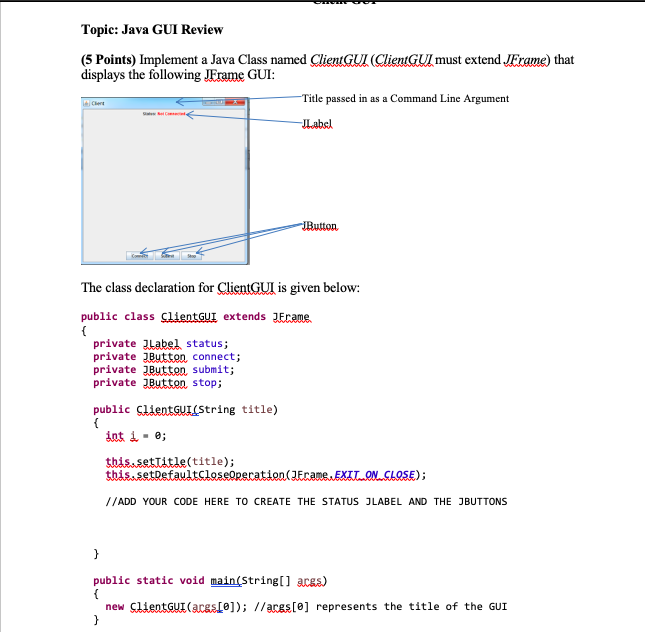
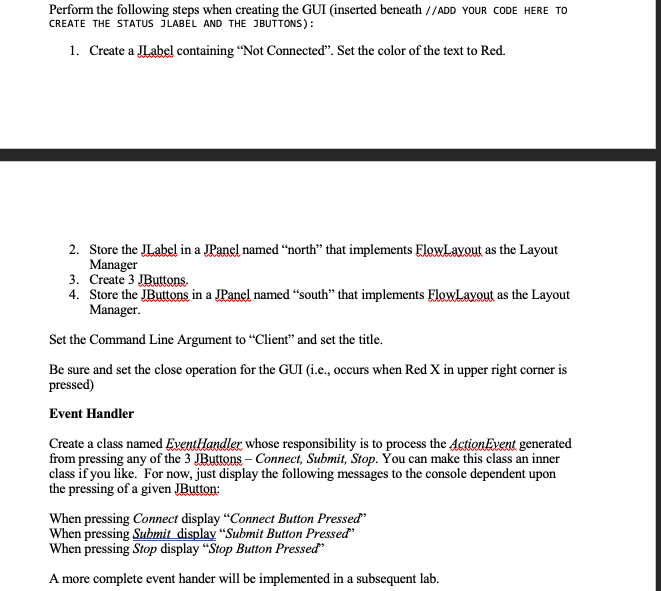
Topic: Java GUI Review (5 Points) Implement a Java Class named ClieutGUlJ (ClieutGUl must extend JExame) that displays the following JErame GUI Title passed in as a Command Line Argument JLabsl JButton The class declaration for ClientGUI is given below: public class ClientGu extends JErame. private Label status; private Butten connect; private JButten submit; private Butten stop; public SlientGuI(String title) at i- e; thisssettitle(title); //ADD YOUR CODE HERE TO CREATE THE STATUS JLABEL AND THE JBUTTONS public static void main Stringl acss) new lientGu (aceso]) /aceste] represents the title of the GUI Perform the following steps when creating the GUI (inserted beneath //ADD YOUR CODE HERE TO CREATE THE STATUS JLABEL AND THE JBUTTONS): 1. Create a JLabel containing "Not Connected". Set the color of the text to Red. 2. Store the JLabel in a JPanel named "north" that implements ElowLavout as the Layout 3. 4. Manager Create 3 JButtons Store the JButtons in a JPanel named "south" that implements FlowLayout as the Layout Manager. Set the Command Line Argument to Client" and set the title. Be sure and set the close operation for the GUI (i.e., occurs when Red X in upper right corner is pressed) Event Handler Create a class named EventHandler whose responsibility is to process the ActionEveut generated from pressing any of the 3 JButtons- Connect, Submit, Stop. You can make this class an inner class if you like. For now, just display the following messages to the console dependent upon the pressing of a given JButton: When pressing Connect display "Connect Button Pressed When pressing Submit display "Submit Button Pressed" When pressing Stop display "Stop Button Pressed" A more complete event hander will be implemented in a subsequent lab
Step by Step Solution
There are 3 Steps involved in it

Get step-by-step solutions from verified subject matter experts
 Study Help