







Question: Can someone please help me with Linux/Unix please... Urgent Answer to previous if it helps: https://www.chegg.com/homework-help/questions-and-answers/answer-following-questions-include-text-screen-shots-command-s-type-perform-task--text-scr-q31756234 Can someone please help me with Linux/Unix? To answer
Can someone please help me with Linux/Unix please... Urgent
Answer to previous if it helps:
https://www.chegg.com/homework-help/questions-and-answers/answer-following-questions-include-text-screen-shots-command-s-type-perform-task--text-scr-q31756234
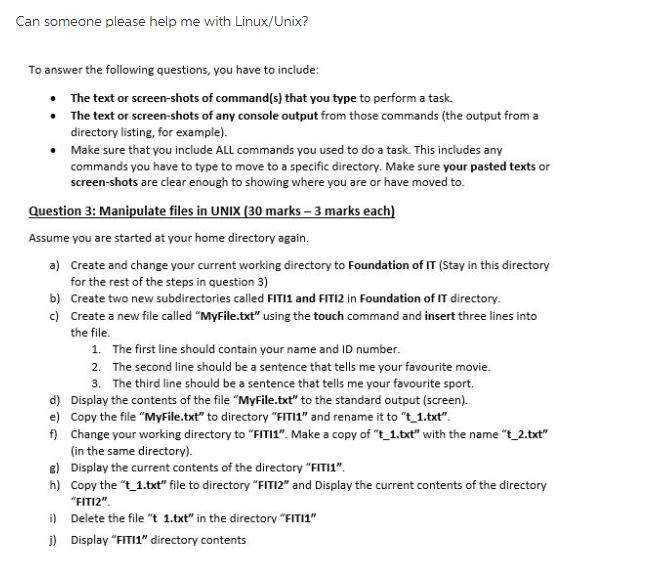
Can someone please help me with Linux/Unix? To answer the following questions, you have to include The text or screen-shots of command(s) that you type to perform a task. The text or screen-shots of any console output from those commands (the output from a directory listing, for example). Make sure that you include ALL commands you used to do a task. This includes any commands you have to type to move to a specific directory. Make sure your pasted texts or screen-shots are clear enough to showing where you are or have moved to. uestion 3: Manipulate files in UNIX (30 marks 3 marks each) Assume you are started at your home directory again. a) Create and change your current working directory to Foundation of IT (Stay in this directory for the rest of the steps in question 3) b) Create two new subdirectories called FITI1 and FITI2 in Foundation of IT directory. c) Create a new file called "MyFile.txt" using the touch command and insert three lines into the file. 1. 2. 3. The first line should contain your name and ID number. The second line should be a sentence that tells me your favourite movie. The third line should be a sentence that tells me your favourite sport. d) Display the contents of the file "MyFile.txt" to the standard output (screen) e) Copy the file "MyFile.txt" to directory "FIT" and rename it to "t 1.txt" f) Change your working directory to "FITI1". Make a copy of "t _1.txt" with the name "t 2.txt" (in the same directory). Display the current contents of the directory "FITI1". Copy the "t_1.txt" file to directory "FIT12" and Display the current contents of the directory FIT12" g) h) i) Delete the file "t 1.txt" in the directorv FITI1" j) Display "FITI1" directory contents
Step by Step Solution
There are 3 Steps involved in it

Get step-by-step solutions from verified subject matter experts
 Study Help