







Question: CAN SOMEONE PLEASE TELL ME WHY I KEEP GETTING ZERO!!!!! or TECH Side 4560 Step 22 of 40: Collections By Month with SUMIF OUT Sea
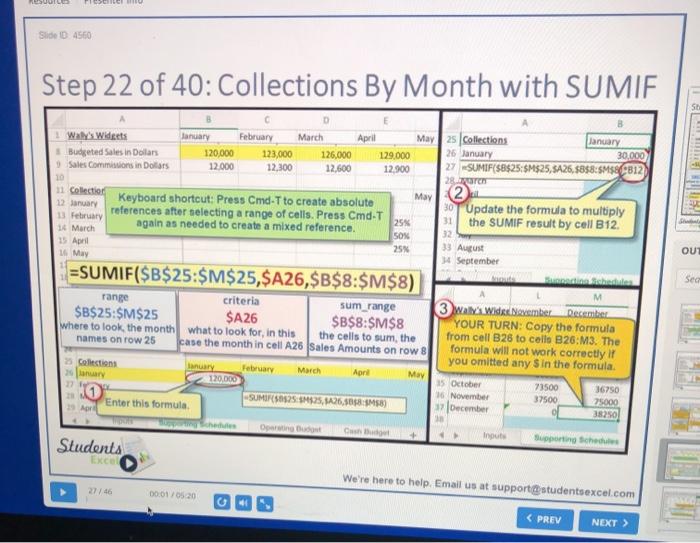
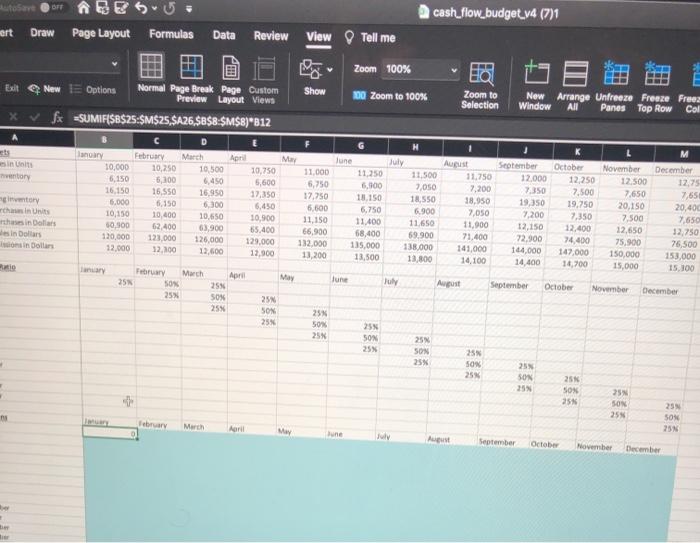
or TECH Side 4560 Step 22 of 40: Collections By Month with SUMIF OUT Sea 1 Ways Widgets January February March April January May 2s Collections Budgeted Salts in Dollars 30,000 120,000 123,000 26 January 126,000 129,000 Sales Commissions in Dollars 12.000 12,300 12,600 12.900 27 SUMIF($B$25:$M$25,5A26,58$8:SM58 B12 2 10 11 Collection May 2. 12 January Keyboard shortcut: Press Cmd-T to create absolute 30 Update the formula to multiply references after selecting a range of cells. Press Cmd-T 31 13 February 25% again as needed to create a mixed reference. the SUMIF result by cell B12. 32 14 March SON 15 April 25 33 August 16 May 4 September =SUMIF($B$25:$M$25,$A26,$B$8:$M$8) ishte M range criteria sum_range 3 Ways Wide Noember December $B$25:$M$25 $A 26 $B$8:$M$8 YOUR TURN: Copy the formula where to look the month what to look for, in this the cells to sum, the from cell B26 to colle B26:M3. The names on row 25 case the month in cell A26 Sales Amounts on row 8 formula will not work correctly if you omitted any S in the formula Collections Ianuary February March April May 120.000 15 October 73500 36750 16 November 37500 SUMIR 50825 $525,8426,5098-4458) Enter this formula 25000 3 December 38250 19 Apr urai Bus Input Supporting Schedule Students Excel We're here to help. Email us at support@studentsexcel.com 00 01/05.20 OFF RESU cash_flow_budget_v4 (7) ert Draw Page Layout Formulas Data Review View Tell me Zoom 100% Show 200 Zoom to 100% Exit New Options Normal Page Break Page Custom Preview Layout Views XV fx =SUMIF($B$25:$M$25, $426,$&$8:$M$8)*812 Zoom to Selection New Arrange Unfreeze Freeze Fruez Window All Panes Top Row Col July in its ventory entory chain Unit those in Dallas in Dollars in Dollar C January February 10,000 10,250 6,150 6,100 16,150 16 550 5.000 6,150 10,150 10,400 10,300 62.400 120,000 121,000 12,000 12.100 March April 19.500 10,750 6,450 5.600 16,950 17,350 6300 6,450 10,650 10.900 63,900 55.400 126,000 129,000 12,600 12.900 May 11,000 6,750 17,750 6,600 31,150 66.900 112,000 13,200 June 11,250 6,100 13.150 6.750 11.400 68,400 115.000 13,500 11.500 7,050 18,550 6.900 11.650 69.900 138.000 13,800 August 11.750 7,200 18,950 2,050 11,900 71,400 141,000 14,100 September 12.000 7,350 19350 7,200 12.150 72,900 144,000 14.400 October 12.250 17.500 19,750 7,350 12,400 74.400 147,000 14,700 November 12.500 7.650 20,150 7.500 12.650 75.900 150,000 15,000 M December 12,75 7,65 20,400 7,650 12,750 76.500 153,000 15.100 Manuary February SON March 25 May lune July August September April 25% SOX 25% October November 25 December 25 SON 25 25% son 25% 25 SON 25% 25% SON 25 25 SON 25% 25 SON 25 25 SON 25 25 SON 255 25% SON 25N February March Aari June AN September October November December
Step by Step Solution
There are 3 Steps involved in it

Get step-by-step solutions from verified subject matter experts
 Study Help