





Question: Can someone show me how to plot a chart for # 8 and the scales you use? I am using Tableau but any other platform
Can someone show me how to plot a chart for # 8Can someone show me how to plot a chart for # 8Can someone show me how to plot a chart for # 8 and the scales you use? I am using Tableau but any other platform will do. If you could also help me with the rest of the questions that would be great also.

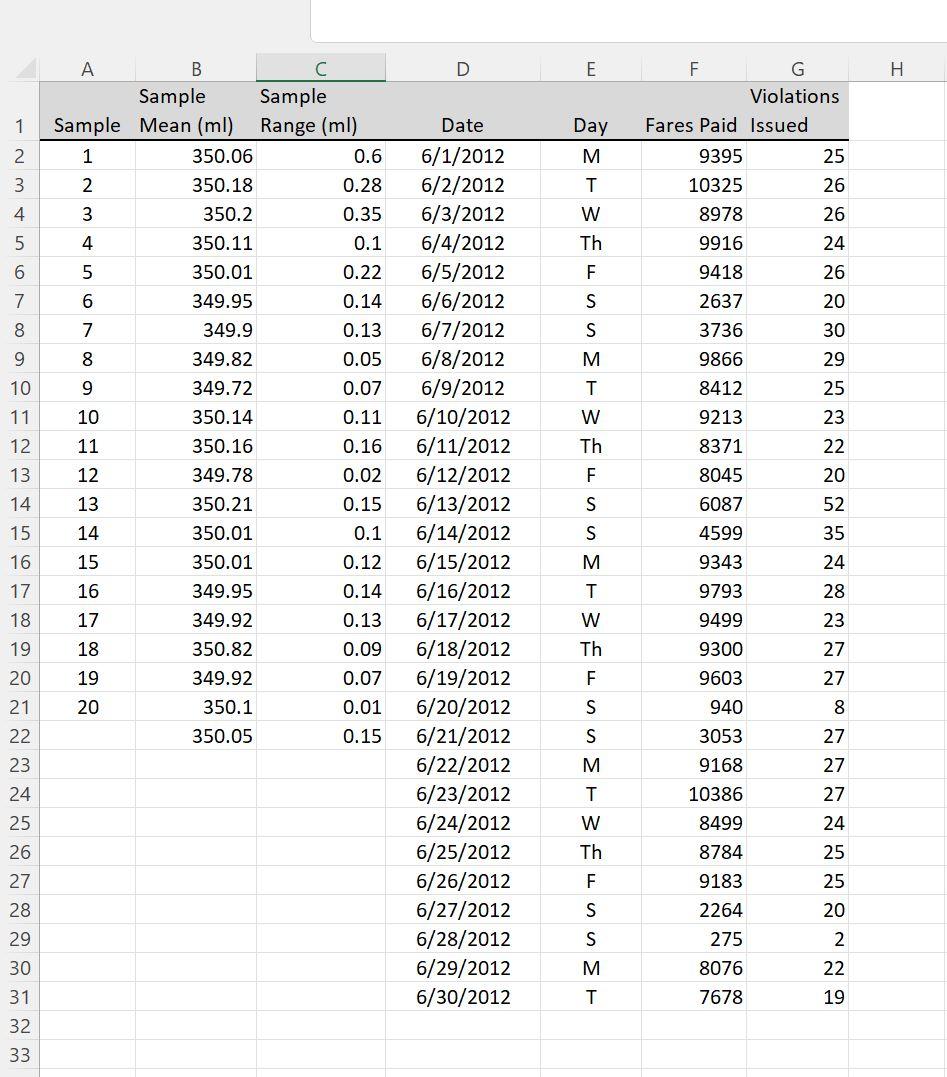
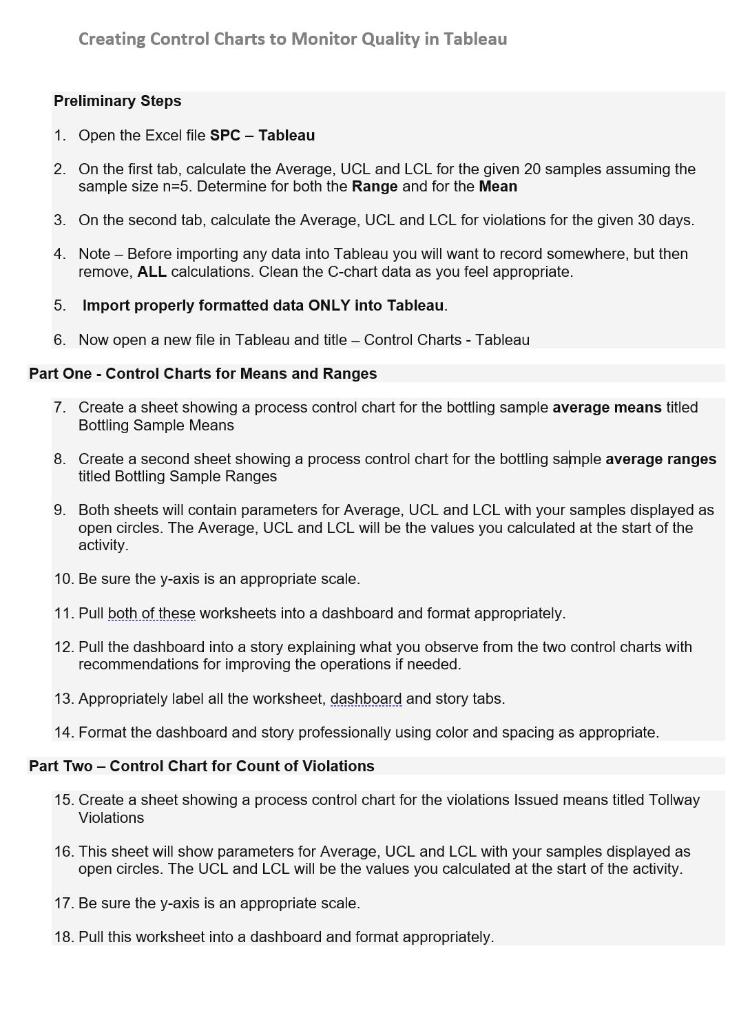
E . F G Violations Fares Paid Issued 1 Date Day 2 M 9395 25 3 T 10325 4 8978 W Th 5 6 26 26 24 26 20 30 29 25 7 8 9916 9418 2637 3736 9866 8412 9213 9 M A B C Sample Sample Sample Mean (ml) Range (ml) 1 350.06 0.6 2 350.18 0.28 3 350.2 0.35 4 350.11 0.1 5 350.01 0.22 6 349.95 0.14 7 349.9 0.13 8 349.82 0.05 9 349.72 0.07 10 350.14 0.11 11 350.16 0.16 12 349.78 0.02 13 350.21 0.15 14 350.01 0.1 15 350.01 0.12 16 349.95 0.14 17 349.92 0.13 18 350.82 0.09 19 349.92 0.07 20 350.1 0.01 350.05 0.15 10 11 12 Th 8371 8045 23 22 20 13 14 6087 4599 15 16 9343 6/1/2012 6/2/2012 6/3/2012 6/4/2012 6/5/2012 6/6/2012 6/7/2012 6/8/2012 6/9/2012 6/10/2012 6/11/2012 6/12/2012 6/13/2012 6/14/2012 6/15/2012 6/16/2012 6/17/2012 6/18/2012 6/19/2012 6/20/2012 6/21/2012 6/22/2012 6/23/2012 6/24/2012 6/25/2012 6/26/2012 6/27/2012 6/28/2012 6/29/2012 6/30/2012 Er3lon EFBunnon reunnar 52 35 24 28 23 27 17 9793 18 W Th 19 20 27 21 8 M 9499 9300 9603 940 3053 9168 10386 8499 8784 9183 2264 275 8076 7678 22 23 24 25 26 27 28 29 30 31 32 33 W Th 27 27 27 24 25 25 20 2 22 19 Creating Control Charts to Monitor Quality in Tableau Preliminary Steps 1. Open the Excel file SPC - Tableau 2. On the first tab, calculate the average, UCL and LCL for the given 20 samples assuming the sample size n=5. Determine for both the Range and for the Mean 3. On the second tab, calculate the Average, UCL and LCL for violations for the given 30 days. 4. Note - Before importing any data into Tableau you will want to record somewhere, but then remove, ALL calculations. Clean the C-chart data as you feel appropriate. 5. Import properly formatted data ONLY into Tableau. 6. Now open a new file in Tableau and title - Control Charts - Tableau Part One - Control Charts for Means and Ranges 7. Create a sheet showing a process control chart for the bottling sample average means titled Bottling Sample Means 8. Create a second sheet showing a process control chart for the bottling sample average ranges titled Bottling Sample Ranges 9. Both sheets will contain parameters for Average, UCL and LCL with your samples displayed as open circles. The Average, UCL and LCL will be the values you calculated at the start of the activity. 10. Be sure the y-axis is an appropriate scale. 11. Pull both of these worksheets into a dashboard and format appropriately. 12. Pull the dashboard into a story explaining what you observe from the two control charts with recommendations for improving the operations if needed. 13. Appropriately label all the worksheet, dashboard and story tabs. 14. Format the dashboard and story professionally using color and spacing as appropriate. Part Two - Control Chart for Count of Violations 15. Create a sheet showing a process control chart for the violations Issued means titled Tollway Violations 16. This sheet will show parameters for Average, UCL and LCL with your samples displayed as open circles. The UCL and LCL will be the values you calculated at the start of the activity. 17. Be sure the y-axis is an appropriate scale. 18. Pull this worksheet into a dashboard and format appropriately

Step by Step Solution

There are 3 Steps involved in it

1 Expert Approved Answer
Step: 1 Unlock blur-text-image

Question Has Been Solved by an Expert!

Get step-by-step solutions from verified subject matter experts

Step: 2 Unlock
Step: 3 Unlock

Students Have Also Explored These Related General Management Questions!