







Question: can somone please help me with this java program? I wiill paste both files that need to be extended below also Its extending these two
can somone please help me with this java program?
I wiill paste both files that need to be extended below also
 Its extending these two
here is ITEMTOPURCHASE.JAVA
public class ItemToPurchase {
private String itemName; private int itemPrice; private int itemQuantity;
public ItemToPurchase() { itemName = ""; itemPrice = 0; itemQuantity = 0; }
public void setName(String itemNameVal) { itemName = itemNameVal; } public void setPrice(int itemPriceVal) { itemPrice = itemPriceVal; } public void setQuantity(int itemQuantityVal) { itemQuantity = itemQuantityVal; }
public String getName() { return itemName; } public int getPrice() { return itemPrice; } public int getQuantity() { return itemQuantity; }
}
HERE IS SHOPPINGCARTPRINTER.JAVA
import java.util.Scanner;
public class ShoppingCartPrinter
{
public static void main(String[] args)
{
Scanner scnr = new Scanner(System.in);
String item ="";
int price = 0;
int quantity = 0;
int item1Cost = 0;
int item2Cost = 0;
ItemToPurchase firstItem = new ItemToPurchase(item, price, quantity);
ItemToPurchase secondItem = new ItemToPurchase(item, price, quantity);
System.out.println("Please enter information for two items.");
System.out.println("Item 1: ");
System.out.println("Enter the item name: ");
item = scnr.nextLine();
firstItem.setItemName( item);
System.out.println("Enter the price: ");
price = scnr.nextInt();
firstItem.setItemPrice(price);
System.out.println("Enter the quantity: ");
quantity = scnr.nextInt();
firstItem.setItemQuantity(quantity);
System.out.println("Item 2: ");
scnr.nextLine();
System.out.println("Enter the second item name: ");
item = scnr.nextLine();
secondItem.setItemName( item);
System.out.println("Enter the price: ");
price = scnr.nextInt();
secondItem.setItemPrice(price);
System.out.println("Enter the quantity: ");
quantity = scnr.nextInt();
secondItem.setItemQuantity(quantity);
System.out.println("Total Cost"); // calculating total cost
item1Cost = firstItem.getItemQuantity() * firstItem.getItemPrice();
System.out.print( firstItem.getItemName());
System.out.print(" " + firstItem.getItemQuantity());
System.out.print(" @ $" + firstItem.getItemPrice());
System.out.print(" = $" + item1Cost);
System.out.println("");
item2Cost = secondItem.getItemQuantity() * secondItem.getItemPrice();
System.out.print( secondItem.getItemName());
System.out.print(" " + secondItem.getItemQuantity());
System.out.print(" @ $" + secondItem.getItemPrice());
System.out.print(" = $" + item2Cost);
System.out.println("");
System.out.print("Total Cost = $" + (item1Cost+item2Cost));
}
}
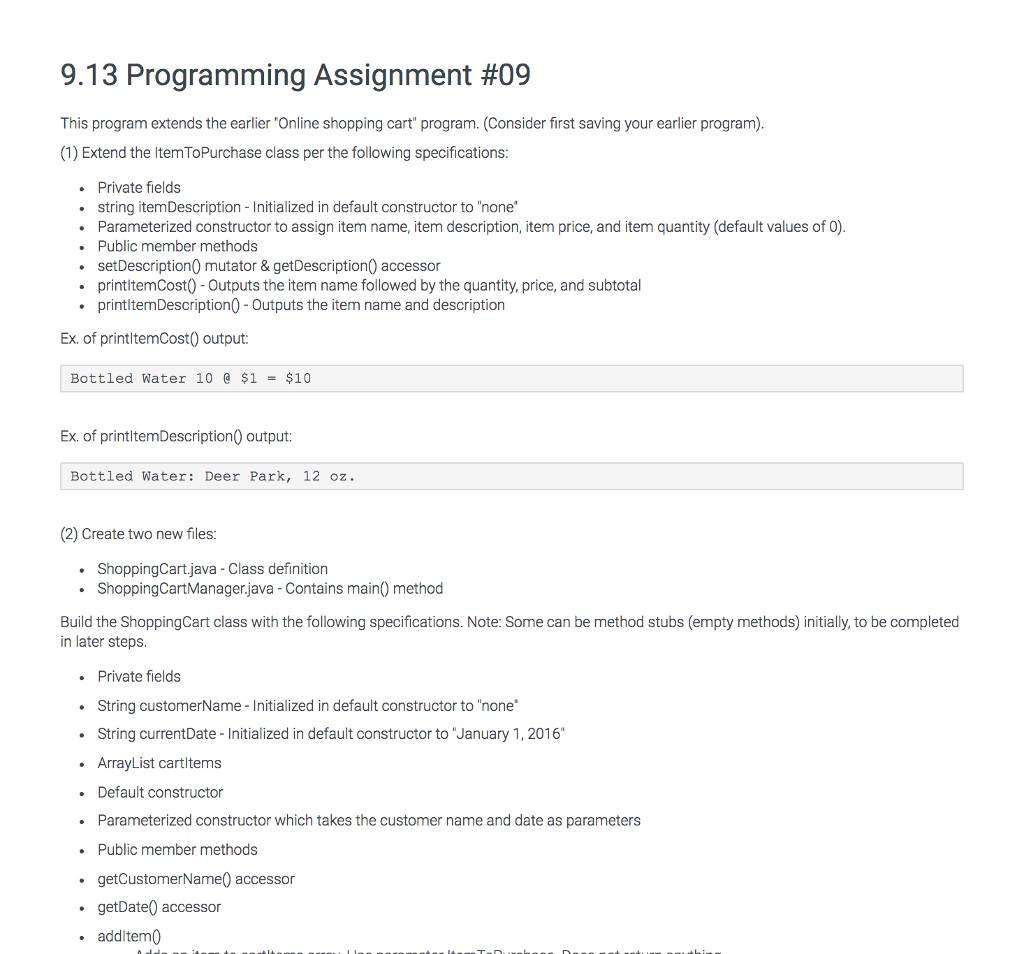
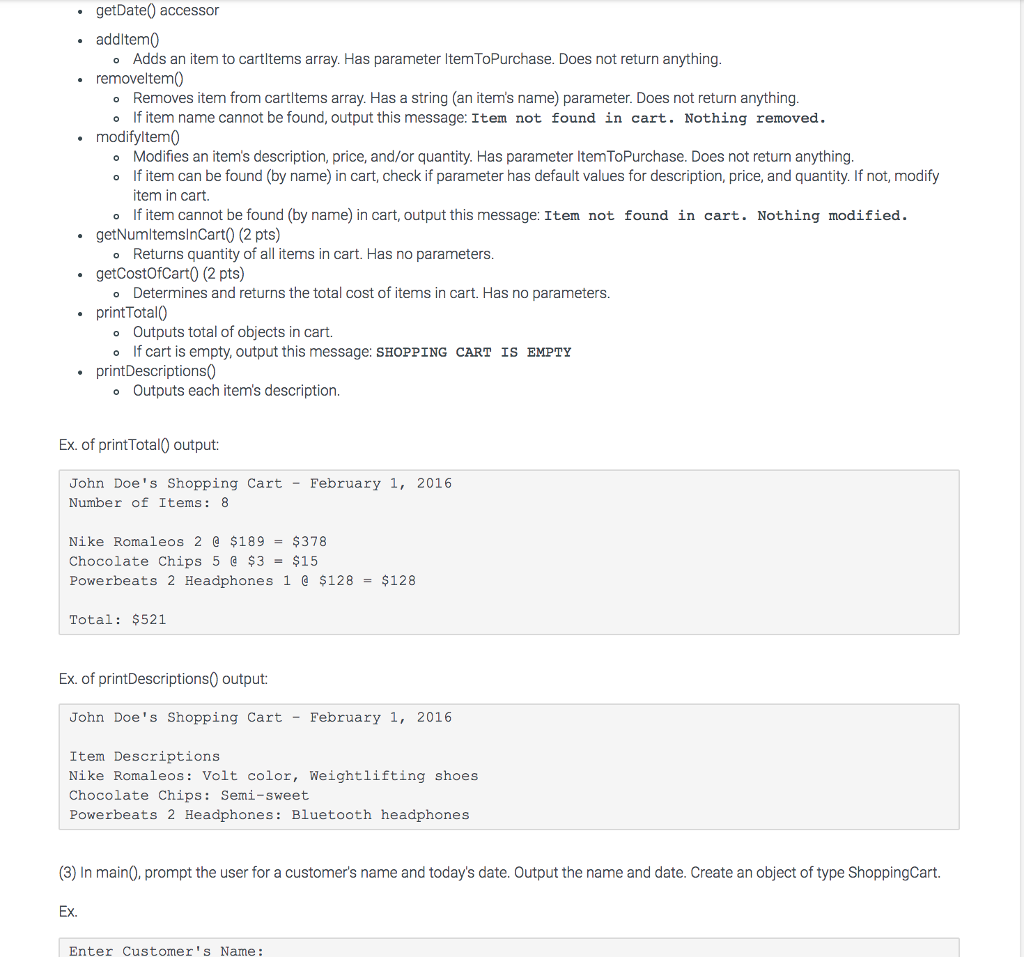
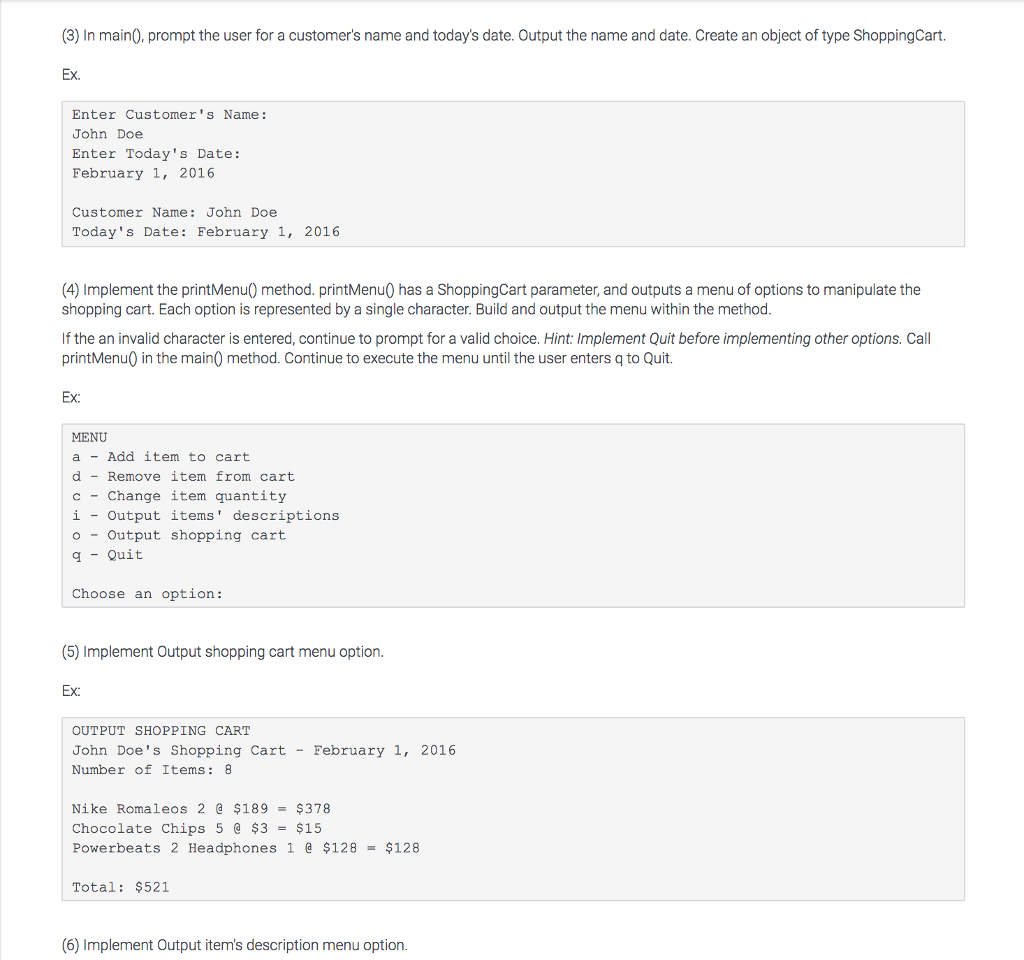
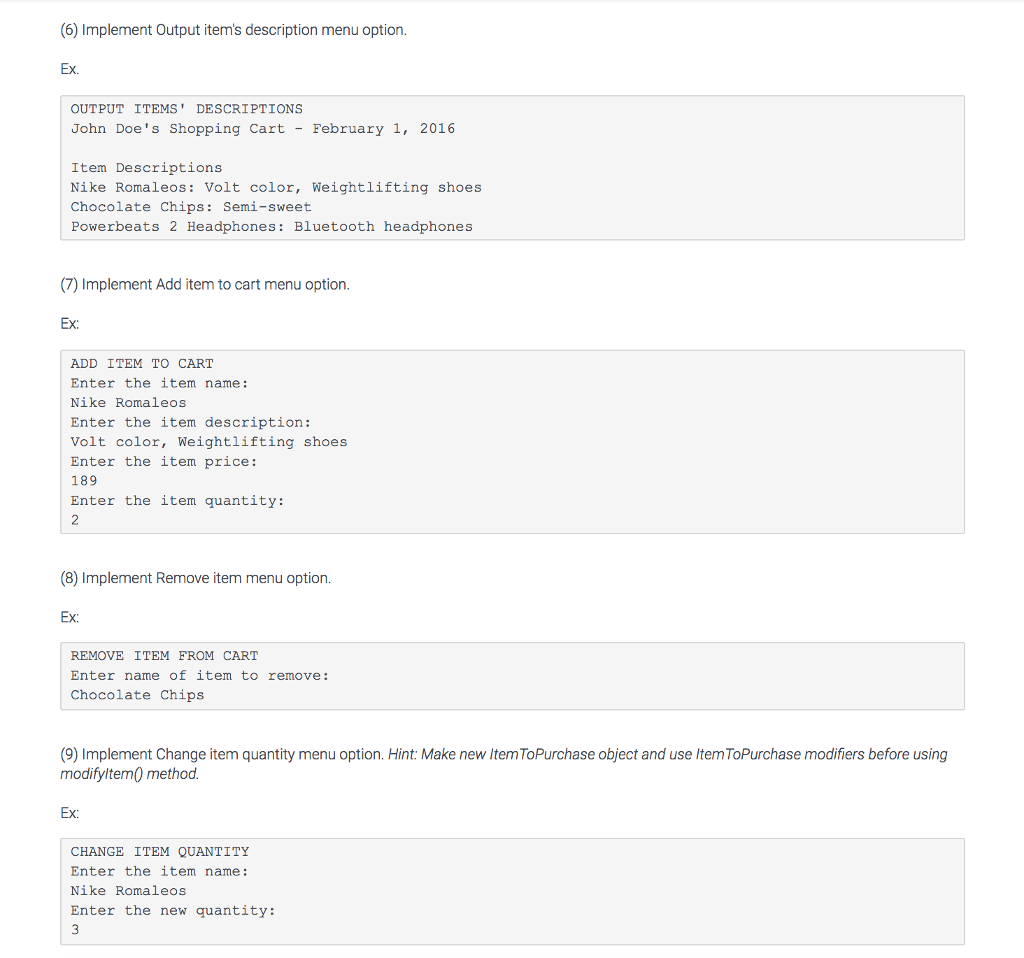
9.13 Programming Assignment #09 This program extends the earlier "Online shopping cart" program. (Consider first saving your earlier program) (1) Extend the ItemToPurchase class per the following specifications . Private fields string itemDescription - Initialized in default constructor to "none Parameterized constructor to assign item name, item description, item price, and item quantity (default values of 0) Public member methods setDescription0 mutator & getDescription) accessor printltemCost0- Outputs the item name followed by the quantity, price, and subtotal printltemDescription0 Outputs the item name and description Ex. of printltemCost0 output: Bottled Water 10 @ $1 = $10 Ex. of printltemDescription0 output: Bottled Water: Deer Park, 12 oz. (2) Create two new files ShoppingCart.java - Class definition ShoppingCartManager.java - Contains main) method Build the ShoppingCart class with the following specifications. Note: Some can be method stubs (empty methods) initially, to be completed in later steps . Private fields String customerName- Initialized in default constructor to "none String currentDate - Initialized in default constructor to "January 1, 2016" ArrayList cartltems . Default constructor .Parameterized constructor which takes the customer name and date as parameters . Public member methods getCustomerName0 accessor . getDate0 accessor additem
Step by Step Solution
There are 3 Steps involved in it

Get step-by-step solutions from verified subject matter experts
 Study Help