







Question: Can you help me complete my delete function using tkinter? And also the search function should printno matching data found message when the search failed,
Can you help me complete my delete function using tkinter? And also the search function should print"no matching data found" message when the search failed, but it is not printing for some reason, could you also help me with that? Please do not copy others answer. thank you.
import csv import tkinter as tk
#Open a csv file with read mode with open('C:\\Users\\1016b\\Desktop\\csc4110project1\\survey.csv','r') as csv_file: csv_reader = csv.reader(csv_file) #store the csv file into a list of lists list_of_csv = list(csv_reader)
# Initialize tkinter root = tk.Tk() root.title("Employee Database")
# Create a frame for the UI elements frame = tk.Frame(root, padx=10, pady=10) frame.pack()
# Create a label for the menu menu_label = tk.Label(frame, text="Please choose one service below:") menu_label.grid(row=0, column=0, columnspan=2)
# Define the function for searching the database def search_csv(): target = search_entry.get() results_text.delete("1.0", tk.END) results_text.insert(tk.END, "Results: ") for row in list_of_csv: for i in row: if target.lower() in i.lower(): results_text.insert(tk.END, row) results_text.insert(tk.END, " ") break if results_text.get("1.0", tk.END) == "Results: ": results_text.insert(tk.END, "No matching data found.") search_entry.delete(0, tk.END)
# Create a label and entry for searching the database search_label = tk.Label(frame, text="Search through our database:") search_label.grid(row=1, column=0) search_entry = tk.Entry(frame) search_entry.grid(row=1, column=1) search_button = tk.Button(frame, text="Search", command=search_csv) search_button.grid(row=1, column=2)
# Create a text box for displaying search results results_text = tk.Text(frame, width=50, height=10) results_text.grid(row=2, column=0, columnspan=3)
# Define the function for adding a new employee def add_data(): add_window = tk.Toplevel(root) add_window.title("Add Employee") add_frame = tk.Frame(add_window, padx=10, pady=10) add_frame.pack() fields = ["Name", "Position", "SSN", "Address", "Email", "Phone Number", "Skill", "ID"] entries = {} for i, field in enumerate(fields): label = tk.Label(add_frame, text=field + ":") label.grid(row=i, column=0) entry = tk.Entry(add_frame) entry.grid(row=i, column=1) entries[field] = entry submit_button = tk.Button(add_frame, text="Add Employee", command=lambda: add_employee(entries)) submit_button.grid(row=len(fields), column=0, columnspan=2)
def add_employee(entries): new_employee = [] for field in entries: new_employee.append(entries[field].get()) entries[field].delete(0, tk.END) list_of_csv.append(new_employee) print("Employee added!") Menu() # Create a button for adding a new employee add_button = tk.Button(frame, text="Add Employee", command=add_data) add_button.grid(row=3, column=0)
# Define the function for deleting an employee def delete_data(): target = delete_entry.get() for row in list_of_csv: for i in row: if target.lower() in i.lower(): list_of_csv.remove(row) delete_text.config(text="Data deleted!")
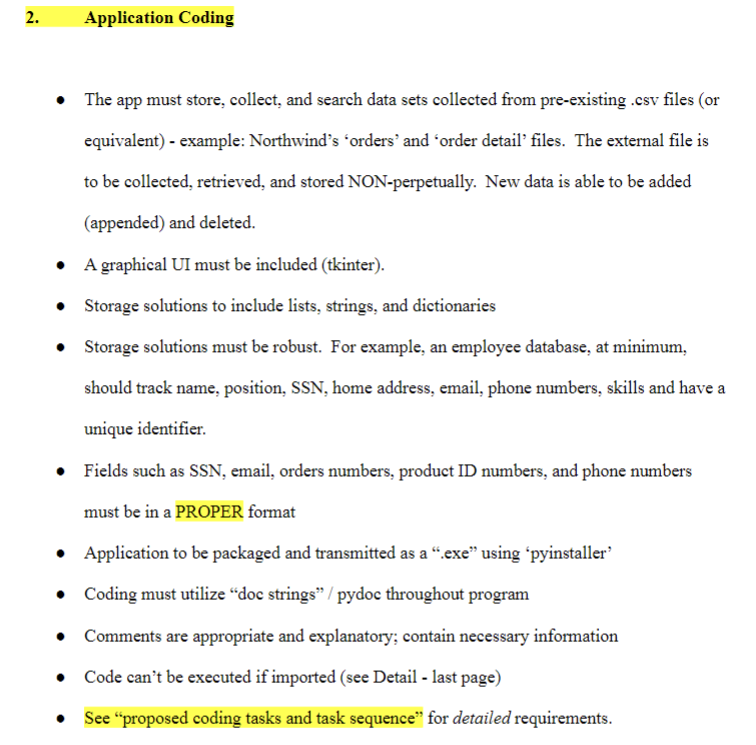
Application Coding - The app must store, collect, and search data sets collected from pre-existing .csv files (or equivalent) - example: Northwind's 'orders' and 'order detail' files. The external file is to be collected, retrieved, and stored NON-perpetually. New data is able to be added (appended) and deleted. - A graphical UI must be included (tkinter). - Storage solutions to include lists, strings, and dictionaries - Storage solutions must be robust. For example, an employee database, at minimum, should track name, position, SSN, home address, email, phone numbers, skills and have a unique identifier. - Fields such as SSN, email, orders numbers, product ID numbers, and phone numbers must be in a PROPER format - Application to be packaged and transmitted as a ".exe" using 'pyinstaller' - Coding must utilize "doc strings" / pydoc throughout program - Comments are appropriate and explanatory; contain necessary information - Code can't be executed if imported (see Detail - last page) - See "proposed coding tasks and task sequence" for detailed requirements
Step by Step Solution
There are 3 Steps involved in it

Get step-by-step solutions from verified subject matter experts
 Study Help