







Question: Assembler. Debiam-NASM Objective In this assignment, we will perform some basic bit operations that are frequently done in assembly language. We've seen much of the
 Assembler. Debiam-NASM
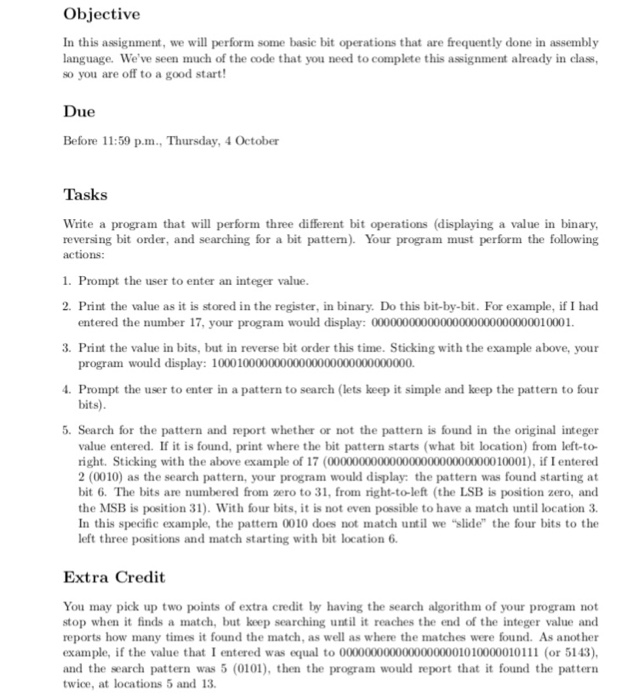
Objective In this assignment, we will perform some basic bit operations that are frequently done in assembly language. We've seen much of the code that you need to complete this assignment already in class, so you are off to a good start! Due Before 11:59 p.m., Thursday, 4 October Tasks Write a program that will perform three different bit operations (displaying a value in binary, reversing bit order, and searching for a bit patte). Your program must perform the following actions: 1. Prompt the user to enter an integer value 2. Print the value as it is stored in the register, in binary. Do this bit-by-bit. For example, if I had . Print the value in bits, but in reverse bit order this time. Sticking with the example above, your 4. Prompt the user to enter in a pattern to search (lets keep it simple and keep the pattern to four entered the number 17, your program would display: 00000000000000000000000000010001. program would display: 10001000000000000000000000000000. bits) 5. Search for the pattern and report whether or not the pattern is found in the original integer value entered. If it is found, print where the bit pattern starts (what bit location) from left-to- right. Sticking with the above example of 17 (00000000000000000000000000010001), if I entered 2 (0010) as the search pattern, your program would display: the pattern was found starting at bit 6. The bits are numbered from zero to 31, from right-to-left (the LSB is position zero, and the MSB is position 31). With four bits, it is not even possible to have a match until location 3. In this specific example, the pattern 0010 does not match until we "slide" the four bits to the left three positions and match starting with bit location 6. Extra Credit You may pick up two points of extra credit by having the search algorithm of your program not stop when it finds a match, but keep searching until it reaches the end of the integer value and reports how many times it found the match, as well as where the matches were found. As another example, if the value that I entered was equal to 00000000000000000001010000010111 (or 5143), and the search pattern was 5 (0101), then the program would report that it found the pattern twice, at locations 5 and 13
Step by Step Solution
There are 3 Steps involved in it

Get step-by-step solutions from verified subject matter experts
 Study Help