







Question: Can you help me with this excel vba code ? Develop a VBA sub FindFives that will return the array row numbers and array column
Can you help me with this excel vba code ?
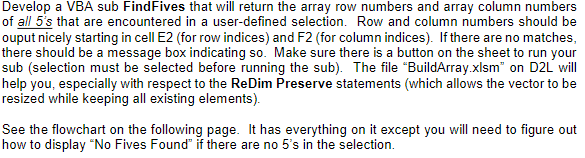
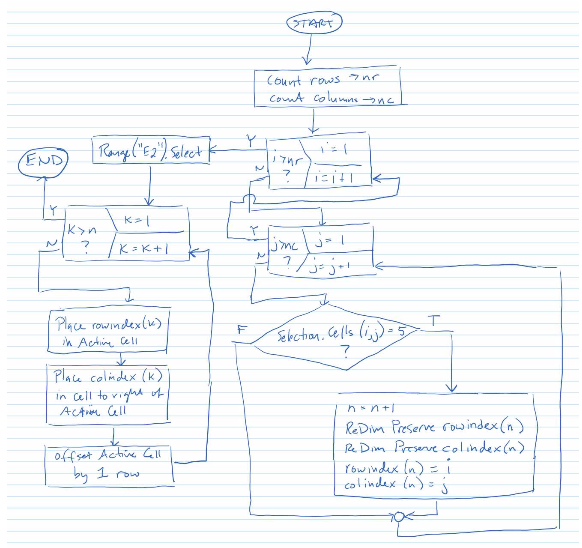
Develop a VBA sub FindFives that will return the array row numbers and array column numbers of all 5's that are encountered in a user-defined selection. Row and column numbers should be ouput nicely starting in cell E2 (for row indices) and F2 (for column indices). If there are no matches, there should be a message box indicating so. Make sure there is a button on the sheet to run your sub (selection must be selected before running the sub). The file "BuildArray.xlsm on D2L will help you, especially with respect to the ReDim Preserve statements (which allows the vector to be resized while keeping all existing elements) See the flowchart on the following page. It has everything on it except you will need to figure out how to display "No Fives Found if there are no 5's in the selection Develop a VBA sub FindFives that will return the array row numbers and array column numbers of all 5's that are encountered in a user-defined selection. Row and column numbers should be ouput nicely starting in cell E2 (for row indices) and F2 (for column indices). If there are no matches, there should be a message box indicating so. Make sure there is a button on the sheet to run your sub (selection must be selected before running the sub). The file "BuildArray.xlsm on D2L will help you, especially with respect to the ReDim Preserve statements (which allows the vector to be resized while keeping all existing elements) See the flowchart on the following page. It has everything on it except you will need to figure out how to display "No Fives Found if there are no 5's in the selection
Step by Step Solution
There are 3 Steps involved in it

Get step-by-step solutions from verified subject matter experts
 Study Help