







Question: Can you please format the answers like the example below: This is the book we use Fundamentals of Database Systems (Subseription) Shamkant B. Navathe, Ramez
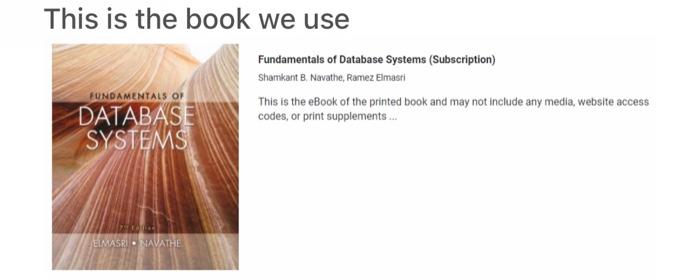
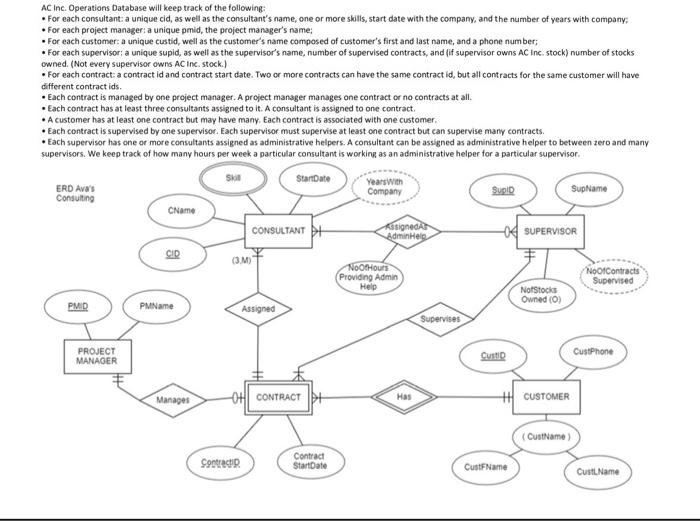
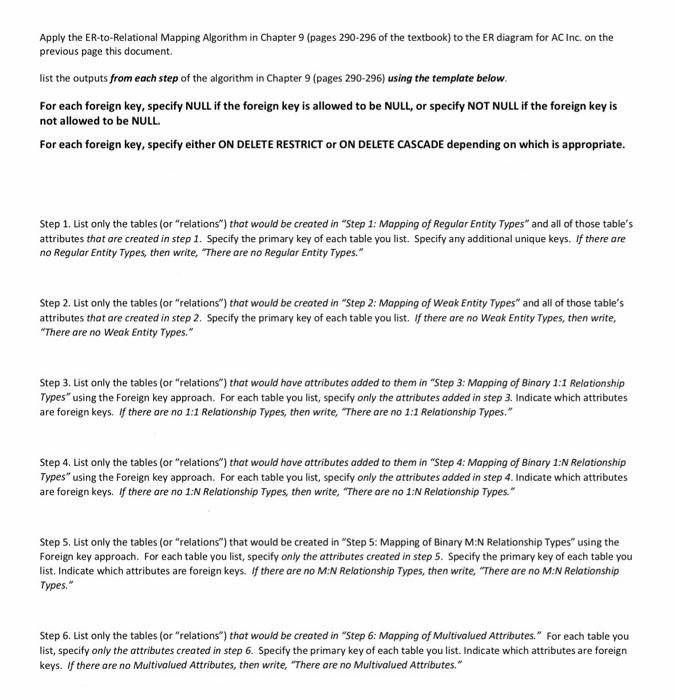
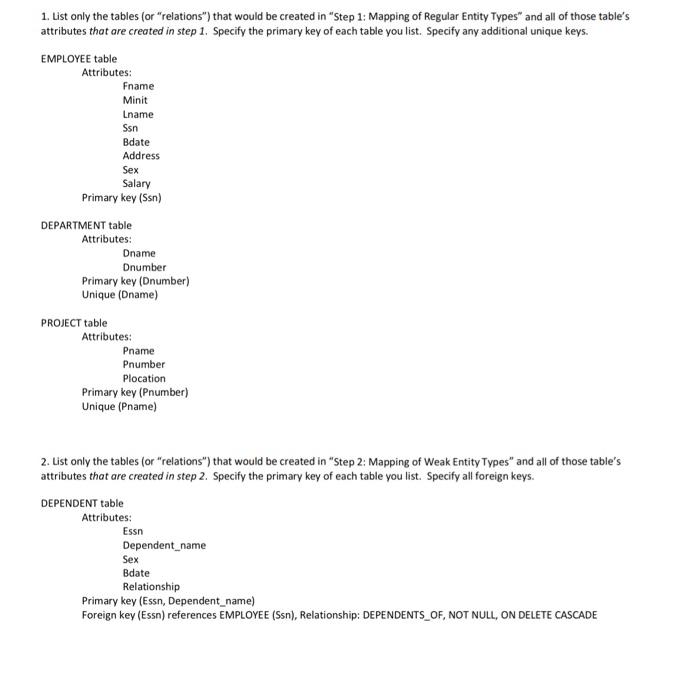
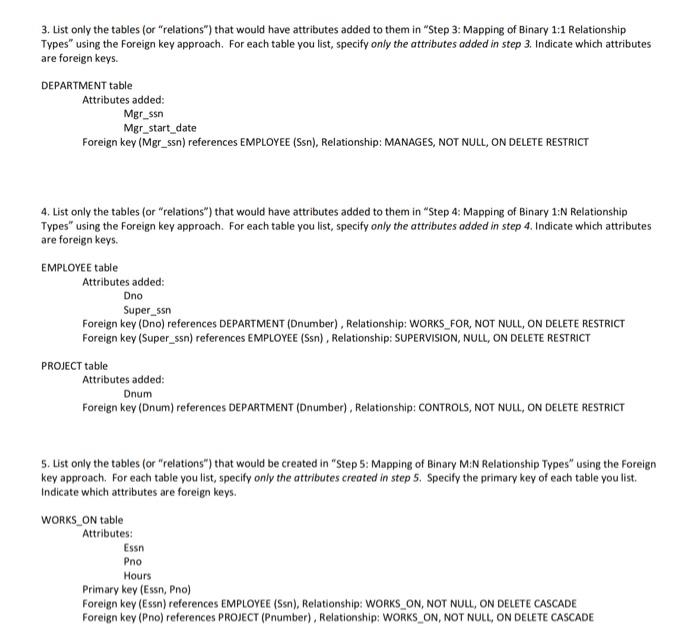
This is the book we use Fundamentals of Database Systems (Subseription) Shamkant B. Navathe, Ramez Elms This is the eBook of the prin codes, or print supplements AC inc. Operations Database will keep track of the following: - For each consultant: a unique cid, as well as the consultant's name, one or more skills, start date with the company, and the number of years with company: - For each project manager: a unique pmid, the project manager's name; - For each customer: a unique custid, well as the customer's name composed of customer's first and last name, and a phone number; - For each supervisor; a unique supid, as well as the supervisor's name, number of supervised contracts, and (if supervisor owns AC inc, stock) number of stocks owned. (Not every supervisor owns AC inc. stock.) - For each contract: a contract id and contract start date. Two or more contracts can have the same contract id, but all contracts for the same customer will have different contract ids. - Each contract is managed by one project manager. A project mansger manages one contract or no contracts at all. - Each contract has at least three consultants assigned to it. A consultant is assigned to one contract. - A customer has at least one contract but may have many. Each contract is associated with one customer. - Each contract is supervised by one supervisor. Each supervisor must supervise at least one contract but can supervise many contracts. - Each supervisor has one or more consultants assigned as administrative helpers. A consultant can be assigned as administrative helper to between zero and many supervisors. We keep track of how many hours per week a particular consultant is working as an administrative helper for a particular supervisor. Apply the ER-to-Relational Mapping Algorithm in Chapter 9 (pages 290-296 of the textbook) to the ER diagram for AC Inc. on the previous page this document. list the outputs from each step of the algorithm in Chapter 9 (pages 290-296) using the template below. For each foreign key, specify NULL if the foreign key is allowed to be NULL, or specify NOT NULL if the foreign key is not allowed to be NULL. For each foreign key, specify either ON DELETE RESTRICT or ON DELETE CASCADE depending on which is appropriate. Step 1. List only the tables (or "relations") that would be created in "Step 1: Mapping of Regular Entity Types" and all of those table's attributes that are created in step 1. Specify the primary key of each table you list. Specify any additional unique keys. If there are no Regular Entity Types, then write, "There are no Regular Entity Types." Step 2. List only the tables (or "relations") that would be created in "Step 2: Mopping of Weak Entity Types" and all of those table's attributes that are created in step 2. Specify the primary key of each table you list. If there are no Weak Entity Types, then write, "There are no Weak Entity Types." Step 3. List only the tables (or "relations") that would have attributes added to them in "Step 3: Mopping of Binary 1:1 Relationship Types" using the Foreign key approach. For each table you list, specify only the attributes added in step 3. Indicate which attributes are foreign keys. If there are no 1:1 Relationship Types, then write, "There are no 1:1 Relationship Types." Step 4. List only the tables (or "relations") that would have attributes added to them in "Step 4: Mapping of Binary 1:N Relationship Types" using the Foreign key approach. For each table you list, specify only the attributes added in step 4. Indicate which attributes are foreign keys. If there are no 1:N Relationship Types, then write, "There are no 1:N Relationship Types." Step 5. List only the tables (or "relations") that would be created in "Step 5: Mapping of Binary M:N Relationship Types" using the Foreign key approach. For each table you list, specify only the attributes created in step 5. Specify the primary key of each table you list. Indicate which attributes are foreign keys. If there are no M:N Relationship Types, then write, "There are no M:N Relationship Types." Step 6. List only the tables (or "relations") that would be created in "Step 6: Mapping of Multivalued Attributes." For each table you list, specify only the attributes created in step 6. Specify the primary key of each table you list. Indicate which attributes are foreign keys. If there are no Multivalued Attributes, then write, "There are no Multivalued Attributes." 1. List only the tables (or "relations") that would be created in "Step 1: Mapping of Regular Entity Types" and all of those table's attributes that are created in step 1. Specify the primary key of each table you list. Specify any additional unique keys. EMPLOYEE table Attributes: Fname Minit Lname Ssn Bdate Address Sex Salary Primary key (Ssn) DEPARTMENT table Attributes: Dname Dnumber Primary key (Dnumber) Unique (Dname) PROJECT table Attributes: Pname Pnumber Plocation Primary key (Pnumber) Unique (Pname) 2. List only the tables (or "relations") that would be created in "Step 2: Mapping of Weak Entity Types" and all of those table's attributes that are created in step 2. Specify the primary key of each table you list. Specify all foreign keys. DEPENDENT table Attributes: Essn Dependent_name Sex Bdate Relationship Primary key (Essn, Dependent_name) Foreign key (Essn) references EMPLOYEE (Ssn), Relationship: DEPENDENTS_OF, NOT NULL, ON DELETE CASCADE 3. List only the tables (or "relations") that would have attributes added to them in "Step 3: Mapping of Binary 1:1 Relationship Types" using the Foreign key approach. For each table you list, specify only the attributes added in step 3. Indicate which attributes are foreign keys. DEPARTMENT table Attributes added: \[ \begin{array}{l} \text { Mgr_ssn } \\ \text { Mgr_start_date } \end{array} \] Foreign key (Mgr_ssn) references EMPLOYEE (Ssn), Relationship: MANAGES, NOT NULL, ON DELETE RESTRICT 4. List only the tables (or "relations") that would have attributes added to them in "Step 4: Mapping of Binary 1:N Relationship Types" using the Foreign key approach. For each table you list, specify only the attributes added in step 4. Indicate which attributes are foreign keys. EMPLOYEE table Attributes added: Dno Super_ssn Foreign key (Dno) references DEPARTMENT (Dnumber), Relationship: WORKS_FOR, NOT NULL, ON DELETE RESTRICT Foreign key (Super_ssn) references EMPLOYEE (Ssn), Relationship: SUPERVISION, NULL, ON DELETE RESTRICT PROJECT table Attributes added: Dnum Foreign key (Dnum) references DEPARTMENT (Dnumber), Relationship: CONTROLS, NOT NULL, ON DELETE RESTRICT 5. List only the tables (or "relations") that would be created in "Step 5: Mapping of Binary M:N Relationship Types" using the foreign key approach. For each table you list, specify only the attributes created in step 5. Specify the primary key of each table you list. Indicate which attributes are foreign keys. WORKS_ON table Attributes: Essn Pno Hours Primary key (Essn, Pno) Foreign key (Essn) references EMPLOYEE (Ssn), Relationship: WORKS_ON, NOT NULL, ON DELETE CASCADE Foreign key (Pno) references PROJECT (Pnumber), Relationship: WORKS_ON, NOT NULL, ON DELETE CASCADE
Step by Step Solution
There are 3 Steps involved in it

Get step-by-step solutions from verified subject matter experts
 Study Help