







Question: Can you please help me design the interface console in C# for my assignment, please? ------- C# -------- Additional Notes: - You cannot add two
Can you please help me design the interface console in C# for my assignment, please?
------- C# --------
Additional Notes:
- You cannot add two flights with the same flight number
- When you select "View Flights", a list containing the Flight number, origin and destination for each flight must be shown.
- When you select "View a particular flight", a list of all flights should be displayed and the user must be allowed to enter a particular flight number. All the information on that selected flight must be displayed. All the customers who are booked on that flight must
SPECIAL NOTE:
A customer can only be deleted if there are no bookings for that customer.
A flight can only be deleted if there are no customers booked on the flight.
You must extend the core design and add the functionality to add customers and booking features to the system.
The information that must be recorded on a customer is as follows:
- A customer ID must be assigned to each customer by the system. (NOT entered by the user)
- The customer's first name
- The customer's last name.
- The customer's phone (a string type is fine for this)
- The number of bookings the customer has made
Your main menu should have the new options:
- Make booking
- View bookings
ADD CUSTOMER
When the "Add Customer" option is selected, all information necessary to make the customer object must be asked for.
A customer can only be added if there is no other customer with the same first name, last name and phone number (all three cannot be the same). An appropriate message as to whether the customer addition was successful or not should be displayed.
VIEW CUSTOMERS
When "View Customers" is selected, the first name, last name and phone number must be displayed for each customer.
The information that must be recorded on a booking is as follows:
- The date of the booking ( a string)
- A booking number must be assigned by the system. (NOT entered by the user)
- The flight object the booking is being made for.
- The customer object the booking is being made for
Note : you can use the following code to get the date and time from your system as a string...
string date = DateTime.Now.ToString(@"MM/dd/yyyy h:mm tt");
Your main menu should have the new options:
- Make booking
- View bookings
MAKE BOOKINGS
When the "Add booking" option is selected, a list of all customers and all flights should be displayed first. The user must then be asked for the Customer id and flight id to make the booking for.
A booking can only be made if there is free space on the plane, the customer id exists and the flight id exists. All associated objects should be updated. An appropriate message as to whether the booking was successful or not should be displayed.
VIEW BOOKINGS
When "View bookings" is selected, the date, booking number, customer name and flight number must be displayed for each booking.
Your main class/program (the default one created when you make a new project) will be responsible for creating an AirlineCoordinator object as well as the complete menu system
Ensure that the interface/s generated by your program is user-friendly and gives a professional look. 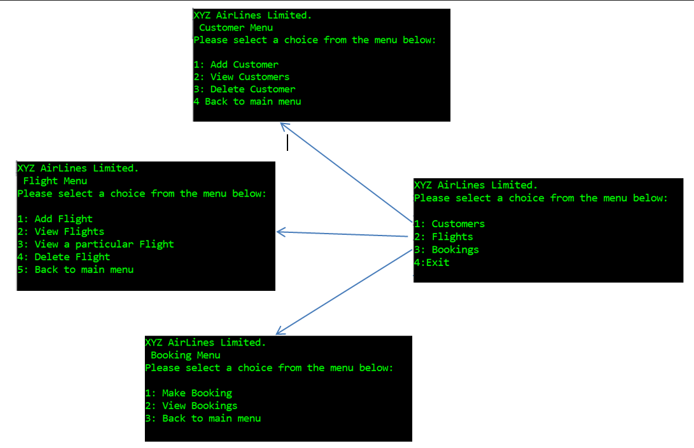
Step by Step Solution
There are 3 Steps involved in it

Get step-by-step solutions from verified subject matter experts
 Study Help