



Question: Can you please help me know how to configure for the below dot points? Task 8a PAT overload on an interface Configure SJ3 with the
Can you please help me know how to configure for the below dot points?
Task 8a PAT overload on an interface
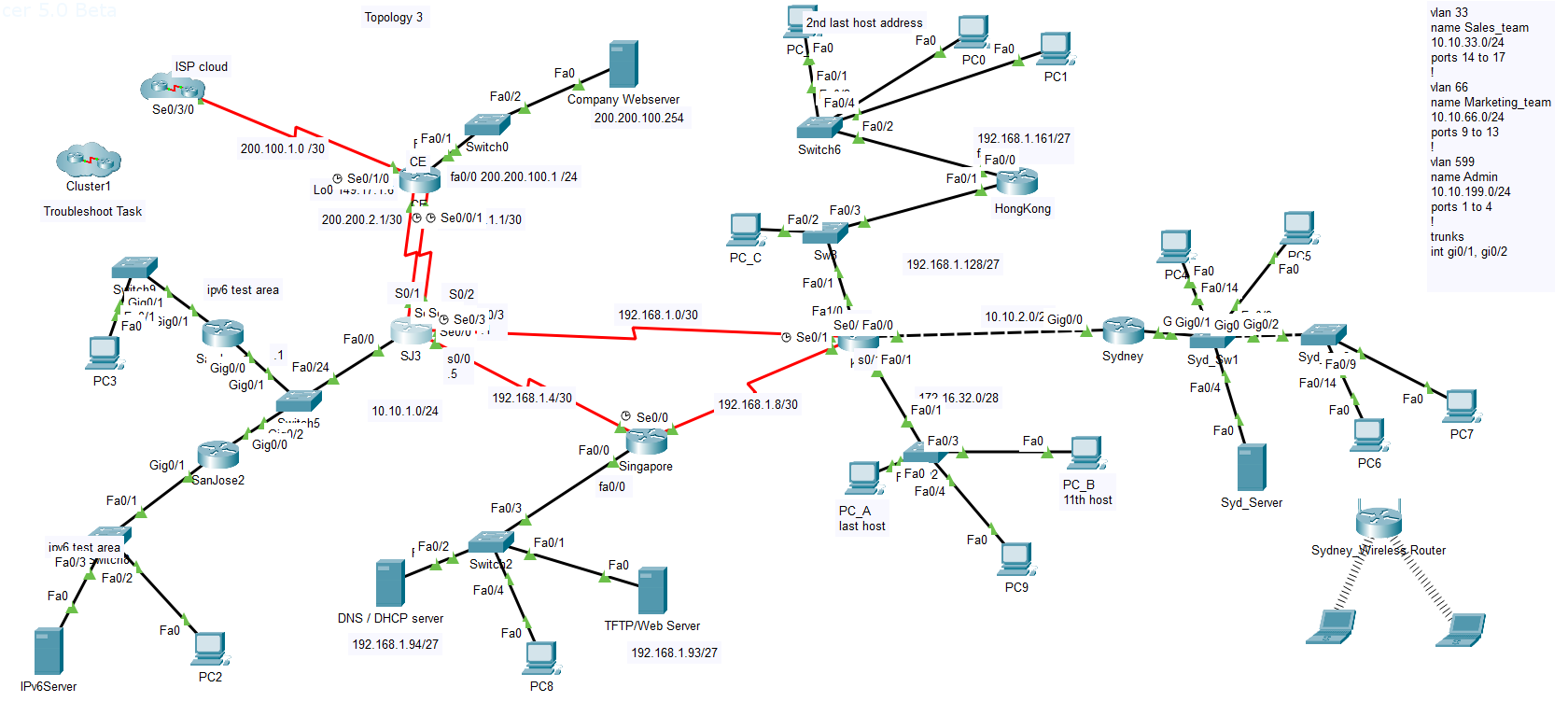
- Configure SJ3 with the command that allow packets matching ACL 50 to be translated by overloading on the serial0/1 interface address.
- The ip nat inside interfaces are pre-configured.
Both SJ3 serial links to CE should be able to carry internet packets.
Task 8b Static NAT
- The TFTP/web Server (192.168.1.93) must always be translated to 200.200.101.1. Configure appropriate entries on SJ3.
Task 9 ACLs
For security and to control the use of bandwidth on links, you are to implement and test the following ACLs:
- The hosts on HongKong's subnet LAN (192.168.1.161/27) are not to have access to the devices on KL's LAN (172.16.32.0/28).
- Use a standard ACL 31 on the KL router to achieve this.
Task 9b ACL#2
- Configure a standard ACL 42 on the Singapore router. This access-list will permit a user on the TFTP server to access Singapore router's vty lines 0 to 4.
cer 5.0 Beta Cluster1 Troubleshoot Task Fa0 IPv6Server Switcha PC3 inv6 test area Fa0/3VILCria Fa0/2 Par Gig0/1 Fa0/1 ISP cloud Se0/3/0 10/1 Fao Sig0/1 Gig0/1 Fa0 ipv6 test area Si 200.100.1.0/30 Gig0/0 PC2 Gig0/1 SanJose2 .1 Fa0/24 -1/2 Gig0/0 Topology 3 h5 F Fa0/1 CE Se0/1/0 Loa 142.10.10 200.200.2.1/30 Se0/0/1.1.1/30 Fa0/0 62 SJ3 10.10.1.0/24 50/1 S0/2 1 S S Se0/30/3 Seu/... Fa0/2 DNS/DHCP server Fa0/2 Switch0 192.168.1.94/27 s0/0 .5 fa0/0 200.200.100.1/24 Fa0/3 Fa0 192.168.1.4/30 Switch2 Fa0/4 Fa0 Company Webserver 200.200.100.254 Fa0/1 PC8 Fa0/0 192.168.1.0/30 Singapore fa0/0 Se0/0 Fa0 TFTP/Web Server PC_C 192.168.1.93/27 2nd last host address PC Fa0 Fa0/1 Fa0/4 Switch6 192.168.1.8/30 Fa0/2 Fa0/3 Swe Fa0/1 Se0/1 Fa1/0 Fa0/2 Se0/ Fa0/0 + $0/* Fa0/1 PC A last host Fa0 PC0 Fa0/1 Fa0/3 F Fa0 2 Fa0/4 192.168.1.128/27 Fa0 192.168.1.161/27 f Fa0/0 17 16.32.0/28 Fa0/1 HongKong Fa0 10.10.2.0/2 Gig0/0 20 PC1 Fa0 PC9 Sydney PC B 11th host PC Fa0 Fa0/14 G Gig0/1 Gig0 Gig0/2 Syd Sw1 Fa0/4 Fa0 Fa0 PC5 Syd_Server Syd. Fa0/9 Fa0/14 Fa0 PC6 Fa0 vlan 33 name Sales_team 10.10.33.0/24 ports 14 to 17 ! vlan 66 name Marketing_team 10.10.66.0/24 ports 9 to 13 ! vlan 599 name Admin 10.10.199.0/24 ports 1 to 4 ! trunks int gi0/1, gi0/2 Sydney Wireless Router PC7
Step by Step Solution
There are 3 Steps involved in it
Here are the configuration commands for the tasks Task 8a PAT Overload on an interface To configure ... View full answer

Get step-by-step solutions from verified subject matter experts