



Question: Can you please help me with steps 1-6 with screenshots and steps of how you did each step? I dont seem to be doing it
Can you please help me with steps 1-6 with screenshots and steps of how you did each step? I dont seem to be doing it correctly.
| 1 | Start Excel. Open exploring_ecap_grader_c2_Transactions.xlsx and save the workbook as exploring_ecap_grader_c2_Transactions_LastFirst. |
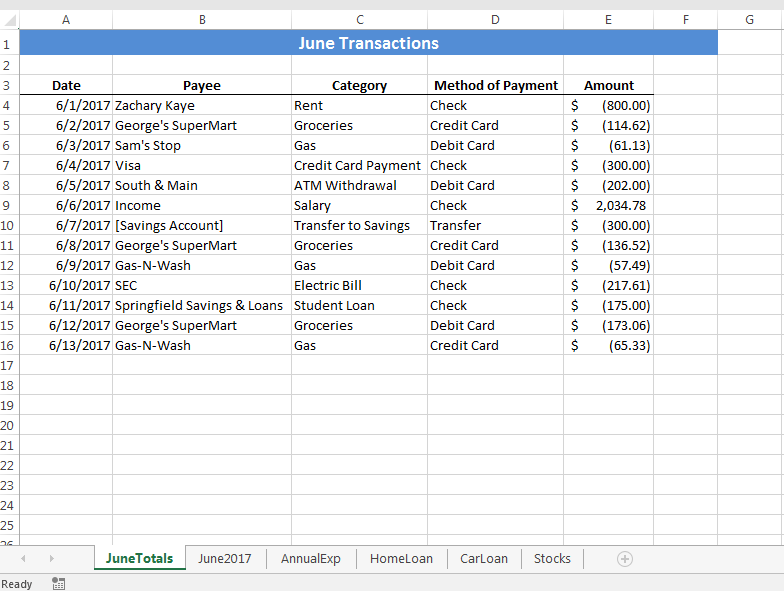
| 2 | On the JuneTotals worksheet, sort the data in the range A3:E16 in ascending order by Category. At each change in Category, use the Sum function to add subtotals to the data in the Amount column. Accept all other defaults. Collapse the outline to show the grand total and Category subtotals only. |
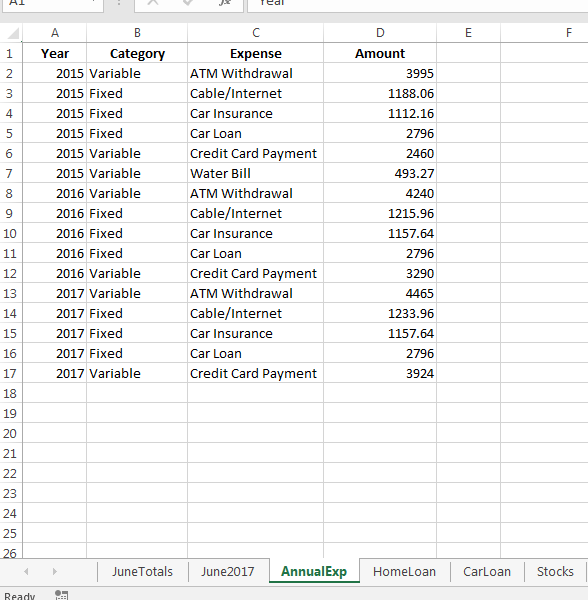
| 3 | Create a PivotTable in cell F1 on the AnnualExp worksheet using the data in the range A1:D17. Add the Expense field to the PivotTable as a row label; add the Amount field as the value; add the Year field as the column label. Change the format of the values in the PivotTable to accounting with no decimal places and set colums F:J to AutoFit Column Width. |
| 4 | Add the Category field to the Report Filter area of the PivotTable. Filter the data so that only expenses in the Variable category are displayed. Display the values as percentages of the grand total. |
| 5 | Insert a Year slicer in the worksheet and use the slicer to filter the data so that only data from 2015 is displayed. Change the height of the slicer to 2" and then reposition it so that the top left corner aligns with the top left corner of cell I2. |
| 6 | Create a PivotChart based on the data in the PivotTable using the default Pie chart type. Change the chart title text to Variable Expenses and remove the legend. Add data labels to the outside end position displaying only the category names and leader lines. Reposition the chart so that the top left corner aligns with the top left corner of cell F13. |
1Year Category Expense Amount 2015 Variable 2015 Fixed 2015 Fixed 2015 Fixed 2015 Variable 2015 Variable 2016 Variable 2016 Fixed 2016 Fixed 2016 Fixed 2016 Variable 2017 Variable 2017 Fixed 2017 Fixed 2017 Fixed 2017 Variable ATM Withdrawal Cable/Internet Car Insurance Car Loan Credit Card Payment Water Bill ATM Withdrawal Cable/Internet Car Insurance Car Loan Credit Card Payment ATM Withdrawal Cable/Internet Car Insurance Car Loan Credit Card Payment 3995 1188.06 1112.16 2796 2460 493.27 4240 1215.96 1157.64 2796 3290 1233.96 1157.64 2796 3924 14 17 21 3 25 JuneTotals June2017 AnnualExp HomeLoan CarLoanStocks
Step by Step Solution
There are 3 Steps involved in it

Get step-by-step solutions from verified subject matter experts