







Question: Can you please provide me the whole code This assignment will be used to test your knowledge of native JavaScript, Local Storage and simple JSON
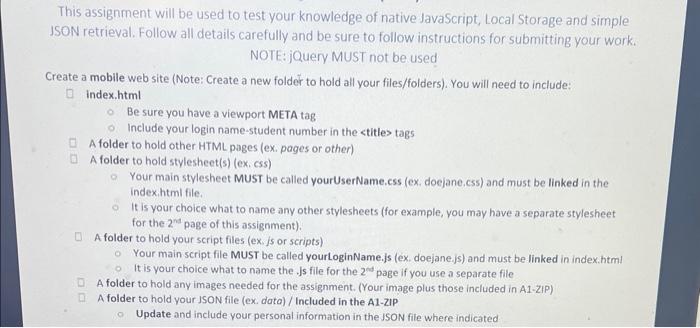
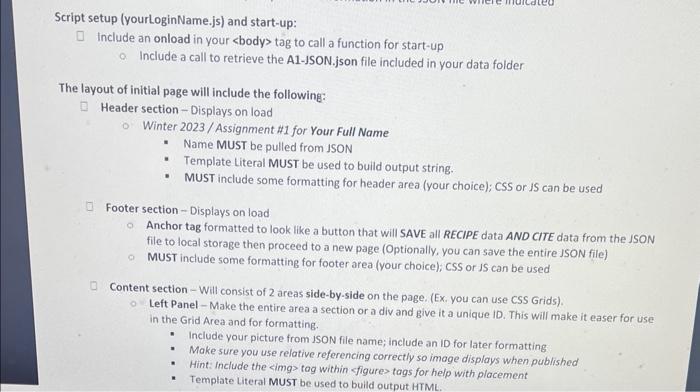
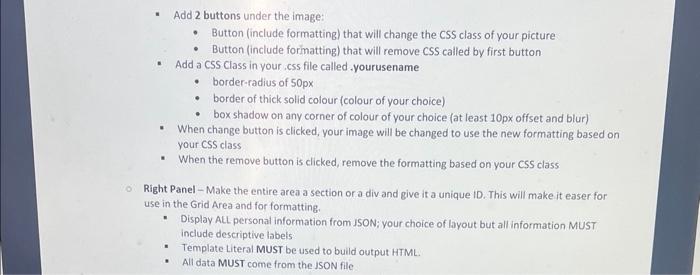
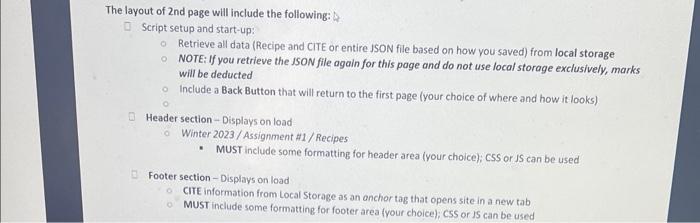
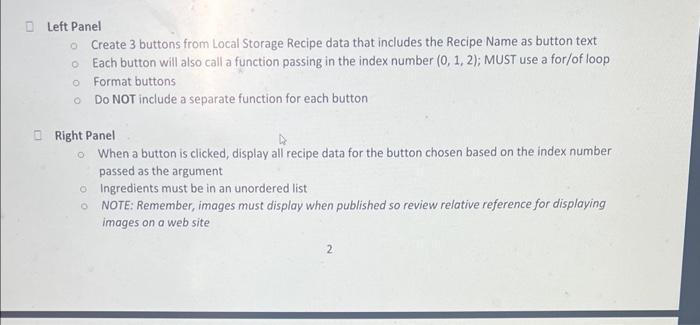
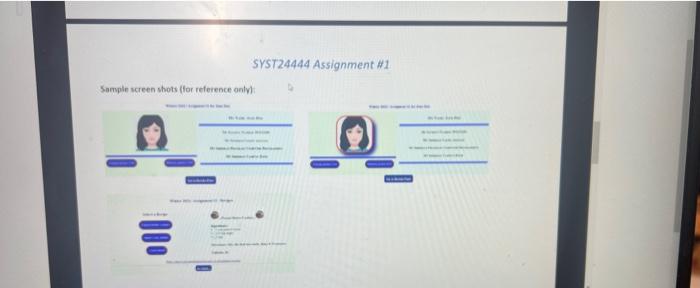
This assignment will be used to test your knowledge of native JavaScript, Local Storage and simple JSON retrieval. Follow all details carefully and be sure to follow instructions for submitting your wark. NOTE: jQuery MUST not be used Create a mobile web site (Note: Create a new folder to hold all your files/folders). You will need to include: index.html Be sure you have a viewport META tag Include your login name-student number in the tags A folder to hold other HTML pages (ex. pages or other) A folder to hold stylesheet(s) (ex. css) Your main stylesheet MUST be called yourUserName.css (ex, doejane.css) and must be linked in the index.html file. It is your choice what to name any other stylesheets (for example, you may have a separate stylesheet for the 2rs page of this assignment). A folder to hold your script files (ex, js or scripts) Your main script file MUST be called yourLoginName.js (ex. doejane.js) and must be linked in index.html It is your choice what to name the. Js file for the 2m page if you use a separate file A folder to hold any images needed for the assignment. (Your image plus those included in A1-ZIP) A folder to hold your JSON file (ex. data) / Included in the A1-21P Update and include yourpersonal information in the USON file where indicated Script setup (yourLoginName.js) and start-up: include an onload in your tag to call a function for start-up Include a call to retrieve the A1-JSON.json file included in your data folder The layout of initial page will include the following: Header section - Displays on load Winter 2023/Assignment \#1 for Your Full Name - Name MUST be pulled from JSON - Template Literal MUST be used to build output string. - MUST include some formatting for header area (your choice); CSS or iS can be used Footer section - Displays on load Anchor tag formatted to look like a button that will SAVE all RECIPE data AND CITE data from the JSON file to local storage then proceed to a new page (Optionally, you can save the entire JSON file) MUST include some formatting for footer area (your choice); CSS or JS can be used Content section - Will consist of 2 areas side-by-side on the page. (Ex. you can use CSS Grids). Left Panel - Make the entire area a section or a div and give it a unique ID. This will make it easer for use in the Grid Area and for formatting. - Include your picture from ISON file name; include an ID for later formatting - Make sure you use relative referencing correctly so image displays when published - Hint: Include the simg> tog within sfigure> tags for help with placement - Template Literal MUST be used to build output HTML. - Button (include formatting) that will change the CSS class of your picture - Button (include formatting) that will remove CSS called by first button - Add a CSS Class in your css file called yourusename - border-radius of 50px - border of thick solid colour (colour of your choice) - box shadow on any corner of colour of your choice (at least 10px offset and blur) - When change button is clicked, your image will be changed to use the new formatting based on your CSS class - When the remove button is clicked, remove the formatting based on your CSs class Right Panel - Make the entire area a section or a div and give it a unique ID. This will make it easer for use in the Grid Area and for formatting. - Display ALL personal information from ISON: your choice of layout but all information MUST include descriptive labels: - Template Literal MUST be used to build output HTML. - All data MUST come from the JSON file. The layout of 2 nd page will include the following: Script setup and start-up: Retrieve all data (Recipe and CITE or entire JSON file based on how you saved) from local storage NOTE: If you retrieve the JSON file again for this page and do not use local storage exclusively, marks will be deducted Include a Back Button that will return to the first page (your choice of where and how it looks) Header section - Displays on load. Winter 2023/Assignment H1/Recipes - MUST include some formatting for header area (your choice), cSS or JS can be used Footer section - Displays on load CITE information from Local Storage as an onchor tag that opens site in a new tab MUST include some formatting for footer area (your choice); cSS or IS can be used Left Panel Create 3 buttons from Local Storage Recipe data that includes the Recipe Name as button text Each button will also call a function passing in the index number (0,1,2); MUST use a for/of loop Format buttons Do NOT include a separate function for each button Right Panel When a button is clicked, display all recipe data for the button chosen based on the index number passed as the argument Ingredients must be in an unordered list NOTE: Remember, images must display when published so review relative reference for displaying images on a web site SYST24444 Assignment \#1
Step by Step Solution
There are 3 Steps involved in it

Get step-by-step solutions from verified subject matter experts
 Study Help