



Question: Can you post answer as a download so I can open in excel thanks IVICROSOFT EXCEL 2016 improve It Project 87 Improve It Project 8-7
Can you post answer as a download so I can open in excel thanks
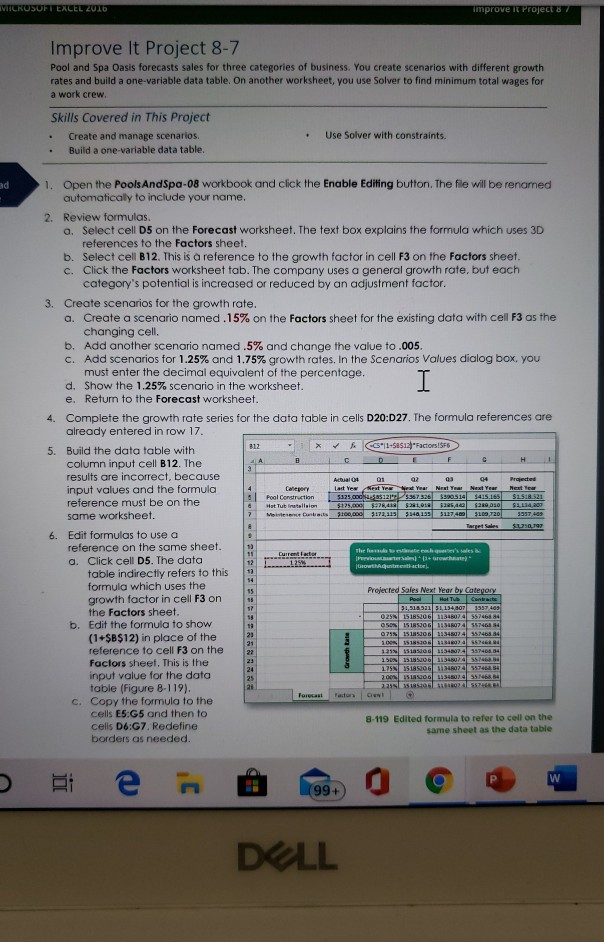
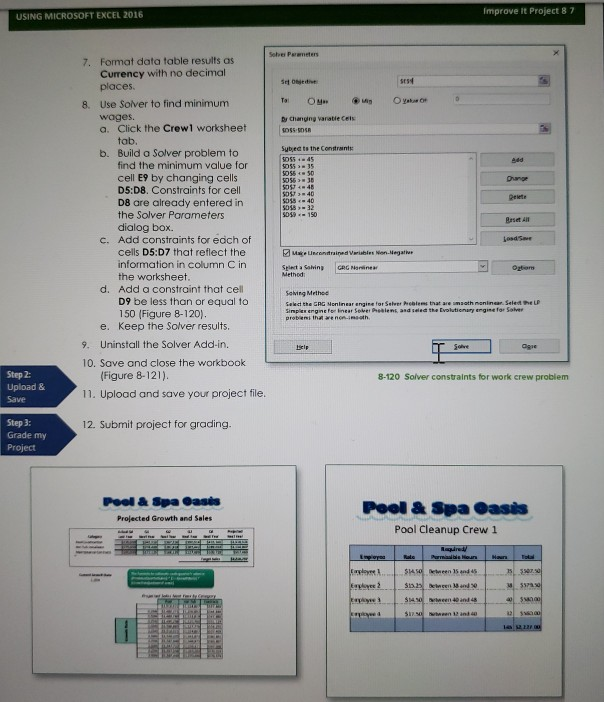
IVICROSOFT EXCEL 2016 improve It Project 87 Improve It Project 8-7 Pool and Spa Oasis forecasts sales for three categories of business. You create scenarios with different growth rates and build a one-variable data table. On another worksheet, you use Solver to find minimum total wages for a work crew Skills Covered in This Project Create and manage scenarios. Build a one-variable data table. Use Solver with constraints. 1. Open the Pools And Spa-08 workbook and click the Enable Editing button. The file will be renamed automatically to include your name. 2. Review formulas. a. Select cell D5 on the Forecast worksheet. The text box explains the formula which uses 3D references to the factors sheet. b. Select cell B12. This is a reference to the growth factor in cell F3 on the factors sheet. c. Click the factors worksheet tab. The company uses a general growth rate, but each category's potential is increased or reduced by an adjustment factor. 3. Create scenarios for the growth rate. a. Create a scenario named. 15% on the factors sheet for the existing data with cell F3 as the changing cell. b. Add another scenario named .5% and change the value to .005. c. Add scenarios for 1.25% and 1.75% growth rates. In the Scenarios Values dialog box, you must enter the decimal equivalent of the percentage. d. Show the 1.25% scenario in the worksheet. e. Return to the Forecast worksheet. 4. Complete the growth rate series for the data table in cells D20:D27. The formula references are already entered in row 17. 5. Build the data table with k CCS"11-SS12 Factors!SFE column input cell B12. The results are incorrect, because Actual 04 01 02 03 04 input values and the formula Category Last Yew seat Yes Year Next Year Next Year Neste Pool Construction 5325.00ES 3 61305145415,165 $1918.521 reference must be on the Hot Tub itallalon $175,000 $281.01120540 $289 0 S114.207 Babits $100,000 $172,125 same worksheet. 5140135 3117400 $100 ao 3937443 Tres USA 6. Edit formulas to use a reference on the same sheet. a. Click cell D5. The data table indirectly refers to this formula which uses the Proiected Sales Next Year by Category growth factor in cell F3 on the factors sheet. 54,316521 31134.307 3557403 0251518200 1310755746484 Edit the formula to show OSO 151RSOG 11 5574634 (1+$B$12) in place of the 0718151850 1134024557463.34 20051518510143120 SS reference to cell F3 on the factors sheet. This is the 175N 1518520G 1347557463.54 input value for the data 2003151SOD 14540Z 357468.34 table (Figure 8-119). 111025 Forecast Factor c. Copy the formula to the cells ES:G5 and then to 8-119 Edited formula to refer to cell on the cells D6:G7. Redefine same sheet as the data table borders as needed. Ther e 's als PELLOW which are 337404 13N 150 NOG 1518 N ABS e do. O DELL Improve It Project 87 USING MICROSOFT EXCEL 2016 Soha Perenetes 7. Format data table results as Currency with no decimal She places 8. Use Solver to find minimum Tai Oy MOYO wages. by changing vanatle Cels a. Click the Crewl worksheet tab. Sybre to the Constant b. Build a Solver problem to find the minimum value for cell E9 by changing cells D5:D8. Constraints for cell D8 are already entered in the Solver Parameters 5059 - 150 dialog box. C. Add constraints for each of od 5 cells D5:07 that reflect the Make Umetrained Variables en Negati information in column C in Select a Shiny GRG Marine the worksheet. d. Add a constraint that cell Solving Method D9 be less than or equal to Select the GAG Nonlinear engine for Sower Problems that are maath nonlinear. Select the 150 (Figure 8-120). Simplex engine for near So n and the Evolutionary engine for Solver e. Keep the Solver results. 9. Uninstall the Solver Add-in. T Solve 10. Save and close the workbook (Figure 8-121). 8-120 Solver constraints for work crew problem 11. Upload and save your project file. Step 2: Upload & Save 12. Submit project for grading. Step 3: Grade my Project Pool & Spa Oasis Projected Growth and Sales Pool & Spa Oasis Pool Cleanup Crew 1 Explore S Employee 2 37. ee 15 and Sis. Deinen and $14,50 en 40 and 48 heen S IVICROSOFT EXCEL 2016 improve It Project 87 Improve It Project 8-7 Pool and Spa Oasis forecasts sales for three categories of business. You create scenarios with different growth rates and build a one-variable data table. On another worksheet, you use Solver to find minimum total wages for a work crew Skills Covered in This Project Create and manage scenarios. Build a one-variable data table. Use Solver with constraints. 1. Open the Pools And Spa-08 workbook and click the Enable Editing button. The file will be renamed automatically to include your name. 2. Review formulas. a. Select cell D5 on the Forecast worksheet. The text box explains the formula which uses 3D references to the factors sheet. b. Select cell B12. This is a reference to the growth factor in cell F3 on the factors sheet. c. Click the factors worksheet tab. The company uses a general growth rate, but each category's potential is increased or reduced by an adjustment factor. 3. Create scenarios for the growth rate. a. Create a scenario named. 15% on the factors sheet for the existing data with cell F3 as the changing cell. b. Add another scenario named .5% and change the value to .005. c. Add scenarios for 1.25% and 1.75% growth rates. In the Scenarios Values dialog box, you must enter the decimal equivalent of the percentage. d. Show the 1.25% scenario in the worksheet. e. Return to the Forecast worksheet. 4. Complete the growth rate series for the data table in cells D20:D27. The formula references are already entered in row 17. 5. Build the data table with k CCS"11-SS12 Factors!SFE column input cell B12. The results are incorrect, because Actual 04 01 02 03 04 input values and the formula Category Last Yew seat Yes Year Next Year Next Year Neste Pool Construction 5325.00ES 3 61305145415,165 $1918.521 reference must be on the Hot Tub itallalon $175,000 $281.01120540 $289 0 S114.207 Babits $100,000 $172,125 same worksheet. 5140135 3117400 $100 ao 3937443 Tres USA 6. Edit formulas to use a reference on the same sheet. a. Click cell D5. The data table indirectly refers to this formula which uses the Proiected Sales Next Year by Category growth factor in cell F3 on the factors sheet. 54,316521 31134.307 3557403 0251518200 1310755746484 Edit the formula to show OSO 151RSOG 11 5574634 (1+$B$12) in place of the 0718151850 1134024557463.34 20051518510143120 SS reference to cell F3 on the factors sheet. This is the 175N 1518520G 1347557463.54 input value for the data 2003151SOD 14540Z 357468.34 table (Figure 8-119). 111025 Forecast Factor c. Copy the formula to the cells ES:G5 and then to 8-119 Edited formula to refer to cell on the cells D6:G7. Redefine same sheet as the data table borders as needed. Ther e 's als PELLOW which are 337404 13N 150 NOG 1518 N ABS e do. O DELL Improve It Project 87 USING MICROSOFT EXCEL 2016 Soha Perenetes 7. Format data table results as Currency with no decimal She places 8. Use Solver to find minimum Tai Oy MOYO wages. by changing vanatle Cels a. Click the Crewl worksheet tab. Sybre to the Constant b. Build a Solver problem to find the minimum value for cell E9 by changing cells D5:D8. Constraints for cell D8 are already entered in the Solver Parameters 5059 - 150 dialog box. C. Add constraints for each of od 5 cells D5:07 that reflect the Make Umetrained Variables en Negati information in column C in Select a Shiny GRG Marine the worksheet. d. Add a constraint that cell Solving Method D9 be less than or equal to Select the GAG Nonlinear engine for Sower Problems that are maath nonlinear. Select the 150 (Figure 8-120). Simplex engine for near So n and the Evolutionary engine for Solver e. Keep the Solver results. 9. Uninstall the Solver Add-in. T Solve 10. Save and close the workbook (Figure 8-121). 8-120 Solver constraints for work crew problem 11. Upload and save your project file. Step 2: Upload & Save 12. Submit project for grading. Step 3: Grade my Project Pool & Spa Oasis Projected Growth and Sales Pool & Spa Oasis Pool Cleanup Crew 1 Explore S Employee 2 37. ee 15 and Sis. Deinen and $14,50 en 40 and 48 heen SStep by Step Solution
There are 3 Steps involved in it
1 Expert Approved Answer
Step: 1 Unlock

Question Has Been Solved by an Expert!
Get step-by-step solutions from verified subject matter experts
Step: 2 Unlock
Step: 3 Unlock