







Question: Capacitor Basics : 1. Go to the following website: https ://phet .colorado .edu /sims /html /capacitor -lab - basics /latest /capacitor -lab - basics_en .
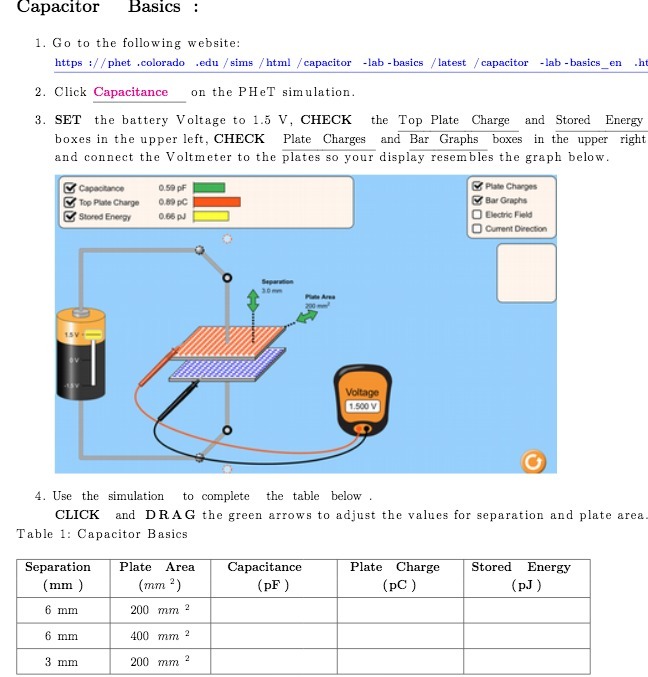
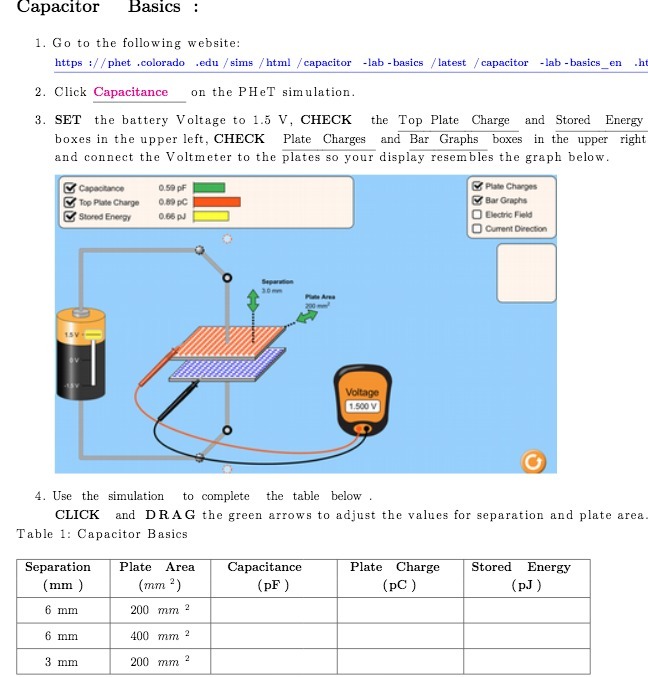
Capacitor Basics : 1. Go to the following website: https ://phet .colorado .edu /sims /html /capacitor -lab - basics /latest /capacitor -lab - basics_en . ht 2. Click Capacitance on the PHeT simulation. 3. SET the battery Voltage to 1.5 V, CHECK the Top Plate Charge and Stored Energy boxes in the upper left, CHECK Plate Charges and Bar Graphs boxes in the upper right and connect the Voltmeter to the plates so your display resembles the graph below. Capacitance 0.50 pF Plate Charges Top Plate Charge 0.69 PC Bar Graphs Stored Energy 0108 pJ O Cedric Fluid Current Direction LOV Voltage 1.500 V 4. Use the simulation to complete the table below . CLICK and DRAG the green arrows to adjust the values for separation and plate area Table 1: Capacitor Basics Separation Plate Area Capacitance Plate Charge Stored Energy mm ) mm ') PF ) (PC ) (pJ 6 mm 200 mm 2 6 mm 400 mm 2 3 mm 200 mm 2
Step by Step Solution
There are 3 Steps involved in it

Get step-by-step solutions from verified subject matter experts
 Study Help