







Question: Case Projects Loan Calculator Create an application that displays a monthly payment on a loan. The application should also display the amount applied to the
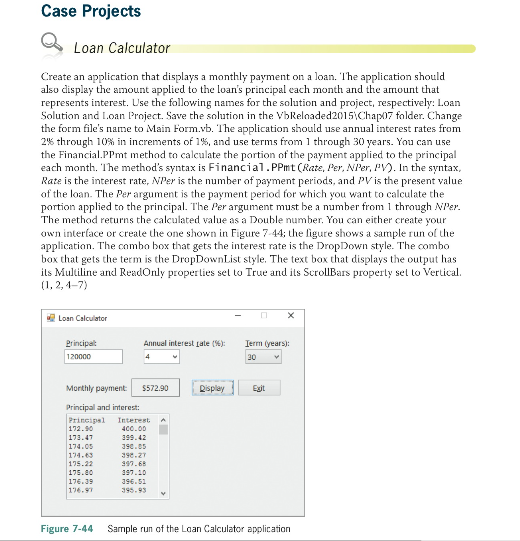
Case Projects Loan Calculator Create an application that displays a monthly payment on a loan. The application should also display the amount applied to the loan's principal each month and the amount that represents interest. Use the following names for the solution and project, respectively: Loan Solution and Loan Project. Save the solution in the VbRelnaded2015iChap)7 folder. Change the form file's name to Main Form.vb. The application should use annual interest rates from 2% through 10% in increments of 1%, and use terms from 1 through 30 years. You can use the FinancialPPt methad to calculate the portion of the payment applied to the principal each month. ? he method's syntax is Financi a1 . PPmt (Rate, Per, Nier, py). In the syntax Rate is the interest rate, NPer is the numher of payment periods, and PV is the present value of the loan. The Per argument is the payment period for which you want to calculate the portion applied to the principal. The Per argument must be a number from 1 thrugh NPer. The method returns the calculated value as a Double number. You can either create your own interface or create the one shown in Figure 7-44; the ligure shows a sample run of the application. The combo box that gets the interest rate is the DropDown style. The combo box that gets the term is the DropDownList style. The text box that displays the output has its Muiline andl ReadOnly properlies set to True and its ScrollBars property sel to Vertical ? ? - Loan Calcuiator rincipa Annual interest Late (%): 1erm (years): Morthly payment $572.90 Egit Principal and interest Principsl Interest A 174.3 175.22 134.9 Figure 7-44 Sample run of the Laan Calculator applicatian Case Projects Loan Calculator Create an application that displays a monthly payment on a loan. The application should also display the amount applied to the loan's principal each month and the amount that represents interest. Use the following names for the solution and project, respectively: Loan Solution and Loan Project. Save the solution in the VbRelnaded2015iChap)7 folder. Change the form file's name to Main Form.vb. The application should use annual interest rates from 2% through 10% in increments of 1%, and use terms from 1 through 30 years. You can use the FinancialPPt methad to calculate the portion of the payment applied to the principal each month. ? he method's syntax is Financi a1 . PPmt (Rate, Per, Nier, py). In the syntax Rate is the interest rate, NPer is the numher of payment periods, and PV is the present value of the loan. The Per argument is the payment period for which you want to calculate the portion applied to the principal. The Per argument must be a number from 1 thrugh NPer. The method returns the calculated value as a Double number. You can either create your own interface or create the one shown in Figure 7-44; the ligure shows a sample run of the application. The combo box that gets the interest rate is the DropDown style. The combo box that gets the term is the DropDownList style. The text box that displays the output has its Muiline andl ReadOnly properlies set to True and its ScrollBars property sel to Vertical ? ? - Loan Calcuiator rincipa Annual interest Late (%): 1erm (years): Morthly payment $572.90 Egit Principal and interest Principsl Interest A 174.3 175.22 134.9 Figure 7-44 Sample run of the Laan Calculator applicatian
Step by Step Solution
There are 3 Steps involved in it

Get step-by-step solutions from verified subject matter experts
 Study Help